
You can set up automatic WhatsApp transcription in under two minutes: save TranscribeGo as a contact, forward any voice note to it, and receive the full text back in the same chat — along with an AI summary, translation options, and the ability to set reminders. Once configured, every voice message you forward gets transcribed instantly in 90+ languages. No app to install, no manual tapping, no per-message effort.
WhatsApp users send over 7 billion voice messages every day, and with 3.3 billion monthly active users worldwide, voice notes have become the default way people communicate — especially in Latin America, India, and parts of Europe and Africa. The problem? Listening to a two-minute voice note takes two minutes. Reading the same content takes fifteen seconds.
WhatsApp's built-in transcription feature, launched in late 2024, helps — but it requires you to manually tap each message, supports only a handful of languages, and offers no summaries, no translation, and no searchable history. If you receive more than a few voice notes a day, you need something fully automatic. Here's how to set it up.
What You'll Need
Before we start, make sure you have these ready:
A WhatsApp account on your phone (iOS or Android), a web browser to create your TranscribeGo account (optional but recommended for accessing your searchable dashboard later), and about two minutes of your time. That's it — no additional apps to download.
Step 1: Create Your TranscribeGo Account
Go to transcribego.com and sign up. You can use Google sign-in (one tap) or create an account with your email address. The free plan gives you 10 minutes of transcription per month — enough to test the full workflow before deciding if you need more.
Once signed in, you'll see the TranscribeGo dashboard. This is your searchable web archive where every transcription you do — from WhatsApp, Telegram, or direct uploads — lives in one place. You can search across all your transcriptions, export SRT subtitle files, translate content, and manage your reminders.
Step 2: Save TranscribeGo as a WhatsApp Contact
Open WhatsApp on your phone and add TranscribeGo's number as a new contact. You'll find the number on your TranscribeGo dashboard under Settings, or on the TranscribeGo homepage. Save it with a name you'll recognize — "TranscribeGo" or "Transcriber" works well.
Once saved, open a chat with TranscribeGo on WhatsApp and send any message to start the conversation. TranscribeGo will reply with a welcome message and your account will be linked automatically.
That's the entire setup. From this point on, any voice note you forward to TranscribeGo gets transcribed automatically.
Step 3: Forward Voice Notes and Get Instant Text
Now comes the part you'll use every day. When someone sends you a voice note in any WhatsApp chat:
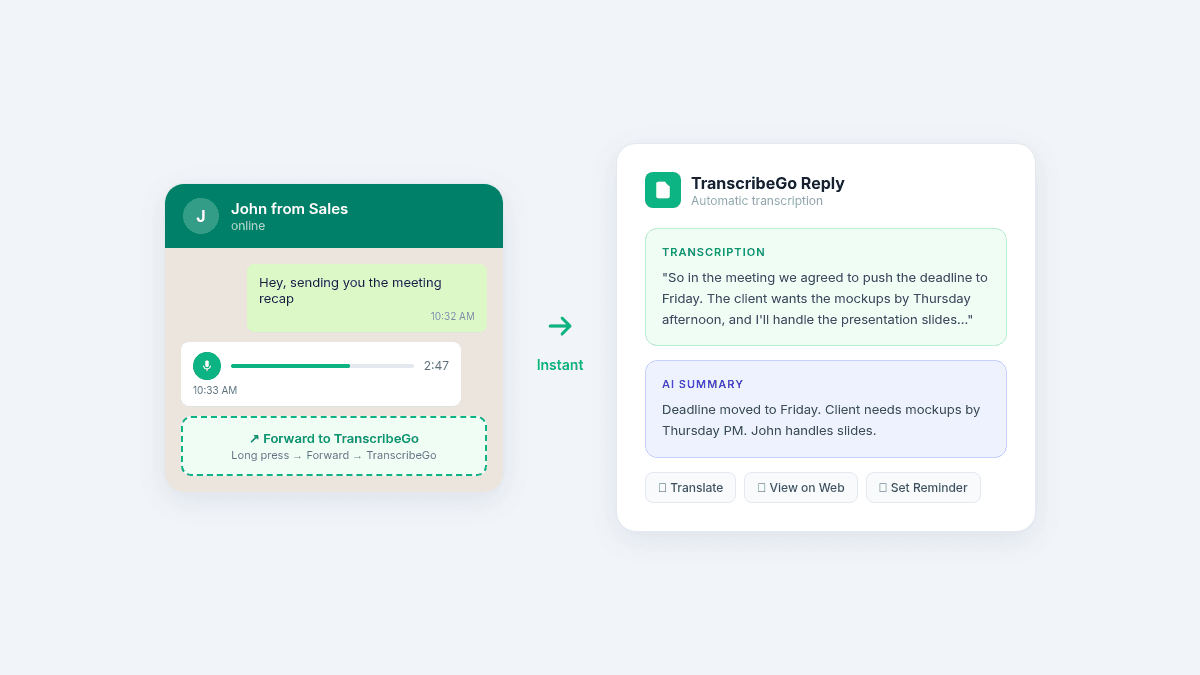
Long-press the voice message, tap Forward, and select your TranscribeGo contact. Within seconds, you'll receive a reply containing the full transcription of the voice note, an AI-generated summary that captures the key points, and options to translate the text into any language.
The transcription works in over 90 languages and handles accents, background noise, and mixed-language audio with high accuracy. Whether someone sends you a three-minute project update in Spanish or a quick note in Hindi, TranscribeGo processes it the same way.
What You Get Back
Every transcribed voice note returns three things directly in your WhatsApp chat. First, the complete text transcription — word for word, what was said in the voice note. Second, an AI summary that distills the message into its key points, so you can scan a two-minute voice note in five seconds. Third, action buttons that let you translate the text, view the full transcription on the web dashboard, or set a reminder based on what was said.
Beyond Transcription: Reminders That Save You
One of TranscribeGo's most powerful features is voice reminders — and most people don't discover it until weeks after they start using transcription. Here's how it works: instead of forwarding a voice note, send TranscribeGo a message (voice or text) like:
"Remind me to call the client tomorrow at 3pm"
"Remind me to take my medication every day at 8am"
"Remind me about the team meeting on Friday at 10am"
TranscribeGo's AI parses the natural language, sets the reminder, and sends you a WhatsApp notification at the exact time you specified. You can set one-time reminders or recurring ones (daily, weekly, monthly). It works in any language — send "Recordame llamar al médico mañana a las 9" in Spanish, and it works exactly the same way.
For busy professionals who live in WhatsApp, this turns the app into a personal assistant that never forgets.
Your Searchable Web Dashboard
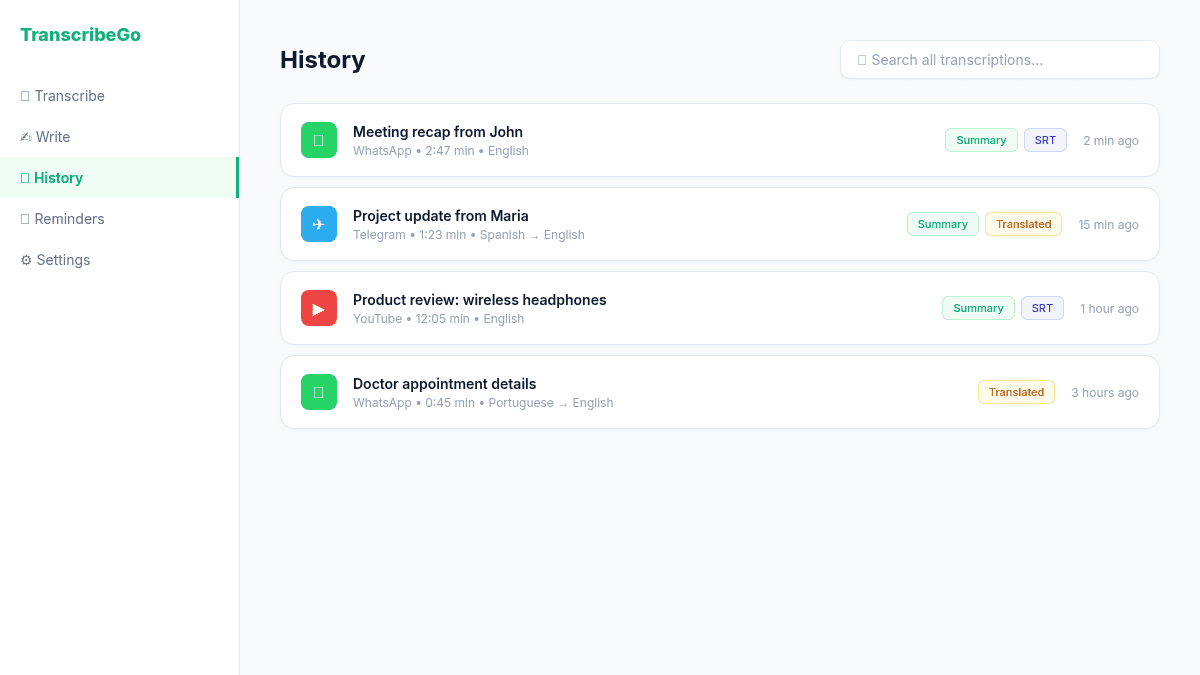
Every voice note you transcribe through WhatsApp (or Telegram) is automatically saved to your TranscribeGo web dashboard at transcribego.com. This gives you a searchable archive of every voice message you've ever transcribed.
Need to find what your colleague said about the project deadline three weeks ago? Search for "deadline" in the dashboard and find it instantly. Need the exact wording from a client's voice note? It's all there — searchable, organized, and accessible from any device.
From the dashboard you can also export transcriptions as SRT subtitle files (useful for video content), translate any transcription into another language with one click, view AI summaries alongside the original text, and download or share transcriptions as needed.
It Works on Telegram Too
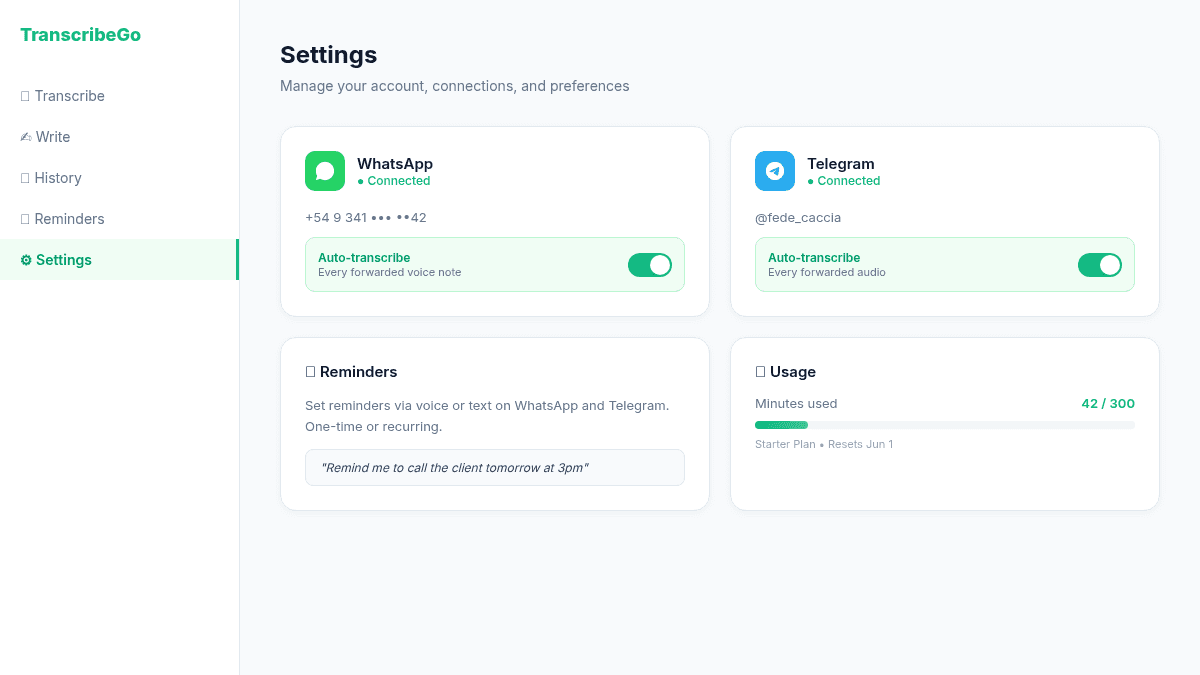
TranscribeGo isn't limited to WhatsApp. If you also use Telegram, you can connect your Telegram account and get the exact same automatic transcription for voice messages, audio files, and forwarded content. Both channels feed into the same dashboard, the same searchable history, and the same unified account.
To set up Telegram, open Telegram and search for the TranscribeGo bot (you'll find the link in your dashboard settings). Start a conversation with the bot and you're connected. Forward audio messages to the bot and receive transcriptions, summaries, and translations — just like on WhatsApp.
You can also link your WhatsApp and Telegram accounts from the Settings page on the web dashboard, so all your transcriptions from both platforms appear under one account.
Pricing: Start Free, Upgrade When Ready
TranscribeGo's free plan gives you 10 minutes of transcription per month — no credit card required. That's enough to transcribe around 10 to 15 average voice notes and see if the tool fits your workflow.
If you need more, paid plans start at $3.99/month (Starter, 60 minutes) and go up to $12.99/month (Pro, 300 minutes). All plans include AI summaries, translation, reminders, the web dashboard, and support for 90+ languages. There's no difference in features between plans — only the number of transcription minutes.
Tips for Getting the Most Out of Automatic Transcription
Pin the TranscribeGo contact at the top of your WhatsApp chat list. This makes forwarding voice notes a two-tap action instead of scrolling through your contacts every time.
Use reminders aggressively. Any time someone mentions a date, deadline, or to-do in a voice note, forward the note to TranscribeGo for the transcript, then immediately send a reminder. "Remind me to send the report by Friday 5pm" takes three seconds and means you'll never forget.
Check the web dashboard weekly. Your transcription history becomes a knowledge base over time. Searching across weeks of voice notes can surface information you'd otherwise have forgotten.
Link all your channels. Connect both WhatsApp and Telegram (and use web uploads for longer audio files) to keep everything in one place. One account, one dashboard, one search.
Try TranscribeGo Free
10 free minutes. No credit card required.
Frequently Asked Questions
How long does it take to get a transcription back?▾
Most voice notes under 5 minutes are transcribed within 5 to 15 seconds. Longer audio files (up to 4 hours) may take a bit more, but you'll receive a notification when the transcription is ready. The entire process is automatic — no waiting, no manual steps after forwarding.
What languages does TranscribeGo support?▾
TranscribeGo supports over 90 languages for transcription, including English, Spanish, Portuguese, French, German, Italian, Hindi, Arabic, Turkish, Indonesian, Vietnamese, Russian, Chinese, Japanese, Korean, and many more. It also handles mixed-language audio and strong accents with high accuracy.
Is my audio private and secure?▾
Yes. Your voice notes are processed by our AI transcription engine and the resulting text is stored securely in your account. Audio files are not shared with third parties and are deleted after processing. You also have full control over whether WhatsApp transcriptions are visible on the web dashboard through a privacy toggle in Settings.
Can I use TranscribeGo without a web account?▾
Yes. You can start using TranscribeGo directly from WhatsApp by saving the contact number and sending a message. A basic account is created automatically linked to your phone number. However, creating a web account gives you access to the searchable dashboard, translation tools, SRT export, and account linking features.
What's the difference between TranscribeGo and WhatsApp's built-in transcription?▾
WhatsApp's built-in transcription requires you to manually tap each voice note, supports fewer than 20 languages, and offers no summaries, no translation, and no searchable history. TranscribeGo transcribes automatically when you forward a message, supports 90+ languages, adds AI summaries, offers one-click translation, includes voice reminders, and saves everything to a searchable web dashboard. It's the difference between a basic feature and a full productivity tool.
Does TranscribeGo work with audio files, not just voice notes?▾
Yes. You can forward audio files (MP3, M4A, OGG, and other formats) to TranscribeGo on WhatsApp or Telegram, and they'll be transcribed the same way. You can also upload audio and video files directly on the web dashboard, or paste YouTube, TikTok, and Vimeo URLs to transcribe online videos.