From the interview to the story,
in minutes.
Send the audio over WhatsApp and get the transcript back. On the web you see who's speaking, ask the AI for the quotes and a search-optimized article, and publish it. Plus a radar that alerts you the moment something breaks.
▶ In 80 seconds
See the full workflow
From interview to published story: WhatsApp, a diarized transcript, AI quotes and article, and the Media Radar.
◆ How it works
Four steps, nothing to install
From audio to front page, all in one place.
Send the audio
Over WhatsApp, to the TranscribeMe bot.
Get the transcript
In seconds, right in the chat.
Edit and draft
On the web: diarization, quotes and AI article.
Publish
Search-optimized, ready for your CMS.
Capture · WhatsApp
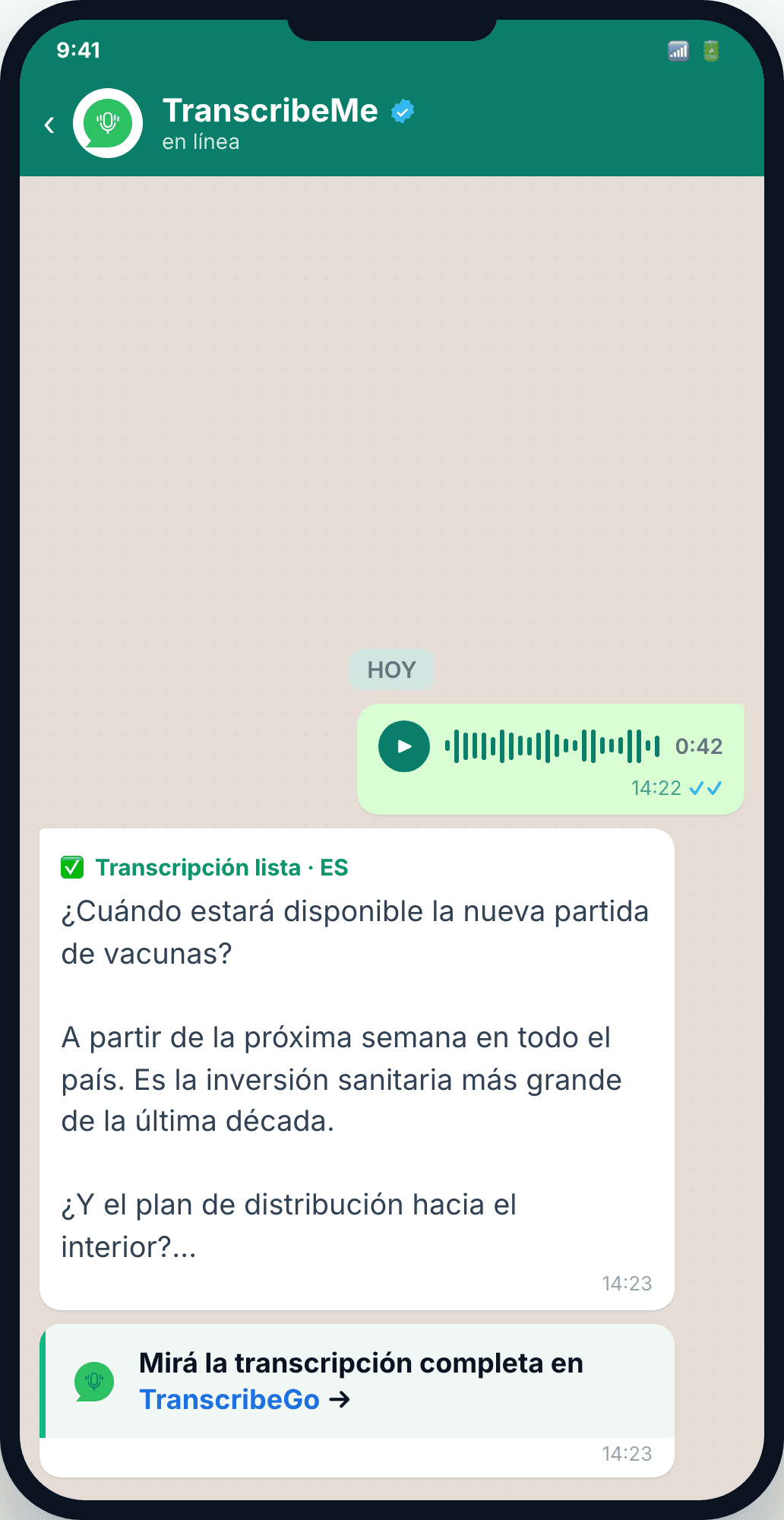
Step 1Send the audio over WhatsApp and the transcript comes back
Forward the interview to the verified TranscribeMe bot and in seconds you get the full transcript, with nothing to install. A link takes you to the web to see who is speaking and build the article.
- ✓Audio to text in secondsSend the recording and get the full transcript, without replaying the audio.
- ✓In the chat where you already workIt works in WhatsApp. No new apps, no learning curve.
- ✓And continue on the webA link takes you to TranscribeGo for diarization, quotes and the article.
🖥️ On the web
Who said what, with your AI assistant
Two panels: on the left the transcript with diarization (every speaker identified and editable); on the right the AI assistant in Journalist mode, where you ask for the quotes or a news article.
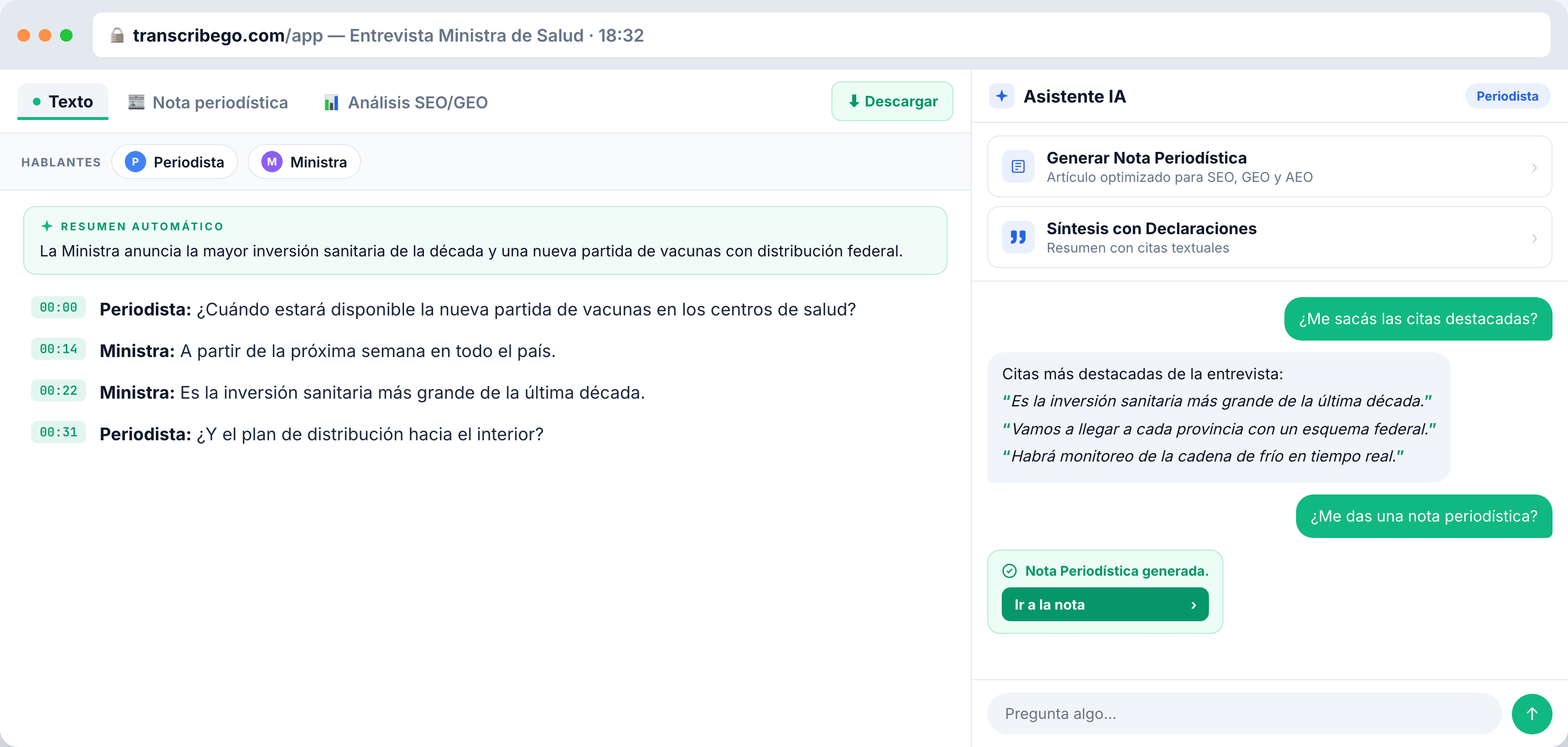
Speaker diarization
Who said what, with editable names and a jump to the exact moment in the audio.
Quotes on demand
Type 'pull out the quotes' and the AI returns the strongest statements, verbatim.
News article
'Generate News Article' drafts the piece, optimized for SEO, GEO and AEO.
📰 Your article
Drafted, formatted and search-optimized
The article appears in the 'News Article' tab: headline, subheadings, a pull-quote and clean paragraphs. Plus an SEO/GEO/AEO analysis panel with the score and the recommendations already applied.
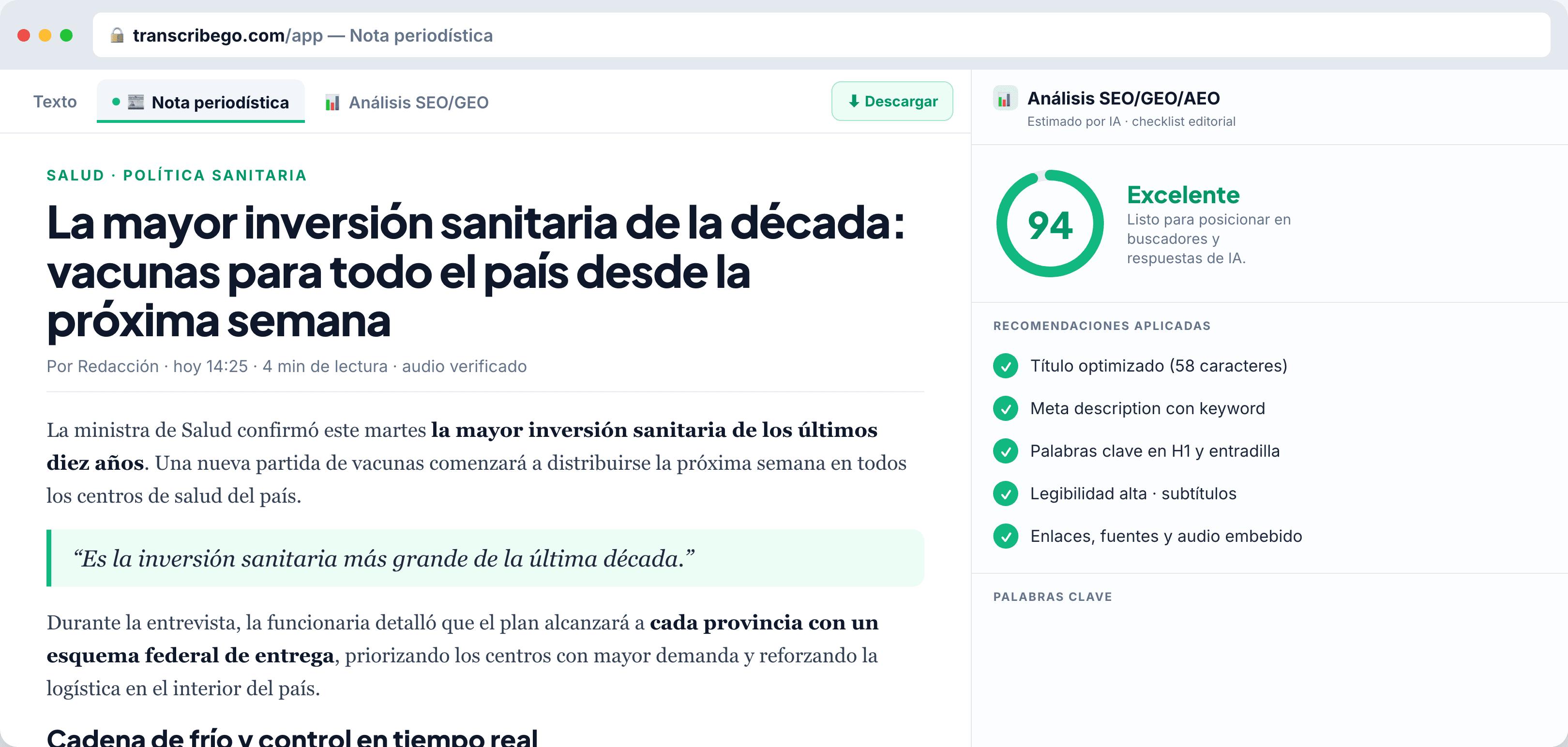
Formatted, ready to read
Big headline, subheadings, pull-quote and paragraphs: it reads like a finished story.
Effortless SEO
A high score (94/100) and an editorial checklist: headline, meta, keywords and readability.
Edit by chatting
Tell it 'change the headline to…' and the AI rewrites it in place.
Publish
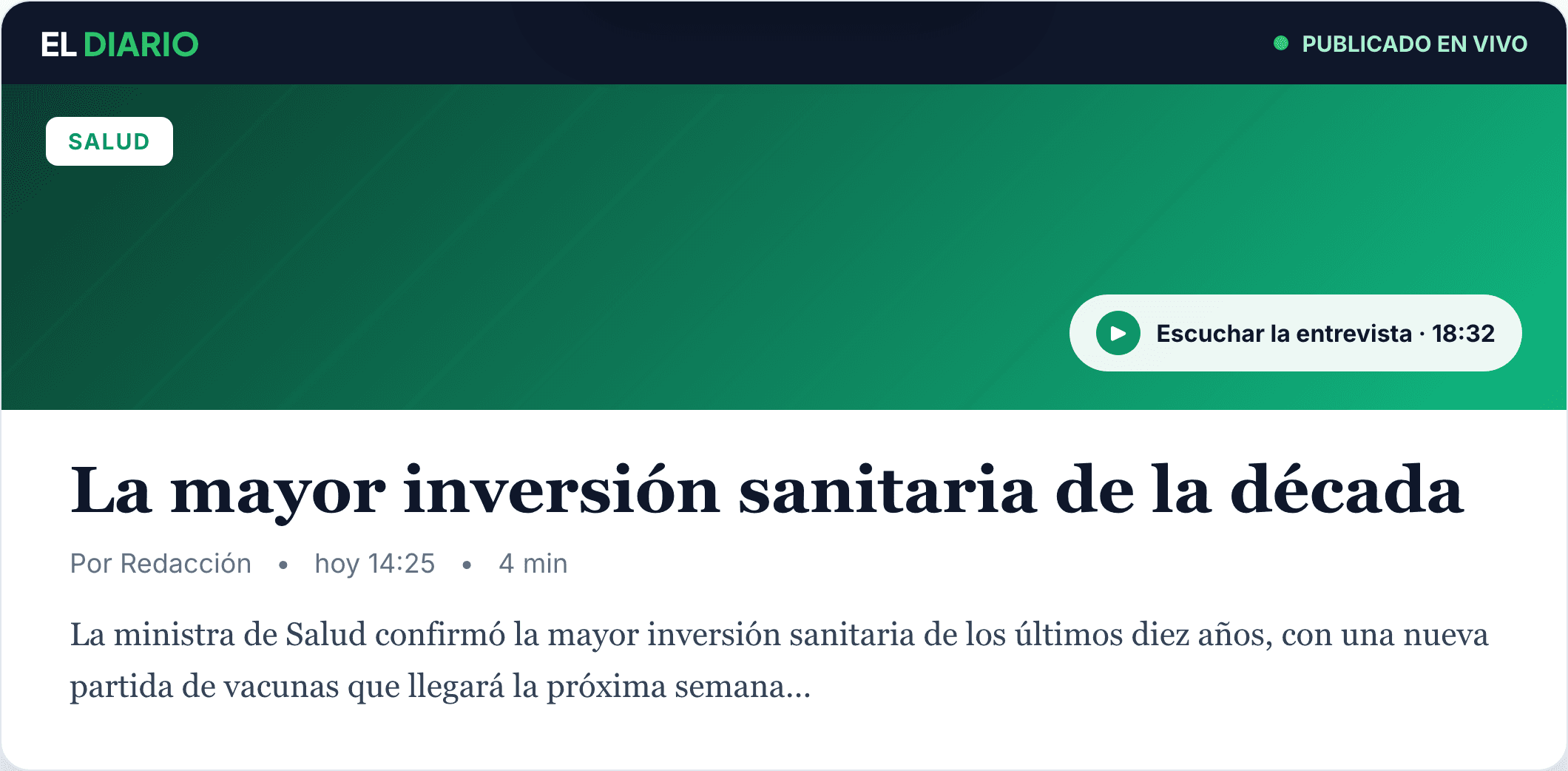
Step 4From audio to front page, without leaving the platform
When the article is ready, you publish it: download it as Word or PDF, or copy it into your CMS, with the original audio embedded as a backup. Search-optimized from the first minute.
- ✓Export anywhereWord, PDF or a direct copy into your CMS, with the audio as a backup of the source.
- ✓Built to be foundStructured for SEO, GEO and AEO, with a real shot at being the version that surfaces.
- ✓Ready to shipNo copy-pasting between tools: from audio to published story in one place.
And now, something new for journalists
One of the most requested features by journalists across Latin America just landed in TranscribeGo. Here it is.
Media Radar📡 Media Radar
Find out what's breaking before anyone else
Our newest feature, and one of the most requested by journalists across Latin America: you pick the countries, their outlets light up, you filter by keywords if you want, and breaking stories reach you instantly over WhatsApp, Telegram or email.
Set up your Radar
Get only the news that mentions your topics.
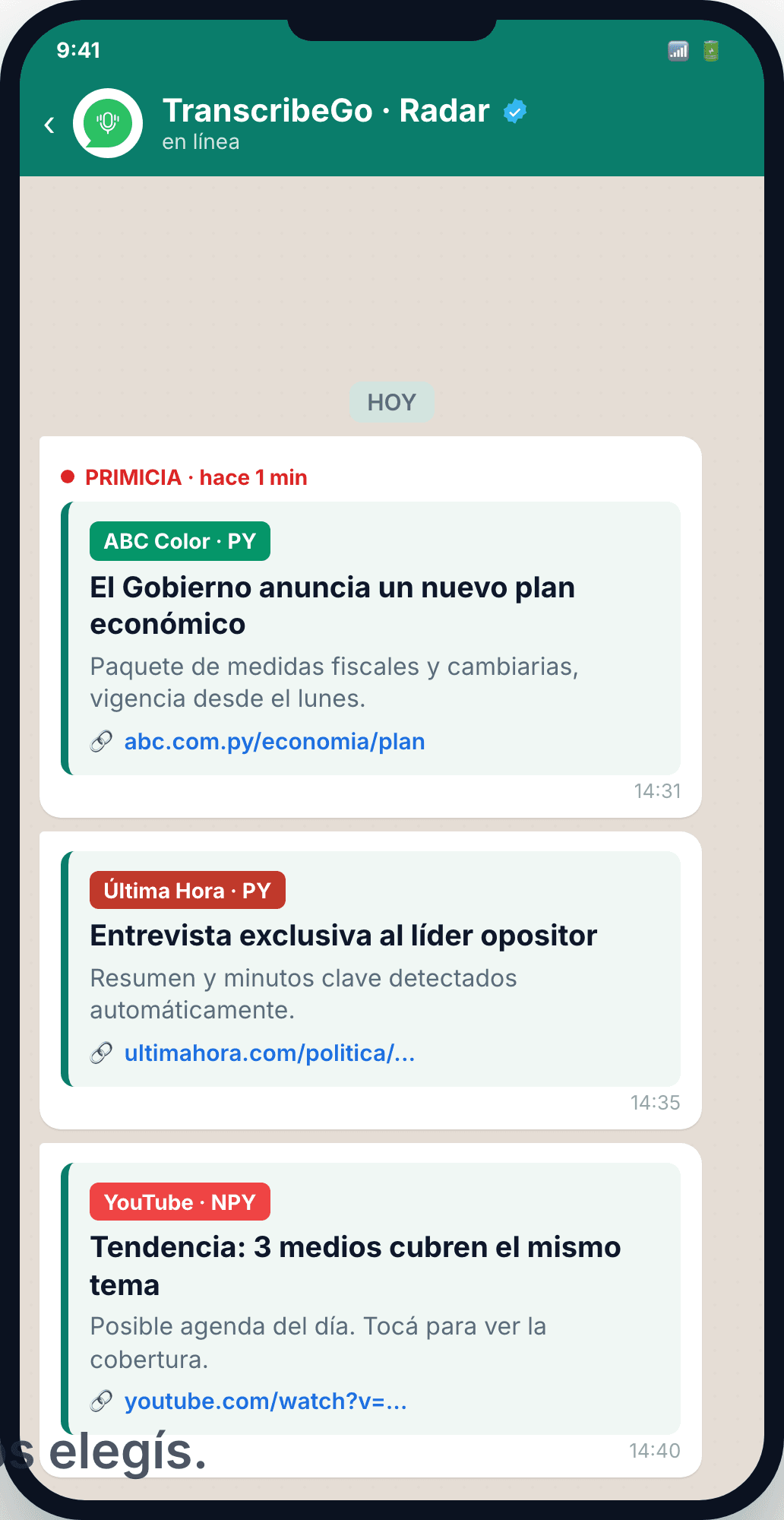
- ✓Pick your countriesAdd countries and their newspapers, radio and YouTube channels light up.
- ✓Filter by topic (optional)Keywords like 'oil', 'energy' or 'Milei': you only get what's relevant.
- ✓Instant alertsOver WhatsApp, Telegram or email, with a summary, link and trend detection.
💰 Pricing
Start free, scale when you need to
Try it with your next interview. No card required.
Free
$0
10 min / month
Starter
$6.99
200 min / month
USD / /mo
Pro
$19.99
1000 min / month
USD / /mo
Extra minutes available in packs that never expire.
❓ FAQ
Frequently asked questions
The essentials of the workflow, in brief.
How do I get the transcript over WhatsApp?
Send the interview audio to the verified TranscribeMe bot on WhatsApp and in seconds you get the full transcript, with nothing to install. A link takes you to the web for diarization, quotes and the article.
What is diarization and why does it matter for interviews?
Diarization identifies who said what: each speaker is separated and labeled, with editable names and timestamps to jump to the exact moment in the audio. It's what makes the transcript quotable and attributable.
Can the AI write the article and keep the exact quotes?
Yes. In Journalist mode, the assistant generates a structured news article and a quote-based summary. Ask it to 'pull the quotes' or 'write the article' and it responds, preserving your source's exact words.
Is the article optimized for search engines?
Every article includes an SEO/GEO/AEO analysis with a score and applied recommendations (headline, meta, keywords and readability), so it's built to surface in search engines and AI answers alike.
What is the Media Radar and which channels does it cover?
It's our newest feature, heavily requested by journalists across Latin America. You pick the countries and their outlets light up — newspapers, radio and social/YouTube — add optional keywords (like "oil" or "Milei"), and breaking stories reach you instantly over WhatsApp, Telegram or email, with a summary, link and trend detection.
Start with WhatsApp
Your next story, in minutes
Record, transcribe and publish from day one. Nothing to install, in 12 languages, with a radar that keeps you one step ahead.
Try it free now10 free minutes every month. No credit card.