
To convert OGG to text, upload your .ogg file to TranscribeGo and click Transcribe. You get a full transcript in seconds, plus an AI summary, one-click translation into 90+ languages, and SRT subtitle export. If the OGG file is a WhatsApp or Telegram voice note, you can skip the upload entirely: forward it to the TranscribeGo bot in the chat and the transcript comes back in the same conversation. No converter, no codec pack, no software install.
That last part matters more than it sounds, because almost nobody deliberately creates an OGG file. They receive one. WhatsApp users send roughly 7 billion voice messages every day, and every single one of them is an OGG file under the hood. Voice notes are no longer a niche habit either: two out of three Americans send them, and a February 2026 YouGov survey found roughly 59% of US adults use voice notes to some degree.
So the usual reason people search for how to convert OGG to text is simple: a voice note landed in their inbox, they can't listen to it right now, and they need the words.
What is an OGG file, exactly?
OGG is a container format — an open, license-free wrapper that holds compressed audio. Inside a WhatsApp or Telegram voice note, the audio is encoded with Opus, a codec designed specifically for speech over the internet. At speech bitrates Opus is dramatically smaller than MP3 while sounding just as clear, which is exactly why messaging apps standardized on it.
There's a second, less obvious reason. Because WhatsApp messages are end-to-end encrypted, the servers can't transcode media in the cloud — the audio leaves your phone already encrypted. Every client therefore has to speak the same codec, and Opus in an OGG container is that common language.
The practical consequence: .ogg and .opus files play fine inside the messaging app, but often refuse to open in older desktop players, and none of them give you text. That's the gap you're trying to close.
The fastest way to convert OGG to text: 3 steps
Step 1: Open the OGG tool page
Go to transcribego.com/en/ogg-to-text. You'll land on the upload widget with the OGG format already selected. You don't need to install anything or convert the file to MP3 first — our AI technology reads OGG/Opus natively.
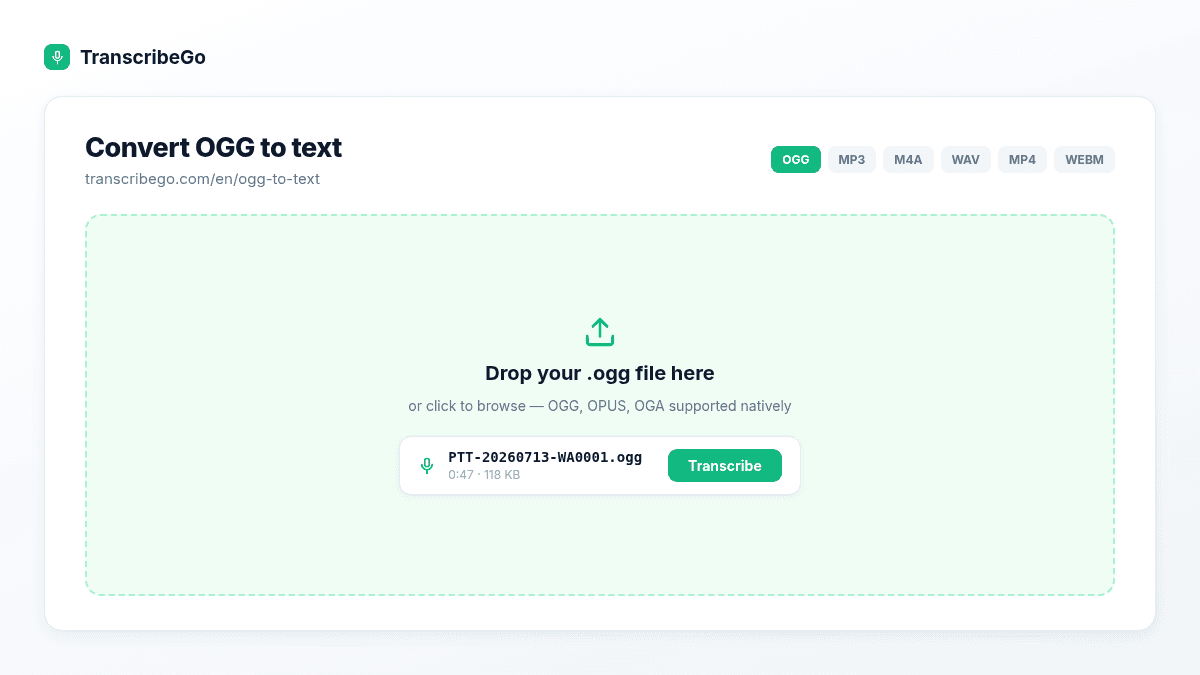
Step 2: Drop in your .ogg file and hit Transcribe
Drag the file into the box, or click to browse. If you exported the voice note from WhatsApp, it's typically named something like PTT-20260713-WA0001.ogg (PTT stands for "push to talk"). Telegram voice notes usually come through as .ogg or .oga.
Short voice notes finish in a few seconds. Long recordings — a one-hour interview, a lecture, a webinar — are supported too; they simply take a bit longer to process, and you can close the tab while they run.
Step 3: Read, copy, translate, or export
When processing completes, you land on the result page with:
- The full transcript, punctuated and broken into paragraphs, fully editable in place
- An AI summary — the gist of a 12-minute rant in three lines
- Detected language, duration, and word count
- Export options: copy to clipboard, download as TXT, or download an SRT subtitle file with timestamps
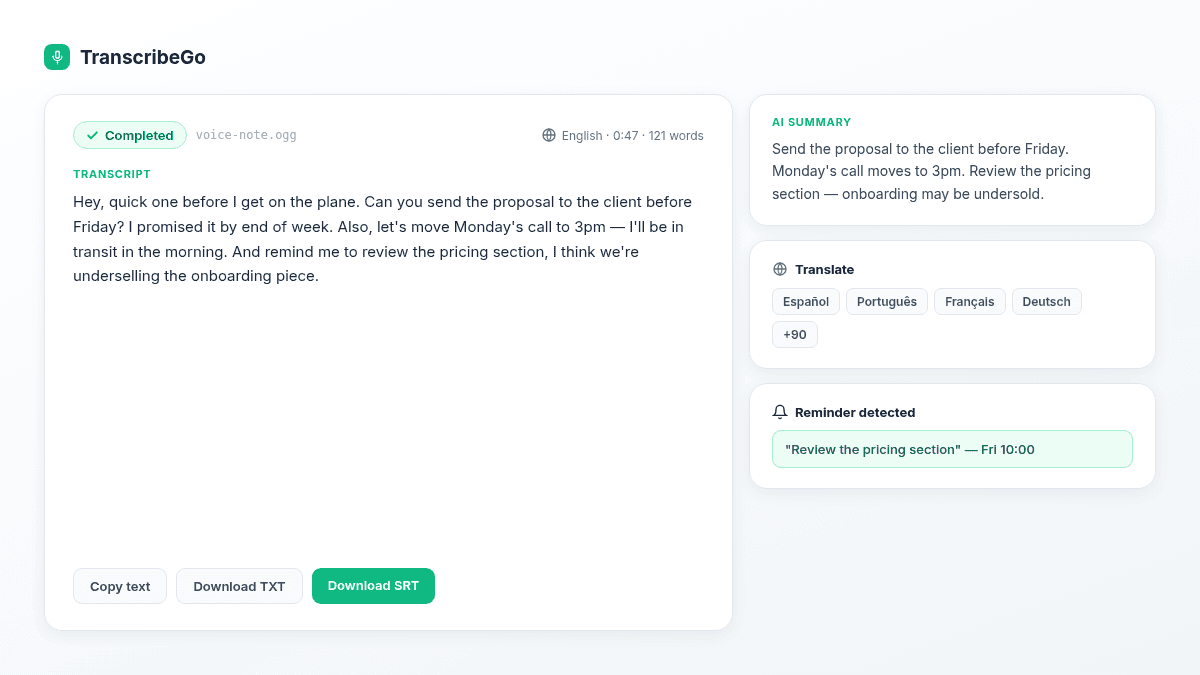
If the voice note is in a language you don't speak, hit Translate and pick from 90+ languages. The translation appears next to the original, and both versions can be downloaded.
The even faster way: never touch the file at all
Uploading works, but if the OGG file is a WhatsApp or Telegram voice note, exporting it to your computer just to upload it again is wasted effort.
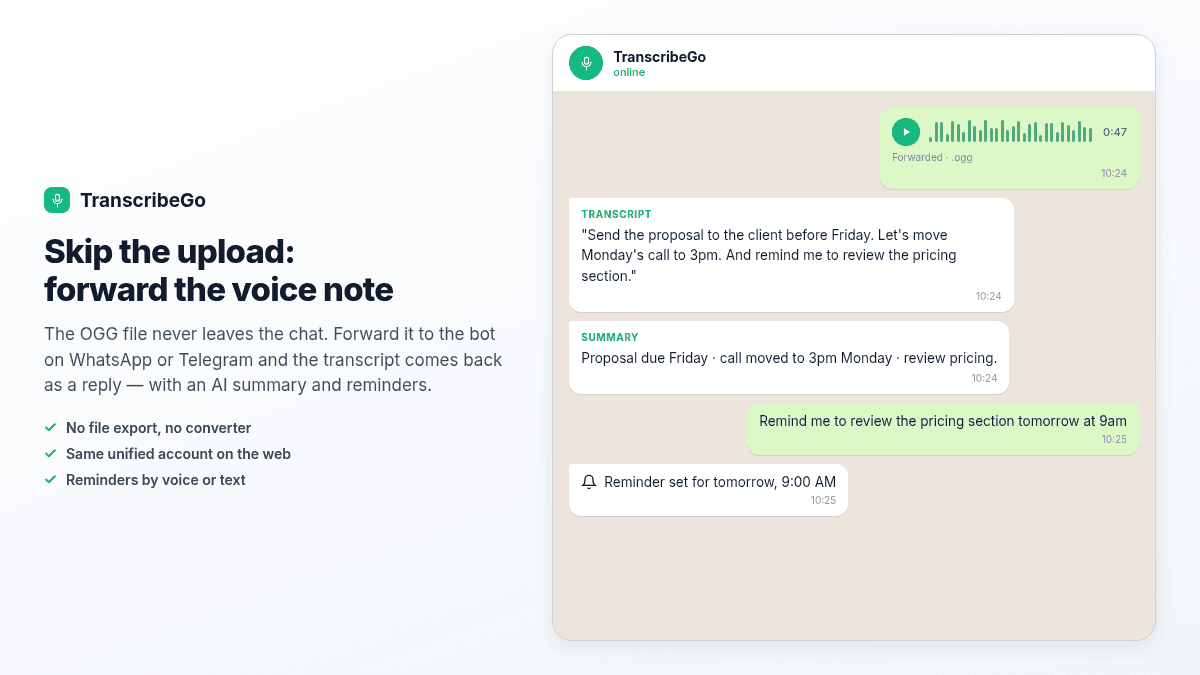
Instead, forward the voice note to TranscribeGo inside the chat. Add the bot as a contact on WhatsApp or Telegram, forward any voice note to it, and the transcript comes back as a reply in the same conversation — usually within seconds. Nothing to download, nothing to convert, nothing to open in a browser. Both channels share one unified account with the web app, so every transcript you generate on your phone is waiting for you in your dashboard at transcribego.com, searchable, whenever you sit down at a computer.
This is the flow most people end up living in, and it's covered end to end in our guide on how to transcribe WhatsApp voice notes automatically.
Beyond the transcript: what else you get
Converting OGG to text is where most tools stop. It's where the useful part starts.
- Reminders by voice or text. Say or type "Remind me to call the client tomorrow at 3pm" in WhatsApp or Telegram and TranscribeGo schedules it. One-off or recurring — "remind me every Monday at 9am to send the weekly report". Voice notes are full of commitments; this is the feature that stops them from evaporating. No other transcription tool does this.
- Translation into 90+ languages, one click, included.
- AI summaries on every transcript, so you can triage a long note in five seconds.
- URL transcription. Paste a link from YouTube, TikTok, Vimeo, Instagram, Facebook, X/Twitter, SoundCloud, Twitch, TED or Dailymotion and get the transcript without downloading anything.
- SRT subtitle export with timestamps, ready for any video editor — see our complete guide to SRT files.
- A searchable web dashboard where every transcript from every channel lives in one place.
- Three channels, one account: WhatsApp, Telegram, and the web app, fully unified.
Try TranscribeGo Free
10 free minutes. No credit card required.
Why not just use a free OGG-to-MP3 converter first?
You can — it's just a detour that costs you quality and time. Converting Opus to MP3 re-encodes audio that was already lossy, which slightly degrades exactly the speech detail a transcription engine relies on. And once you've converted, you still need a separate tool to produce the text.
Uploading the .ogg directly skips the round trip. If you're working with other formats too, the same flow handles MP3, M4A, WAV, MP4 and WebM — that's what our complete guide to transcribing audio files walks through.
Common OGG problems, solved
"My .ogg file won't open on my computer." Older desktop players often don't ship an Opus decoder. You don't need one: upload the file as-is and read the text instead.
"The file is .opus, not .ogg." Same thing — Opus audio, different extension. It works the same way.
"It's a long recording, not a voice note." Long audio is supported. Start it and walk away; you'll find the transcript in your dashboard. Our guide on transcribing long audio files covers podcasts, webinars and lectures.
"I have dozens of voice notes to get through." Connect the WhatsApp or Telegram bot once, and every voice note you forward from then on comes back as text automatically. That's the setup described in automatic WhatsApp transcription.
Frequently Asked Questions
Can I convert OGG to text for free?▾
Yes. TranscribeGo's Free plan includes transcription minutes at no cost — enough to convert a batch of typical voice notes to text. Upload the .ogg file, or forward the voice note to the bot on WhatsApp or Telegram. See the plans page at transcribego.com for what's included in Free, Starter and Pro in your country.
Do I need to convert the OGG file to MP3 first?▾
No. TranscribeGo reads OGG/Opus natively, along with MP3, M4A, WAV, MP4 and WebM. Converting to MP3 first only re-encodes already-compressed audio, which can shave off a little accuracy and wastes a step.
Why are WhatsApp voice notes in OGG format?▾
WhatsApp encodes voice notes with the Opus codec inside an OGG container. Opus is optimized for speech, produces very small files at speech bitrates, and is open and license-free. Because WhatsApp messages are end-to-end encrypted, the servers can't transcode audio in the cloud, so every client has to use the same codec — Opus.
What's the difference between .ogg, .oga and .opus files?▾
They're all containers carrying (usually) Opus audio; the extension is mostly a naming convention. WhatsApp exports .ogg, Telegram uses .ogg or .oga, and some tools save .opus. TranscribeGo accepts all of them without conversion.
How accurate is OGG to text transcription?▾
Our AI technology delivers high accuracy on clear speech, which is what most voice notes are — a single speaker, close to the microphone. Heavy background noise, several people talking over each other, or a very strong accent can reduce accuracy. Every transcript is editable in place, so you can fix a word in a second.
What languages are supported?▾
The spoken language is detected automatically and more than 90 languages are supported for transcription, including English, Spanish, Portuguese, French, German, Italian, Hindi, Arabic, Turkish, Indonesian, Vietnamese and Russian. You can also translate any transcript into any of those languages with one click.
