
Short version of this TurboScribe review: TurboScribe is the best pure-volume transcription tool on the market. Its unlimited plan removes the per-hour meter that makes most competitors expensive, and if your job is dumping large batches of long recordings into a browser, nothing beats it on price-per-hour. But it is a one-trick tool: upload a file in a browser, download a transcript. There is no WhatsApp, no Telegram, no reminders, and the free tier is deliberately tight. If your audio arrives as voice notes on your phone rather than as files on your desktop, TranscribeGo is the better fit — it transcribes straight from WhatsApp, Telegram, the web, and social links in 90+ languages, with AI summaries, one-click translation, and reminders built in.
Let's be fair up front: TurboScribe has earned its reputation. The company reports more than 46 million hours transcribed to date, and its unlimited model was a genuine shake-up in a category where almost everyone else charges by the audio hour. When people say TurboScribe changed how much they transcribe, they usually mean it literally — the meter is gone, so they stopped rationing.
Some context on the market. AI transcription is projected to grow from USD 4.5 billion in 2024 to USD 19.2 billion by 2034, a 15.6% compound annual growth rate, and modern engines now reach up to 99% accuracy under optimal conditions. Accuracy is no longer what separates the leaders. Meanwhile, WhatsApp users send roughly 7 billion voice messages every day — an enormous share of the audio people actually need turned into text, and a channel TurboScribe does not serve at all.
Below: what TurboScribe does well, where it falls short, and how it compares to TranscribeGo.
TurboScribe review at a glance
TurboScribe is a browser-based, upload-first transcription service with an unusual pricing model: one flat subscription, unlimited minutes. You sign in, drag files in, and download transcripts as DOCX, PDF, TXT, SRT, VTT, or CSV.
Quick verdict:
- Best for: high-volume desktop transcribers — researchers, academics, agencies, anyone processing dozens of hours of recorded files a month who wants a predictable flat bill.
- Weakest for: mobile-first professionals. If your audio lives in WhatsApp or Telegram voice notes, TurboScribe cannot reach it.
- Standout strengths: truly unlimited minutes, very large file support (up to 10 hours / 5 GB per file, 50 files at a time), 98+ languages, translation into 130+ languages, speaker recognition.
- Main limitations: browser-only and upload-first, no messaging channels, no reminders, a restrictive free tier, and mixed third-party reviews on billing and support.
TurboScribe features
The feature set is focused and well-executed:
- Unlimited transcription on the paid plan, with no monthly minute cap.
- 98+ languages, with a language picker rather than fully automatic detection.
- Three transcription modes trading speed against accuracy, so you can run a quick pass or a slow, careful one.
- Speaker recognition (diarization) with automatic or manual speaker counts.
- Built-in translation of transcripts and subtitles into 130+ languages, plus a "transcribe directly to English" option.
- Large uploads: up to 10 hours or 5 GB per file, and 50 files queued at once.
- Export flexibility: DOCX, PDF, TXT, CSV, SRT, and VTT, with bulk export.
- Audio restoration — an AI noise-reduction pass for poor-quality recordings.
- Encrypted storage of files and transcripts.
That is a strong toolkit for one specific job: turning a pile of files you already have into text. It is worth noting that everything on that list except audio restoration and the 5 GB ceiling, TranscribeGo also does — and TranscribeGo adds channels TurboScribe has no equivalent for.
TurboScribe accuracy and languages
TurboScribe advertises 99.8% accuracy, and on clean, single-speaker audio in a well-supported language, results genuinely are excellent. Independent testers have found it holds up better than some specialist research tools on difficult files, and the audio restoration option helps with noisy recordings.
The honest caveat — which applies to every automated engine, ours included — is that accuracy degrades in the real world. Third-party reviews note quality drops with heavy accents, overlapping speakers, and background noise. Language quality also varies a lot: TurboScribe itself lists a tier of "high accuracy" languages and a separate tier of everything else, so the 98+ figure is broader than it is uniformly good.
TranscribeGo covers 90+ languages with automatic detection — no language picker, no wrong-language reruns — at professional-grade accuracy (95–98% on clear audio). On messy real-world recordings, both tools need a quick human review anyway. Which means the real differentiator isn't the last decimal of accuracy. It's how the audio gets into the tool in the first place.
TurboScribe pricing model
We don't print competitor prices here — they change and vary by country — so this is the model. Check TurboScribe's pricing page for current rates.
TurboScribe runs a simple two-tier model: a free tier and a single flat-rate unlimited subscription (cheaper if billed yearly, per-person, not shareable). There are no per-hour charges and no overage meter. For heavy users that is genuinely the most predictable model in the category, and it's TurboScribe's strongest argument.
The free tier is where expectations get set incorrectly. It allows 3 transcripts per day, up to 30 minutes each, one file at a time, at lower processing priority. That's enough to evaluate quality, not enough to actually work — which is by design, and worth knowing before you plan around it.
One more thing to weigh: third-party review scores are mixed. TurboScribe sits at 2.6 out of 5 on Trustpilot, where complaints cluster around billing disputes and support responsiveness, and some heavy users report throttling after very large volumes despite the "unlimited" label. Plenty of users are also delighted with it. Read a sample of both before you commit to an annual plan.
Where TurboScribe falls short
No WhatsApp or Telegram. This is the big structural gap. TurboScribe cannot receive a voice note. With 7 billion voice messages sent daily on WhatsApp, that's an enormous category of audio it simply doesn't serve. To transcribe a voice note you'd have to export it from your chat, move it to a computer, open a browser, and upload it.
Upload-first, always. Every transcript starts with a manual upload. For a batch of interview files that's fine. For a two-minute voice note your client just sent, it's absurd.
Limited URL transcription. TurboScribe supports YouTube links, but not the wider set of social platforms where audio and video actually live today.
No reminders, no action layer. You get text back. What you do with it is your problem. Transcripts pile up as a searchable archive rather than driving anything.
A tight free tier. Three 30-minute files a day at low priority is a demo, not a workflow.
None of this matters if you're a researcher batch-processing recorded interviews at a desk. For everyone else, it's friction on every single recording.
TranscribeGo vs TurboScribe: feature comparison
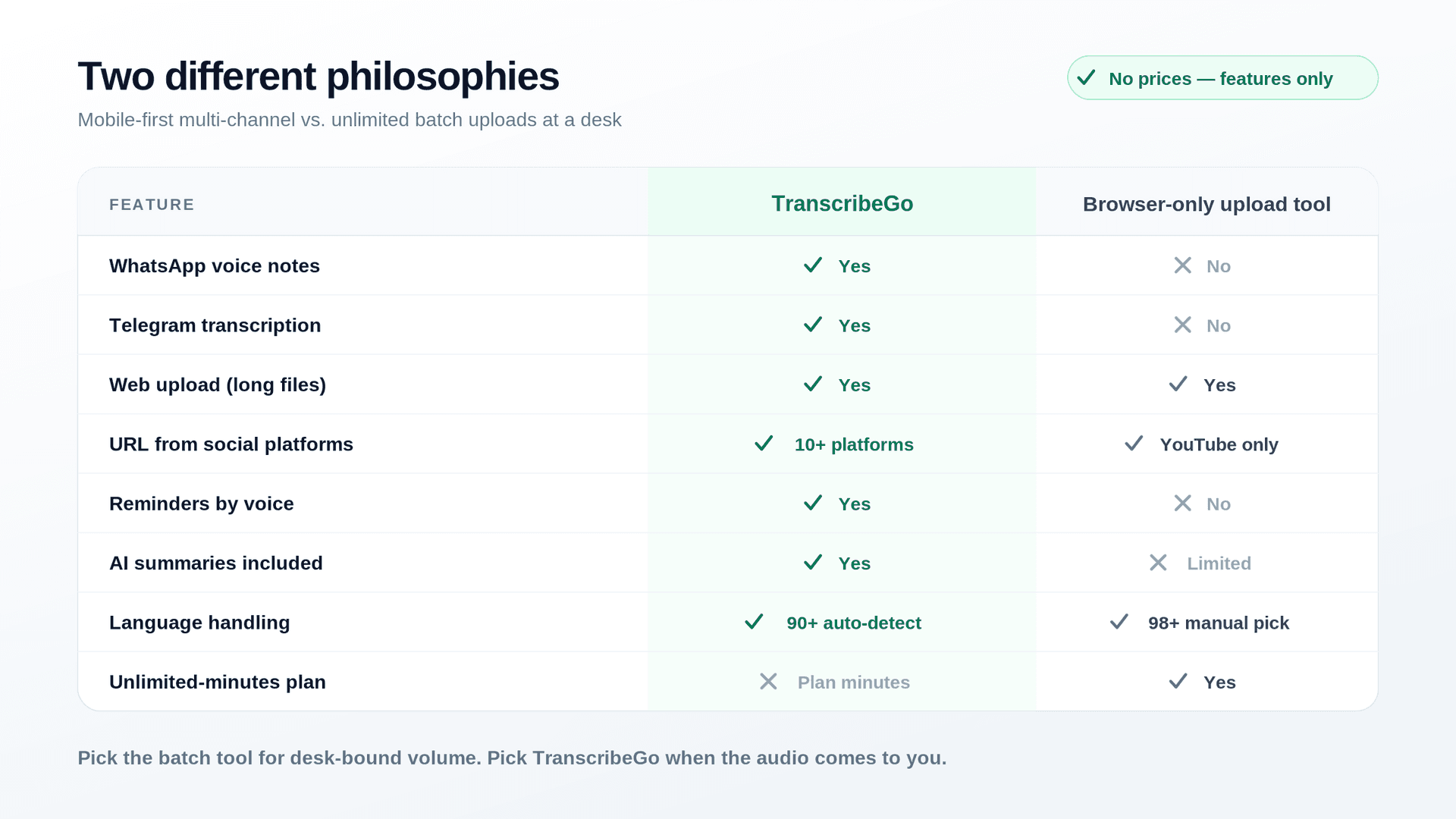
TranscribeGo takes the opposite approach. Instead of a browser you have to open, it meets you in the apps you already use — WhatsApp, Telegram, and the web — with one unified account. Here's an honest side-by-side:
| Feature | TranscribeGo | TurboScribe |
|---|---|---|
| WhatsApp voice notes | Yes (automatic via bot) | No |
| Telegram transcription | Yes (automatic via bot) | No |
| Web upload (audio/video) | Yes (drag & drop, long files) | Yes (up to 10 h / 5 GB per file) |
| Bulk upload | Sequential | Yes (up to 50 files at once) |
| Unlimited minutes | Plan-based minutes | Yes (flat-rate unlimited plan) |
| URL transcription (paste a link) | Yes — 10+ platforms (YouTube, TikTok, Instagram, Facebook, X, Vimeo, SoundCloud and more) | YouTube only |
| Mobile experience | Native chat flow, nothing to install | Browser only, no mobile app |
| Reminders (by voice or text) | Yes | No |
| AI summaries | Yes | Via export/prompt tools |
| Translation | Yes (one-click, included) | Yes (130+ languages, included) |
| SRT / subtitle export | Yes | Yes (SRT, VTT) |
| Language support | 90+ (automatic detection) | 98+ (manual selection) |
| Speaker labels / diarization | Yes (web dashboard only) | Yes (with speaker count control) |
| Noise restoration tool | No | Yes |
| API & automation | B2B API | No public API |
| Searchable web dashboard | Yes | Yes |
| Free tier | Yes | Yes (3 files/day, 30 min each) |
Where each tool wins
TurboScribe wins on volume. If you have hundreds of hours of recorded files and a desk to process them at, the flat unlimited model is the most economical structure in the category and the 10-hour/5 GB ceiling is generous. That's a real, legitimate use case, and TurboScribe serves it better than almost anyone. If that's you, buy it.
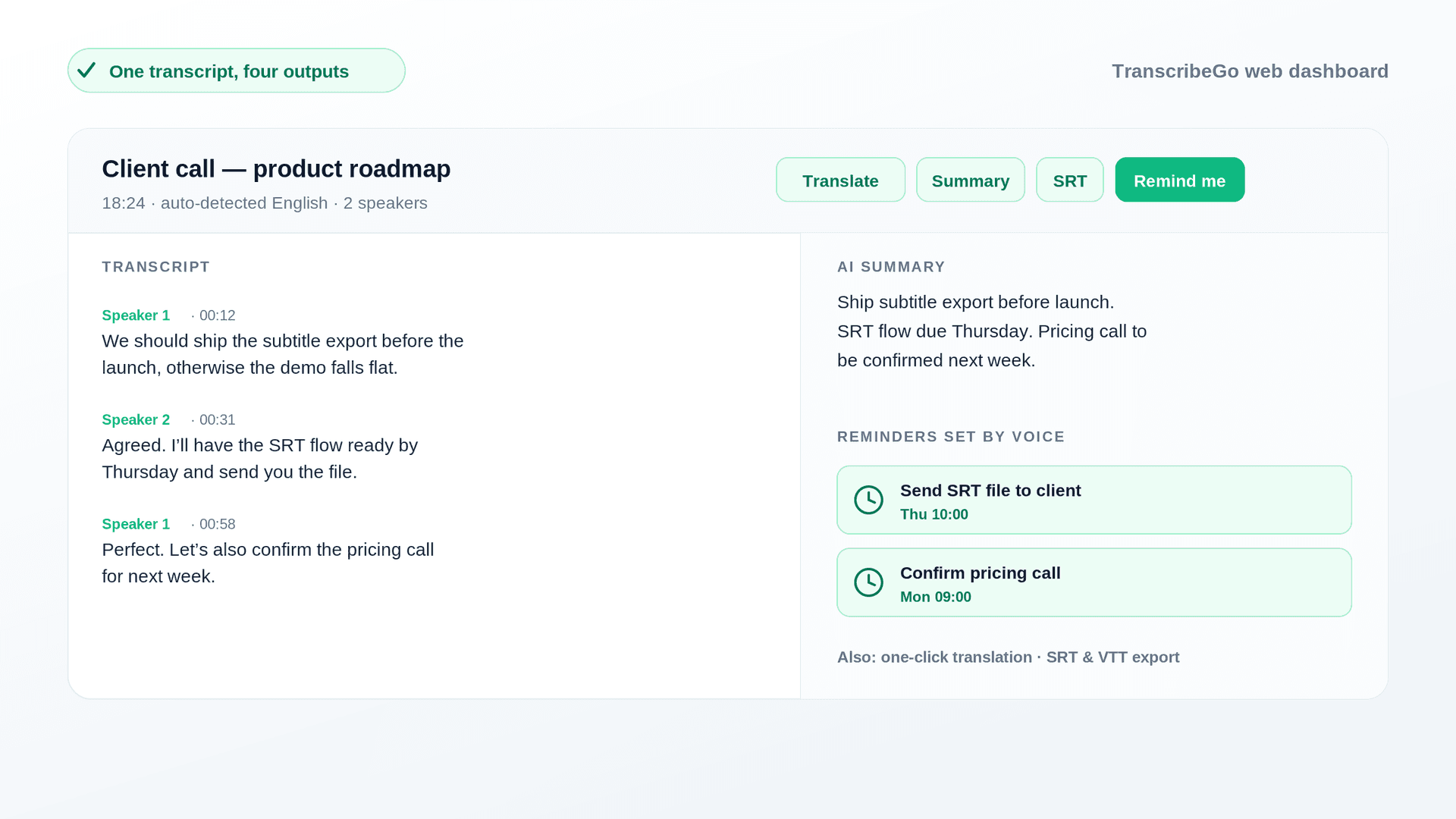
TranscribeGo wins on how audio actually reaches you in 2026. It delivers the professional essentials — accurate transcription in 90+ languages, AI summaries, one-click translation, SRT export, a B2B API, encrypted handling, and a searchable dashboard — and then does what a browser-only tool structurally cannot:
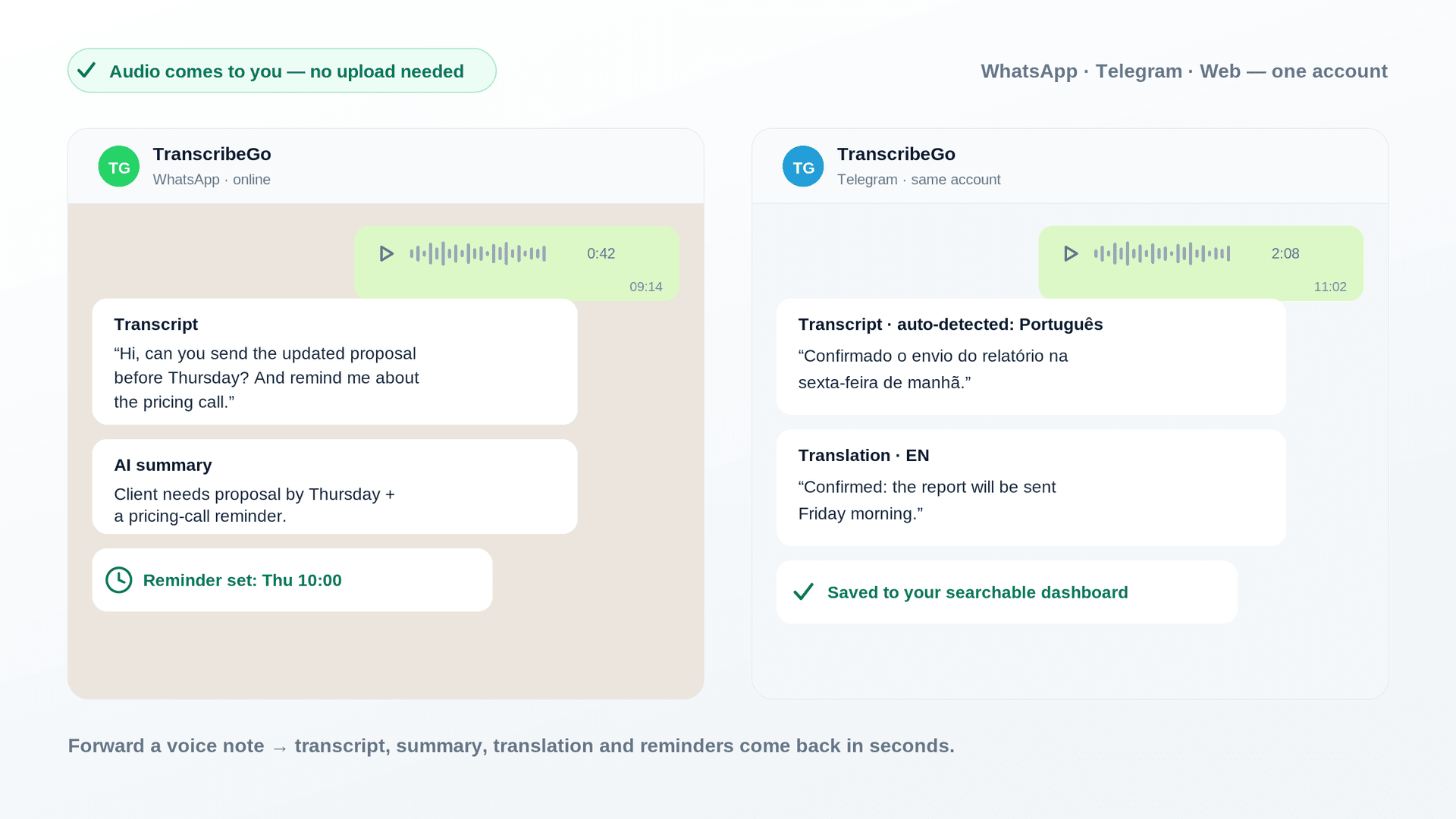
Multi-channel capture. Add the bot on WhatsApp or Telegram, forward a voice note, and the transcript comes back in seconds — no export, no upload, no app to install. You can also drop files on the web or transcribe WhatsApp voice notes automatically without lifting a finger. Everything syncs to one account and one searchable history.
URL transcription from 10+ platforms. Paste a link from YouTube, TikTok, Instagram, Facebook, X, Vimeo, or SoundCloud and TranscribeGo pulls the audio and transcribes it. No download-then-upload dance.
Reminders — the feature no transcription tool has. This is the one people don't expect. Inside WhatsApp or Telegram you can set a reminder by voice or text: say "remind me to call the client tomorrow at 3pm" and TranscribeGo schedules it, one-time or recurring, in any language. Your voice notes stop being a graveyard of forgotten to-dos and start driving your day.
If you're comparing more broadly, our Sonix review covers another browser-first option, and our roundup of free transcription tools puts the free tiers side by side.
Which should you choose?
Choose TurboScribe if you're a high-volume desktop transcriber: batches of long recorded files, a computer you work from all day, and a preference for one predictable flat bill over an hourly meter. That's what it was built for and it does it well.
Choose TranscribeGo if your audio comes to you rather than sitting in a folder — voice notes from clients and colleagues, links you want transcribed, recordings you need summarized and acted on. You get professional accuracy across 90+ languages, AI summaries and included translation on every transcript, subtitle export, a B2B API, and a searchable dashboard — plus transcription that arrives on WhatsApp, Telegram, the web, and social links, with reminders built in. Add the bot, forward one voice note, and you'll feel the difference immediately. Test the whole flow on the free tier before you decide.
Try TranscribeGo Free
10 free minutes. No credit card required.
Frequently Asked Questions
Is TurboScribe really unlimited?▾
Broadly, yes — the paid plan has no monthly minute cap and the company states its systems support at least 720 hours of audio per month per account. That said, some very heavy users report throttling messages after extremely large volumes, and accounts can't be shared. For normal high-volume use, treat it as genuinely unlimited.
What are TurboScribe's free plan limits?▾
The free tier allows 3 transcripts per day, each up to 30 minutes, uploaded one file at a time and processed at lower priority. It's designed for evaluation rather than daily work. TranscribeGo's free tier lets you test the full flow — including WhatsApp and Telegram voice notes, translation, and reminders — which TurboScribe's free tier can't cover at all.
How accurate is TurboScribe?▾
TurboScribe advertises 99.8% accuracy, and on clean, single-speaker audio in a well-supported language it performs excellently. Accuracy drops with heavy accents, overlapping speakers, and background noise — as it does with every automated engine. TranscribeGo delivers professional-grade accuracy (95–98% on clear audio) across 90+ languages with automatic language detection, so there's no language picker to get wrong.
Can TurboScribe transcribe WhatsApp voice notes?▾
Not directly. TurboScribe has no WhatsApp or Telegram integration, so you'd have to export the voice note from your chat, transfer it to a computer, and upload it in a browser. TranscribeGo was built for exactly this: add the bot, forward the voice note, and the transcript comes back in seconds with an AI summary and optional translation.
What is the best TurboScribe alternative?▾
It depends on what's slowing you down. If it's the meter, TurboScribe's own unlimited plan is hard to beat. If it's the browser-and-upload ritual, TranscribeGo is the strongest alternative: it transcribes inside WhatsApp and Telegram, handles web uploads and links from 10+ platforms, includes one-click translation and AI summaries, and lets you set reminders by voice — all from one account.
Does TurboScribe have a mobile app?▾
No. TurboScribe is browser-based, with no dedicated mobile app, which makes capturing and transcribing audio on the go awkward. TranscribeGo needs no app at all — its WhatsApp and Telegram bots run inside apps you already have on your phone.
How do I transcribe a Zoom, Meet, or Teams recording?▾
Neither tool connects to meeting platforms directly. The flow is the same for both: record the meeting, download the recording file (Zoom saves an MP4/M4A), then upload it. With TranscribeGo you can drop it into the web app or simply forward the audio through WhatsApp or Telegram, and you'll get a transcript, an AI summary, and translation included.