
Short version of this Sonix review: Sonix is a capable browser-based transcription tool — 54+ languages and high accuracy on clean audio, wrapped in a desktop editor built for people who sit at a computer all day. The problem is that it's built for a way of working that's fading fast. Every file has to be exported, uploaded, and managed by hand in a browser: there's no mobile app, no WhatsApp or Telegram, and translation is billed on top. If you want professional-grade accuracy without the desk-bound busywork, TranscribeGo transcribes straight from WhatsApp, Telegram, the web, and social links — in 90+ languages, with AI summaries and one-click translation included, plus reminders no other transcription tool offers.
Sonix has been around since 2017 and is used by thousands of companies. That track record is real — but it was earned in the desktop era, when transcription meant sitting down at a computer and uploading a file by hand. How professionals capture audio has changed since then. The useful question in 2026 isn't can Sonix transcribe a file you upload — almost every tool can — it's whether you should still have to upload it by hand at all.
A little context first. The AI transcription market is projected to grow from USD 4.5 billion in 2024 to USD 19.2 billion by 2034, a 15.6% compound annual growth rate. Modern engines now reach up to 99% accuracy under optimal conditions, so accuracy alone no longer separates the leaders. Meanwhile, WhatsApp users send roughly 7 billion voice messages every day across the platform's 3 billion-plus users — a massive slice of the audio people actually need turned into text, and exactly the workflow Sonix was never built for.
Below, we break down what Sonix does well, where it falls short, and how it compares to TranscribeGo so you can pick the right tool.
Sonix review at a glance
Sonix is a web-based, upload-first transcription platform. You sign in through a browser, upload an audio or video file, and get back a time-coded, editable transcript. It does that one job well — as long as your job keeps you at a desk.
Here is the quick verdict:
- Best for: desk-bound teams in tightly regulated fields — law firms, clinics — that need formal compliance certificates (SOC 2, HIPAA) and per-seat admin controls, and don't mind uploading every file by hand.
- Weakest for: almost everyone else — founders, journalists, sales teams, researchers, students, creators — anyone who captures audio on a phone, lives in WhatsApp or Telegram, or just wants a transcript without a browser-upload ritual.
- Standout strengths: accuracy on clean audio and a mature in-browser editor.
- Main limitations: no mobile app, no messaging channel, upload-first friction on every single file, translation billed as an extra, and fewer languages than newer tools.
Sonix features
Sonix covers the core of desktop transcription thoroughly:
- Automated transcription in 54+ languages, with speaker labels and timestamps.
- AI translation into 55+ languages (billed separately from transcription).
- Subtitles and captions, with SRT and VTT export and burn-in options for video.
- AI analysis for summaries, chapters, and sentiment on longer recordings.
- The Sonix Editor, a browser-based tool that lets you edit the audio by editing the text — one of the better editing experiences in the category.
- Collaboration and admin tools: multi-user permissions, shared folders, and read-only sharing.
- Security and compliance: SOC 2 Type II, HIPAA readiness, and PII redaction for regulated industries.
- A developer API and integrations (Zapier, Zoom, Adobe Premiere) for teams that automate their workflow.
That is a thorough desktop feature set. The catch: most of what professionals reach for every day — accurate transcription, speaker labels, AI summaries, subtitle export, translation, an API — TranscribeGo also does, and it includes translation instead of metering it. What Sonix piles on top is heavyweight compliance tooling for regulated industries. What it can't add is a way to capture the audio without a manual upload.
Sonix accuracy and languages
Accuracy is where Sonix has built its name. On clean, single-speaker audio it delivers up to 99% accuracy, and it handles regional accents and even multilingual recordings where speakers switch languages mid-sentence.
That said, independent reviews are honest about the limits. On noisy recordings or fast, overlapping natural conversation, quality drops: filler words creep in, statements are sometimes punctuated as questions, and you will spend time cleaning up. This is true of every automated engine, so plan to review any transcript before it goes anywhere important.
Language coverage is solid at 54+ languages — but this is a place TranscribeGo simply does more: 90+ languages with automatic detection, plus professional-grade accuracy (95–98%) on clear audio. And here's the part that decides it in practice: on the messy, real-world recordings most people actually deal with, both tools need a quick human review anyway. So the real differentiator isn't the last percentage point of accuracy — it's how easily you can get the audio into the tool. A browser-only, upload-first workflow charges you that friction on every single file.
Sonix pricing model
We do not print competitor prices here (they change and vary by country), so this is the model, not the numbers — check Sonix's pricing page for current rates in your currency.
Sonix uses a hybrid model. There is a single-user, pay-as-you-go tier where you buy transcription hours up front, which suits occasional projects. Above that sit multi-user subscription tiers billed per seat, each including a set number of hours, with additional hours billed at an hourly rate and translation charged separately at the transcription rate. An Enterprise tier adds custom terms and compliance. Every new account includes a free trial (30 minutes, no credit card).
The key thing to understand: transcription and translation are both metered by the hour of audio, and seats are billed per user. For a team that means three separate meters running at once — seats, overage hours, and translation — and a bill that scales in ways that are hard to predict. TranscribeGo folds AI summaries and one-click translation into the transcript itself, so there's no separate translation meter to watch.
Where Sonix falls short
For most people who aren't chained to a desk, Sonix has real blind spots:
No mobile app. This is the single most common complaint. Reviewers on G2 frequently note the absence of a mobile app, which makes on-the-go capture awkward. Everything happens in a browser on a computer.
No messaging channel. Sonix cannot receive a WhatsApp or Telegram voice note. In a world where 7 billion voice messages are sent on WhatsApp every day, that is a huge workflow it simply does not serve.
Translation is an extra step. Useful, but billed on top of transcription rather than included.
Upload-first friction. You export the file from wherever it lives, open the browser, and upload it. For a quick voice note or a video you found online, that is several steps more than it needs to be.
None of this matters if you never leave your desk. For everyone else, it's friction on every recording — and it's the reason a lot of professionals who could use Sonix end up reaching for something that meets them where the audio already is.
TranscribeGo vs Sonix: feature comparison
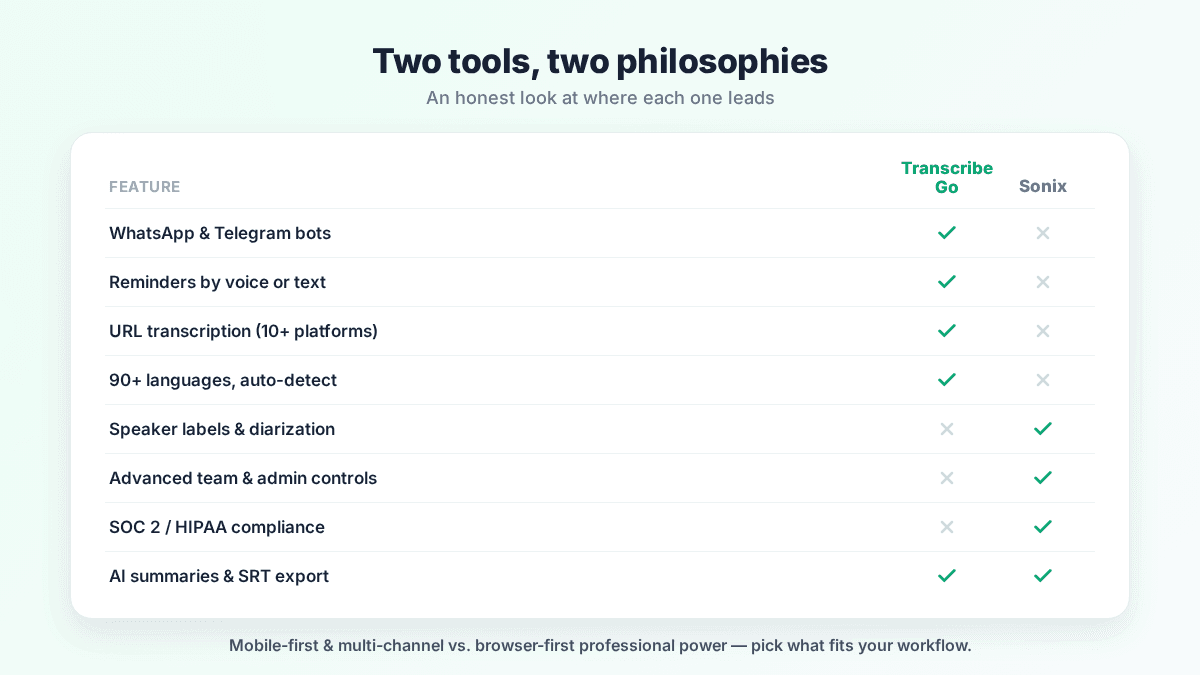
TranscribeGo takes a different approach. Instead of a browser you have to open, it meets you in the apps you already use — WhatsApp, Telegram, and the web — with one unified account. Here is how the two compare, honestly:
| Feature | TranscribeGo | Sonix |
|---|---|---|
| WhatsApp voice notes | Yes (automatic via bot) | No |
| Telegram transcription | Yes (automatic via bot) | No |
| Web upload (audio/video) | Yes (drag & drop, long files) | Yes |
| URL transcription (paste a link) | Yes — 10+ platforms (YouTube, TikTok, Instagram, Facebook, X, Vimeo, SoundCloud and more) | Partial (YouTube via convert tool) |
| Mobile experience | Native chat flow, nothing to install | No mobile app (browser/desktop) |
| Reminders (by voice or text) | Yes | No |
| AI summaries | Yes | Yes |
| Translation | Yes (one-click, included) | Yes (billed separately) |
| SRT / subtitle export | Yes | Yes |
| Language support | 90+ (auto-detect) | 54+ |
| Speaker labels / diarization | Yes (web dashboard only) | Yes |
| Team collaboration & admin | Shared account & searchable history | Per-seat admin & permissions |
| API & automation | B2B API | API, Zapier, integrations |
| Security & compliance certs | Encrypted in transit & at rest | SOC 2, HIPAA, PII redaction |
| Searchable web dashboard | Yes | Yes |
| Free tier / trial | Yes | Yes (30 free minutes) |
Where each tool wins
Sonix still has a place — a narrow one. If you work at a desk all day in a heavily regulated field, where SOC 2 and HIPAA certificates are a procurement checkbox and every file already lives on your computer, its compliance paperwork and per-seat controls are a legitimate reason to choose it. That is a real use case. It's just a much smaller one than Sonix's positioning suggests — and if it isn't your use case, most of that machinery is overhead you pay for and rarely touch.
TranscribeGo is built for how professionals actually work in 2026. It delivers the professional essentials — accurate transcription in 90+ languages, AI summaries, one-click translation, SRT export, a B2B API, encrypted handling, and a searchable dashboard — and then does the things Sonix structurally can't:
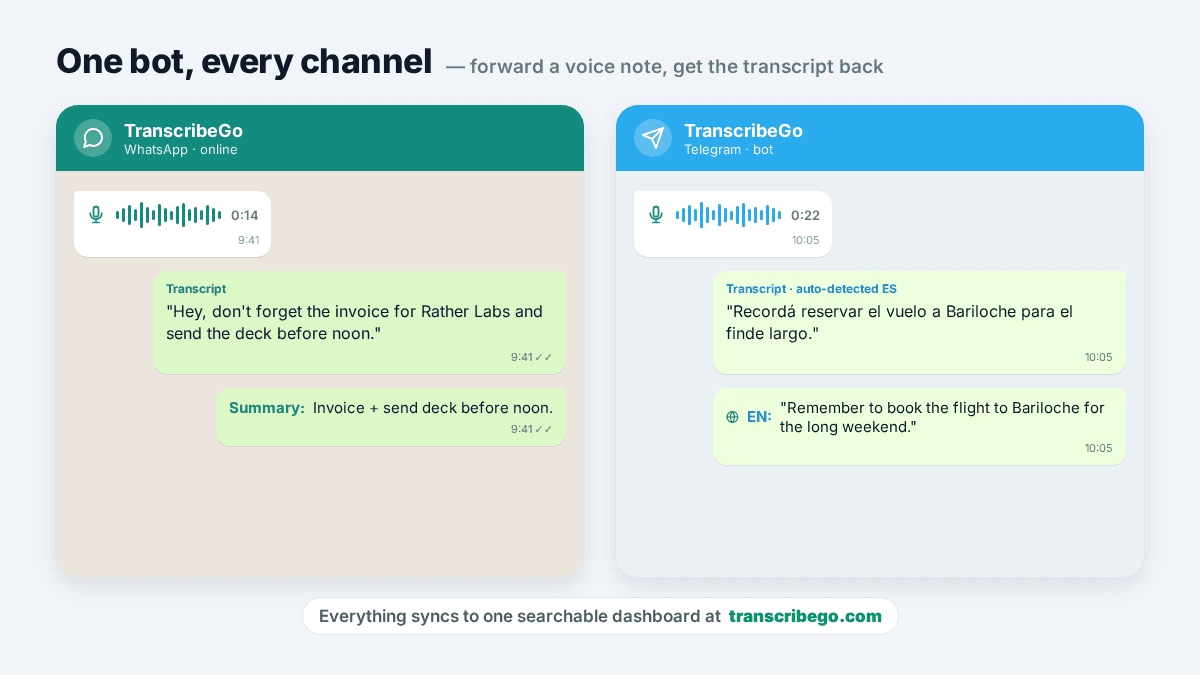
Multi-channel capture. Add the bot on WhatsApp or Telegram, forward a voice note, and the transcript comes back in seconds — no upload, no app to install. You can also drop files on the web or transcribe WhatsApp voice notes automatically without lifting a finger. Everything syncs to one account and one searchable dashboard.
URL transcription from 10+ platforms. Paste a link from YouTube, TikTok, Instagram, Facebook, X, Vimeo, or SoundCloud and TranscribeGo pulls the audio and transcribes it. For creators and researchers, this removes the download-then-upload dance entirely.
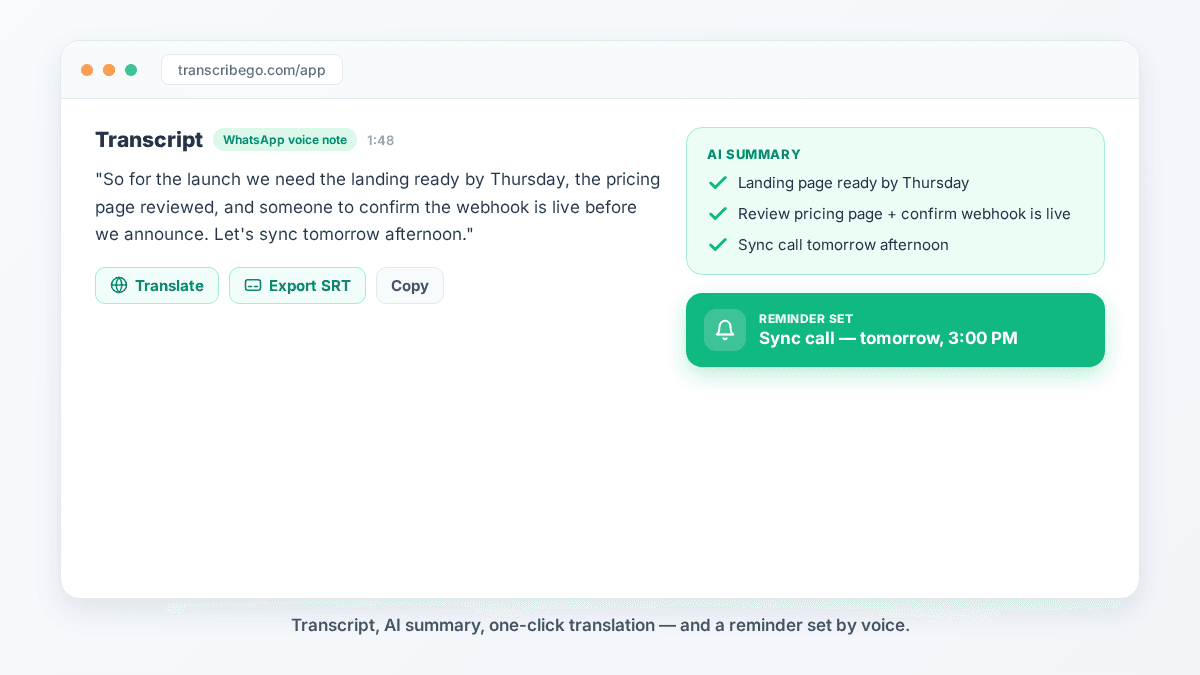
Reminders — the feature no transcription tool has. This is the one people don't expect. Inside WhatsApp or Telegram you can set a reminder by voice or text: say "remind me to call the client tomorrow at 3pm" and TranscribeGo schedules it, one-time or recurring, in any language. Your voice notes stop being a graveyard of forgotten to-dos and start driving your day.
Same transcripts, same summaries, same subtitle exports a desk tool gives you — except they arrive the moment the audio lands, in an app you already have open. If you're weighing broader options, our TranscribeGo vs Otter.ai comparison covers another popular meeting-first alternative.
Which should you choose?
Choose Sonix only if you're tied to a desk-bound, upload-by-hand routine in a field where SOC 2 or HIPAA certificates are a hard requirement. In that narrow case, its compliance stack earns its keep.
Choose TranscribeGo for everything else — which, for most professionals, is the honest answer. You get professional accuracy across 90+ languages, AI summaries and included translation on every transcript, a B2B API for automation, and a searchable dashboard — plus the part that actually changes your day: transcription that comes to you on WhatsApp, Telegram, the web, and social links, with reminders built in. Add the bot, forward a single voice note, and you'll feel the difference on the first transcript. Test the full flow on the free tier before you decide.
Try TranscribeGo Free
10 free minutes. No credit card required.
Frequently Asked Questions
Is Sonix good for transcription?▾
Sonix is a capable browser-based transcription tool: solid accuracy on clean audio, speaker labels, and a good in-browser editor. The catch is structural — everything runs in a browser on a computer, with no mobile app, no WhatsApp or Telegram, and translation billed separately. Unless you're tied to a regulated desktop workflow, most people get more done with a tool like TranscribeGo, which delivers professional-grade accuracy in 90+ languages and captures audio straight from your phone.
What is the best Sonix alternative for mobile and WhatsApp users?▾
TranscribeGo is the strongest alternative if you capture audio on your phone. It transcribes voice notes directly inside WhatsApp and Telegram, handles web uploads and URL links from 10+ platforms, includes one-click translation, and even lets you set reminders by voice. There's nothing to install and everything syncs to one searchable dashboard.
Does Sonix have a mobile app?▾
No. Sonix is a browser-based platform, and reviewers frequently note the lack of a dedicated mobile app as a drawback for on-the-go work. If you need to capture and transcribe audio from your phone, TranscribeGo's WhatsApp and Telegram bots cover that use case without any app download.
How accurate is Sonix?▾
Sonix reaches up to 99% accuracy on clean, single-speaker audio and handles regional accents and multilingual recordings well. Like every automated engine, accuracy drops on noisy recordings or fast, overlapping conversation, so plan to review any transcript before publishing. TranscribeGo delivers professional-grade accuracy (95–98% on clear audio) across 90+ languages — and, unlike Sonix, gets that audio in without a manual browser upload.
Can Sonix transcribe WhatsApp voice notes?▾
No. Sonix has no WhatsApp or Telegram integration, so you can't forward a voice note to it. TranscribeGo was built for exactly this: add the bot, forward the voice note, and the transcript comes back in seconds — with an AI summary and optional translation.
How do I transcribe a Zoom or Teams meeting?▾
Sonix supports Zoom and Teams recordings through its integrations and API. With TranscribeGo the flow is just as simple and needs no integration: record the meeting, download the recording file (Zoom saves an MP4/M4A), and drop it into the TranscribeGo web app — or forward the audio through WhatsApp. Either way you get a transcript, an AI summary, and translation, included.