
You already use WhatsApp for everything. Messages, calls, sharing, paying. So why do you still open a separate app every time you need to remember something? With TranscribeGo Reminders, you send a voice note or text to the same chat you already talk to friends in, and we remind you at the right moment. No new app, no learning curve, no friction.
This is our most-requested feature, back and rebuilt from scratch with better parsing, edit-from-web, and support across all 11 interface languages. It's live today for every TranscribeGo user — Free, Starter, and Pro.
TLDR — how it works in 3 steps
- Open the TranscribeGo chat on WhatsApp.
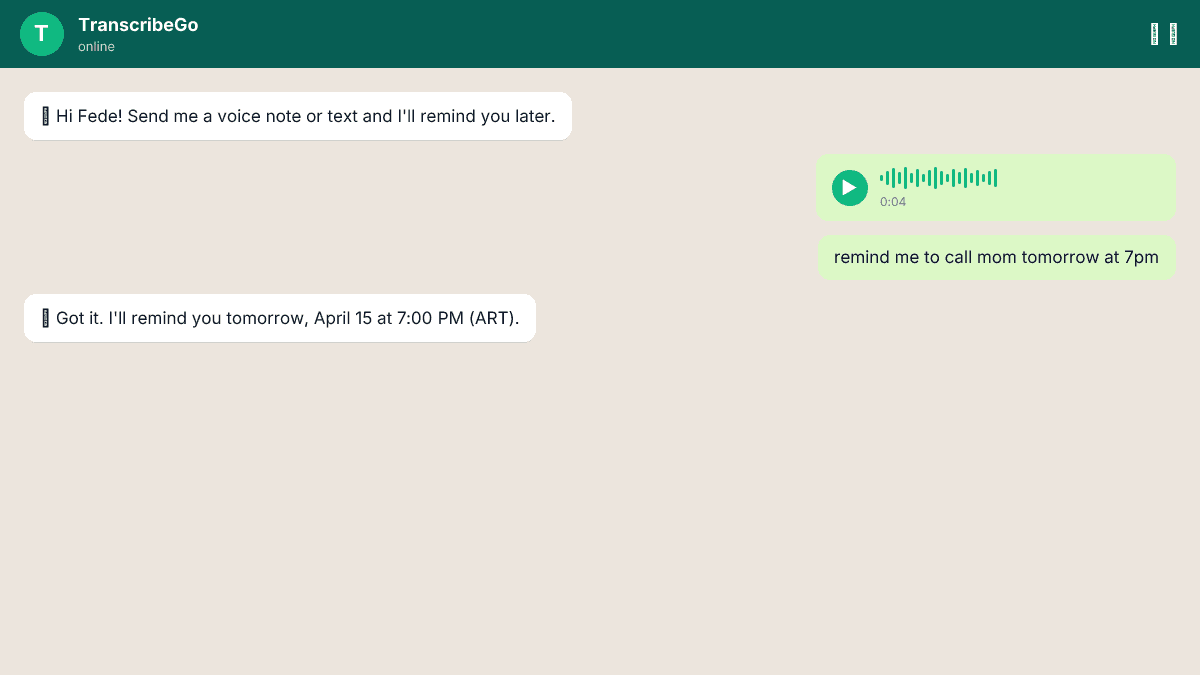
- Send a voice note or text like "remind me to call mom tomorrow at 7pm".
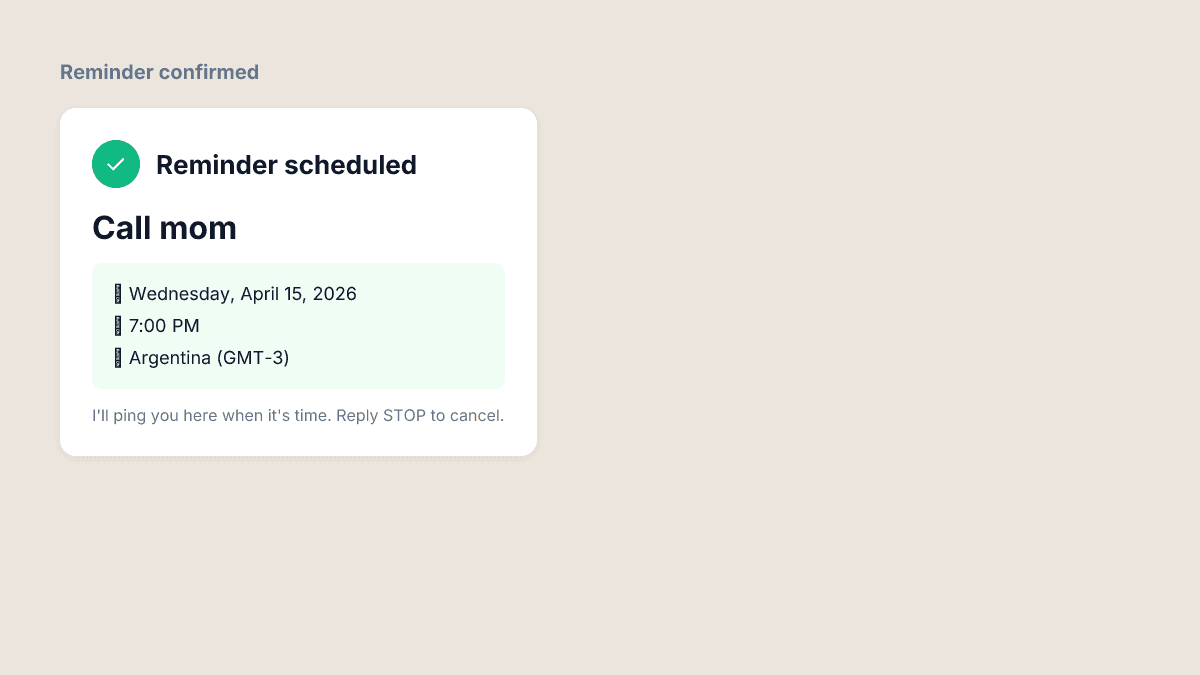
- We parse it in about 2 seconds and schedule the reminder. When the time comes, WhatsApp pings you.
That's it. No menus, no date pickers, no "allow notifications" dialogs. If you can send a WhatsApp message, you can set a reminder.
Why WhatsApp is the perfect reminder app
Reminder apps fail for one simple reason: you don't open them. The average person installs 2-3 productivity apps a year and abandons most of them within a week. WhatsApp, on the other hand, is opened dozens of times a day by over 2 billion people. It's already on the home screen, already unlocked, already in your habit loop.
By turning WhatsApp into a reminder surface, we eliminate the hardest part of any productivity tool: remembering to use it.
Voice or text — whatever is faster in the moment
You're driving and remember you need to renew your car insurance next Monday. You can't type. You hold the WhatsApp mic button, say "remind me to renew insurance next Monday at 10am", and let go. Done.
Or you're in a meeting and need to follow up with a client in 3 days. You type "follow up with Laura about the proposal in 3 days" and hit send. Done.
Both inputs go through the same pipeline:
- Voice notes are transcribed by our AI engine in about 2 seconds, with accuracy above 95% in 90+ languages.
- Text is parsed directly.
- Natural language is interpreted by our intent parser, which understands times like "tomorrow at 7", "in 3 days", "every Monday at 9am", "next Friday", and thousands of other expressions.
The parser works in your language — English, Spanish, Portuguese, French, German, Italian, Hindi, Turkish, Arabic, Indonesian, and Vietnamese. It respects your timezone, which we infer automatically from your phone number when you first sign up.
Edit everything from the web
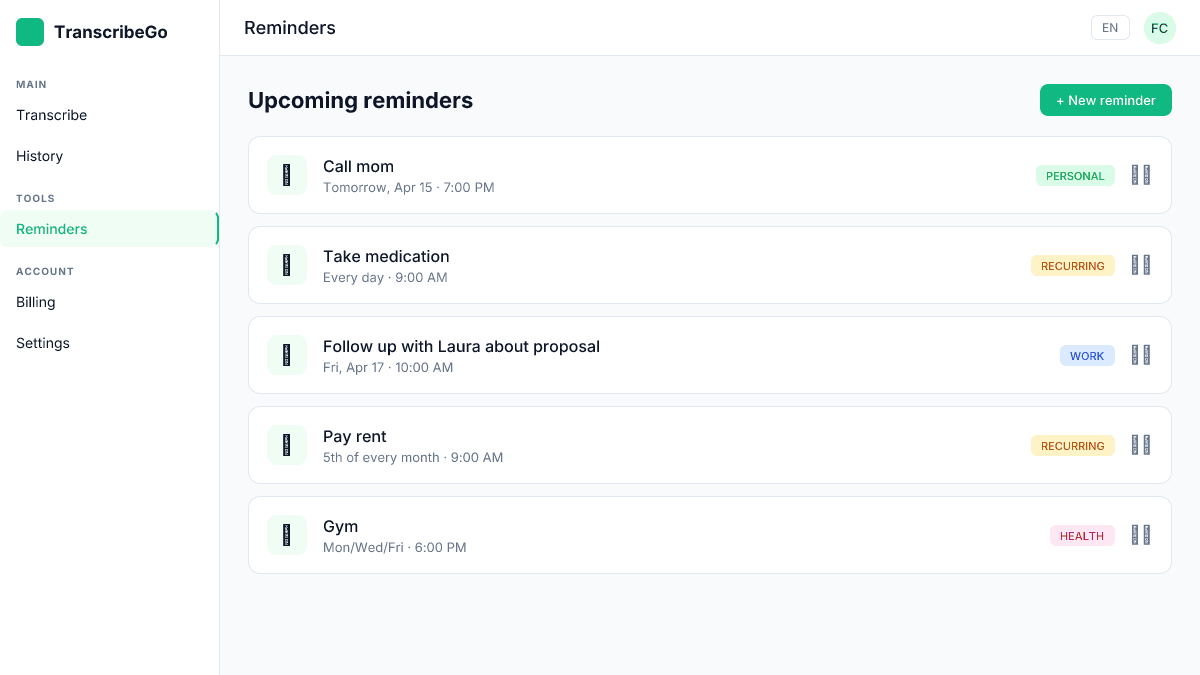
Here's where it gets interesting. Every reminder you create on WhatsApp is mirrored in the TranscribeGo web app under Reminders. Log in at transcribego.com, and you'll see a clean dashboard with every scheduled reminder, every completed one, and every recurring series.
From the web you can:
- Edit the text, date, or time of any reminder
- Turn a one-time reminder into a recurring one
- Pause, reschedule, or cancel reminders
- See your reminder history and completion rate
- Organize reminders by label (work, personal, family, etc.)
This matters because voice input is perfect for capture, but keyboard editing is perfect for correction. If the parser misheard you or you want to adjust a date, you don't have to delete and recreate — just edit it on the web and your WhatsApp reminder updates automatically.
Real use cases from our users
We've run reminders through a closed beta with thousands of users across 80+ countries. The patterns we've seen are surprising — people use it for things a traditional reminder app is too clunky to handle:
- Medication reminders ("remind me to take my pills every day at 9am")
- Follow-ups with clients and leads ("ping me about the proposal in 2 days")
- Bill payments and subscriptions ("rent due on the 5th of every month")
- Workout and habit tracking ("gym Monday Wednesday Friday at 6pm")
- Birthdays and anniversaries ("remind me about Ana's birthday on May 12")
- Quick capture during commute (voice note while driving)
- Parenting tasks ("school pickup at 3:30pm every school day")
The common thread: these are all things you remember in a random moment, somewhere other than at a desk. A reminder app you have to open is useless in those moments. WhatsApp isn't.
How the parser handles ambiguity
Natural language is messy. If you say "remind me about the thing tomorrow", "tomorrow" might mean different things depending on when you send it. Our parser uses your local timezone and the current time to resolve this:
- "in 5 minutes" → exact offset
- "tomorrow at 7pm" → next calendar day, 19:00 local time
- "next Monday" → upcoming Monday, defaults to 9am if no time specified
- "every Monday at 9" → recurring weekly reminder
- "in 2 weeks" → 14 days from now at the same time
- "on the 15th" → upcoming 15th of the current or next month
If something is ambiguous, we reply on WhatsApp asking for clarification — no silent failures.
| Input | Parsed as |
|---|---|
| "remind me to call mom tomorrow at 7pm" | Mar 16, 2026 at 19:00 local |
| "dentist appointment next Friday at 3" | Mar 20, 2026 at 15:00 local |
| "take pills every day at 9am" | Daily recurring at 09:00 local |
| "pay rent on the 5th of every month" | Monthly recurring on day 5 |
| "gym Monday Wednesday Friday at 6pm" | Weekly on Mon/Wed/Fri at 18:00 |
Pricing and limits
Reminders are included in every plan. The only difference is how many you can have active at once:
- Free — 3 active reminders
- Starter ($3.99-$6.99/mo) — 20 active reminders
- Pro ($12.99-$19.99/mo) — 50 active reminders
Completed reminders don't count against the limit, and you can always upgrade or downgrade in your billing settings.
Try TranscribeGo Free
10 free minutes. No credit card required.
FAQ
Do I need to install anything to use WhatsApp reminders?▾
No. If you already have WhatsApp, you're ready. Just start a chat with the TranscribeGo bot and send your first reminder as a voice note or text. No app install, no account required to try.
What languages does the reminder parser understand?▾
All 11 TranscribeGo interface languages: English, Spanish, Portuguese, French, German, Italian, Hindi, Turkish, Arabic, Indonesian, and Vietnamese. We detect your language automatically from your message.
Can I edit a reminder after I've created it?▾
Yes. Open the TranscribeGo web app at transcribego.com, go to the Reminders tab, and edit the text, date, time, or recurrence. Changes sync back to WhatsApp instantly.
How accurate is the voice transcription for reminders?▾
Our AI engine transcribes voice notes with 95-98% accuracy across 90+ languages. For short reminder voice notes, accuracy is typically even higher because the context is constrained.
Can I set recurring reminders like daily medication or weekly meetings?▾
Yes. Just say or type the recurrence in natural language — "every day at 9am", "every Monday at 6pm", "on the 1st of every month". The parser will create a recurring series that repeats automatically.
Will the reminder actually arrive on WhatsApp?▾
Yes. Reminders are delivered as WhatsApp messages, so they show up like any other notification. No email, no push, no missed alerts because you forgot to enable notifications for yet another app.