
We have some big news: Telegram is now a full channel on TranscribeGo.
Starting today, you can send voice messages, audio files, and video files directly to our Telegram bot and get accurate transcriptions in seconds. And the best part? Your Telegram account can be linked to your existing WhatsApp and web accounts, so everything lives under one roof.
This is a major step forward in our mission to make transcription accessible wherever you communicate.
What You Can Do on Telegram
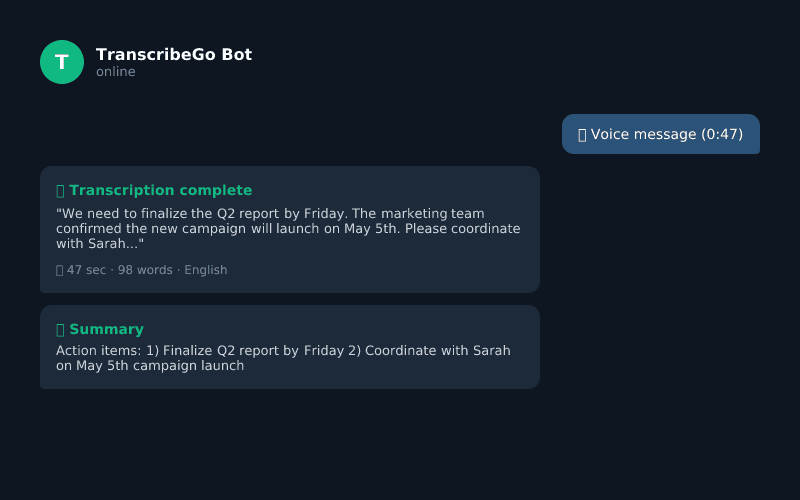
Our Telegram bot works just like you would expect. Open a conversation with the bot, send your audio, and get your transcription back right in the chat. Here is what is supported:
Voice messages. Record a voice message directly in Telegram and send it to the bot. You get a full transcription plus an AI summary within seconds.
Audio and video files. Send any audio or video file as an attachment — MP3, MP4, WAV, M4A, OGG, WEBM, MOV, and more. The bot processes files up to 5 hours long, so podcasts, lectures, and long meetings are all fair game.
URLs. Paste a YouTube, TikTok, Instagram, or any public video URL, and the bot extracts the audio and transcribes it automatically. No downloads needed.
AI Chat. Reply to any transcription message with a question, and the AI assistant answers based on the full context of your audio. Ask for summaries, action items, translations, or anything else.
Reminders. Set reminders using natural language — "Remind me to call the office tomorrow at 10am" — and get notified when the time comes.
Everything that works on WhatsApp now works on Telegram too.
Three Channels, One Account
This is where it gets really powerful. TranscribeGo now supports three communication channels — WhatsApp, Telegram, and the web — and all three can be connected to the same account.
What does that mean in practice?
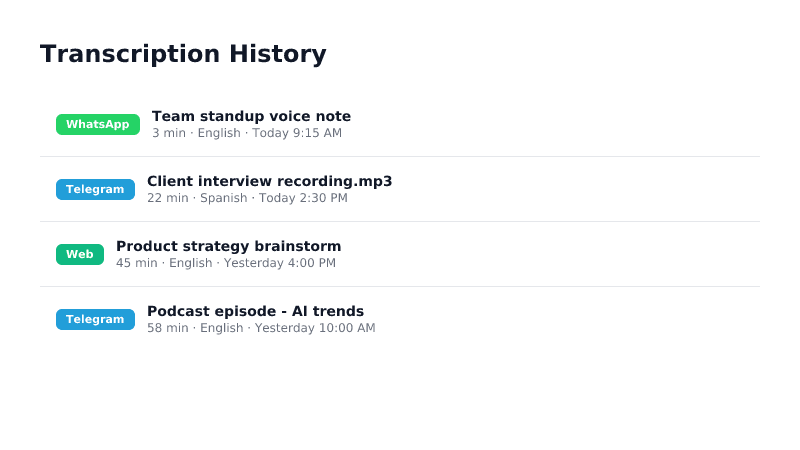
Your transcription history from all channels appears in one unified dashboard on the web. A voice note you transcribed on WhatsApp in the morning and a file you sent via Telegram in the afternoon both show up in your history at transcribego.com.
Your subscription minutes are shared. Whether you transcribe from WhatsApp, Telegram, or the web, it all draws from the same pool. No double billing, no separate quotas.
Your preferences follow you everywhere. Language settings, reminders, privacy options — set them once and they apply across all channels.
How to Link Your Accounts
Connecting your accounts takes less than a minute.
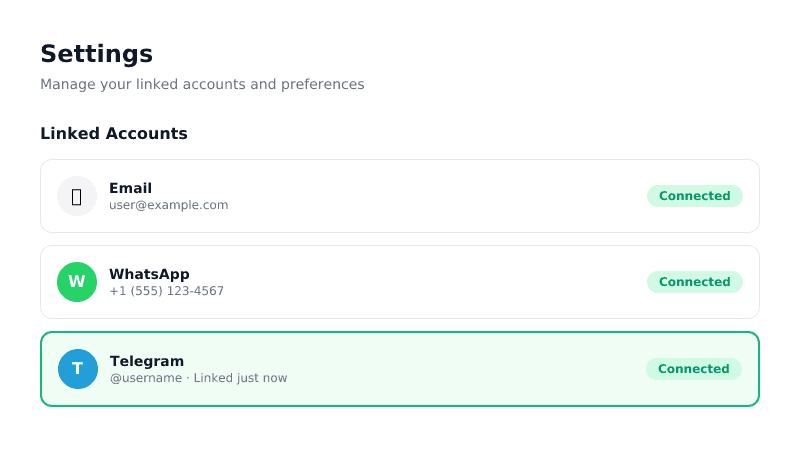
If you already have a TranscribeGo web account, go to Settings and you will see options to link both WhatsApp and Telegram. For WhatsApp, we send you a verification code via the bot. For Telegram, you tap a link that opens our bot and confirms the connection automatically.
If you only use WhatsApp or Telegram today, you can create a web account at transcribego.com and link your messaging accounts from Settings. Once linked, all your past transcriptions sync to the web.
And if you were already a TranscribeMe user on Telegram before the migration, your account has been moved to the new platform automatically. Your history, your subscription, your minutes — everything is preserved.
Why This Matters
We built TranscribeGo around a simple idea: transcription should work wherever you are. Some people live in WhatsApp. Others prefer Telegram. Many use both, plus a browser for longer tasks.
With today's update, you no longer have to choose. Use the channel that fits the moment, and your transcriptions, your minutes, and your data all stay connected.
One account. Three channels. Zero friction.
Get Started
If you are already on WhatsApp or the web, search for our Telegram bot and send your first voice message. Then head to Settings on the web to link everything together.
If you are brand new, start anywhere — WhatsApp, Telegram, or the web. You get 10 free minutes to try the platform, and your account works across all channels from day one.
Try TranscribeGo Free
10 free minutes. No credit card required.
Is the Telegram bot free to use?▾
Yes. TranscribeGo offers a free plan with 10 minutes per month that works across all channels, including Telegram. If you need more minutes, you can upgrade to a paid plan at any time.
Can I use Telegram and WhatsApp with the same account?▾
Absolutely. From the Settings page on the web, you can link your WhatsApp and Telegram accounts to the same profile. Your minutes, history, and preferences are shared across both channels.
What file types can I send on Telegram?▾
You can send any common audio or video format: MP3, MP4, WAV, M4A, OGG, WEBM, MOV, AVI, MKV, and more. The bot handles files up to 5 hours long.
I was a TranscribeMe Telegram user. What happened to my account?▾
Your account was migrated automatically to the new TranscribeGo platform. Your transcription history, subscription, and remaining minutes are all preserved. Just open our bot on Telegram and continue using it as before.
How do I link my Telegram account to my web account?▾
Log in to your account at transcribego.com, go to Settings, and click "Link Telegram." You will see a link that opens our Telegram bot. Tap it, confirm the connection, and your accounts are linked instantly.
Do my minutes carry over between channels?▾
Yes. Your subscription minutes are shared across WhatsApp, Telegram, and the web. There is no separate quota for each channel — you pay once and use your minutes wherever you prefer.