
We've been working on this for months and it's finally here: TranscribeGo and TranscribeMe are now one unified platform. Whether you transcribe voice notes on WhatsApp, upload audio files on the web, or paste YouTube and TikTok links — everything lives under one roof, one account, one history.
Here's what this means for you.
What's New
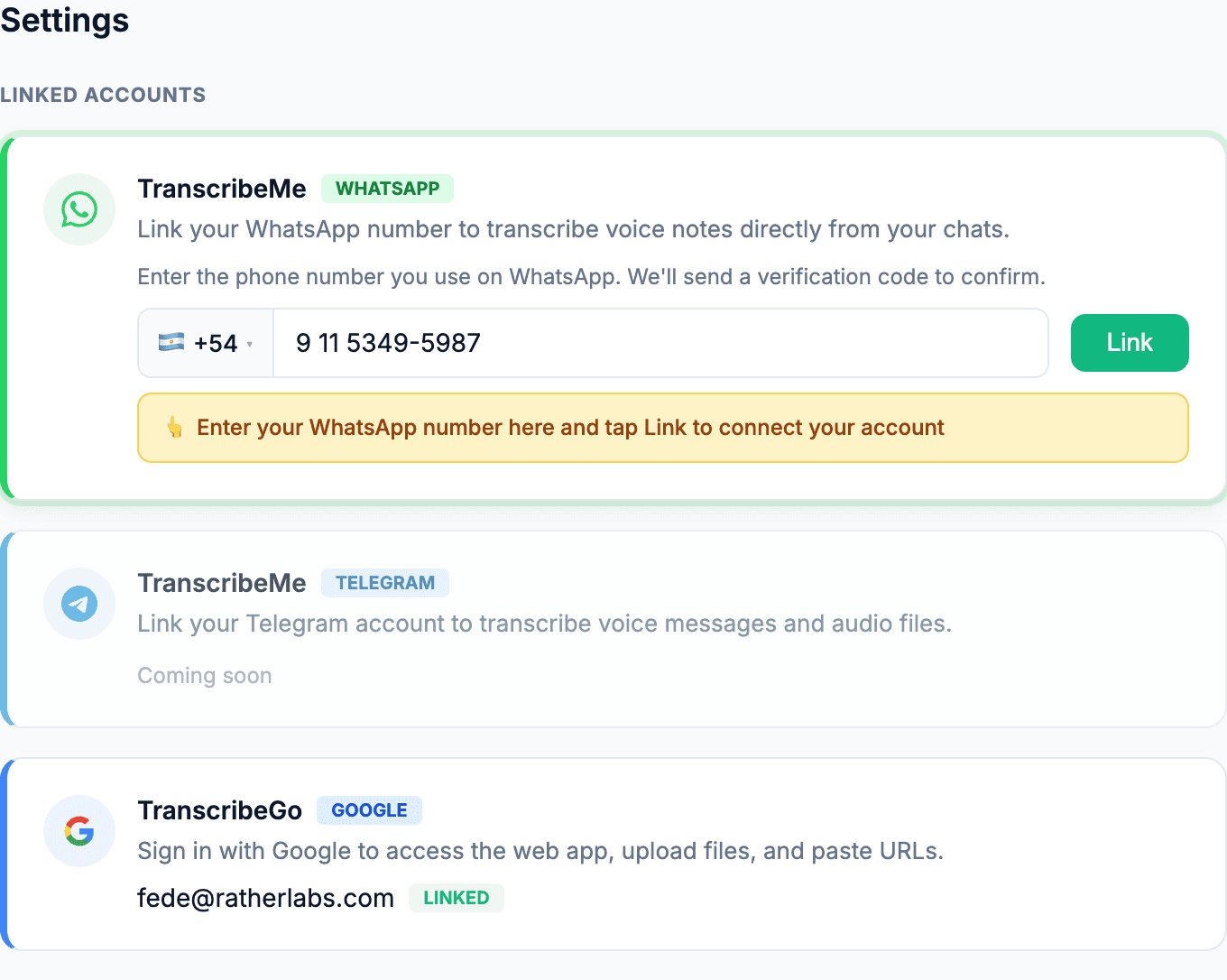
1. Link Your WhatsApp Account
If you already have a TranscribeGo account, you can now connect your WhatsApp number directly from Settings. Once linked, every voice note you send to our WhatsApp bot is automatically associated with your web account — same usage balance, same subscription, same everything.
Go to Settings → Accounts → TranscribeMe (WhatsApp) and follow the linking flow. It takes less than a minute.
2. Multiple Ways to Transcribe
With the unified platform, you now have four ways to get your audio transcribed:
- WhatsApp — Send or forward any voice note to our bot and get the transcription back in seconds, right in the chat.
- File Upload — Drag and drop audio or video files directly on the web app. Supports MP3, WAV, M4A, MP4, and more.
- URL Paste — Paste a YouTube, TikTok, Instagram, or Vimeo link and we'll extract and transcribe the audio automatically.
- Record — Use the built-in recorder on the web to capture audio from your microphone in real time.
3. Process WhatsApp Audio on the Web
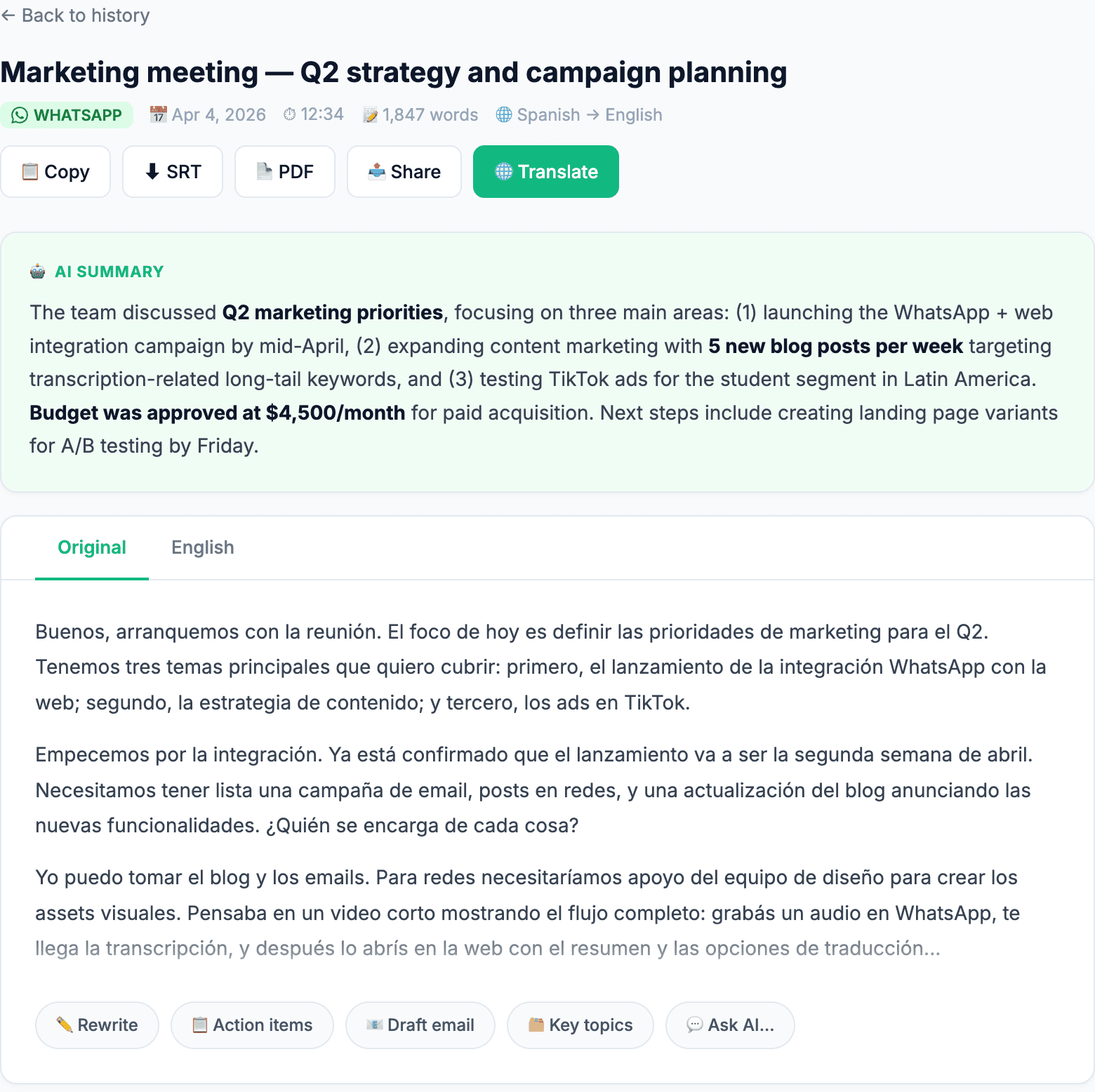
This is the feature we're most excited about. If you enable it in Settings, your WhatsApp transcriptions become fully accessible on the web — with all the tools you'd expect:
- AI summaries that capture the key points of long recordings
- Full-text editing to clean up or annotate your transcriptions
- Translation into any supported language
- Download as TXT, SRT, or PDF
- Search across your entire transcription history
How to enable it: Go to Settings → Accounts → TranscribeMe (WhatsApp) and turn on the web access toggle. This is opt-in — your WhatsApp audio stays private by default.
Can't Listen Right Now? Read It Instead
Sometimes you receive a voice note and you simply can't play it — you're in a meeting, on public transport, or in a noisy place. Just forward it to the TranscribeGo bot and read the full text instantly. If the audio is long, you'll also get an AI-generated summary so you can understand the key points in seconds.
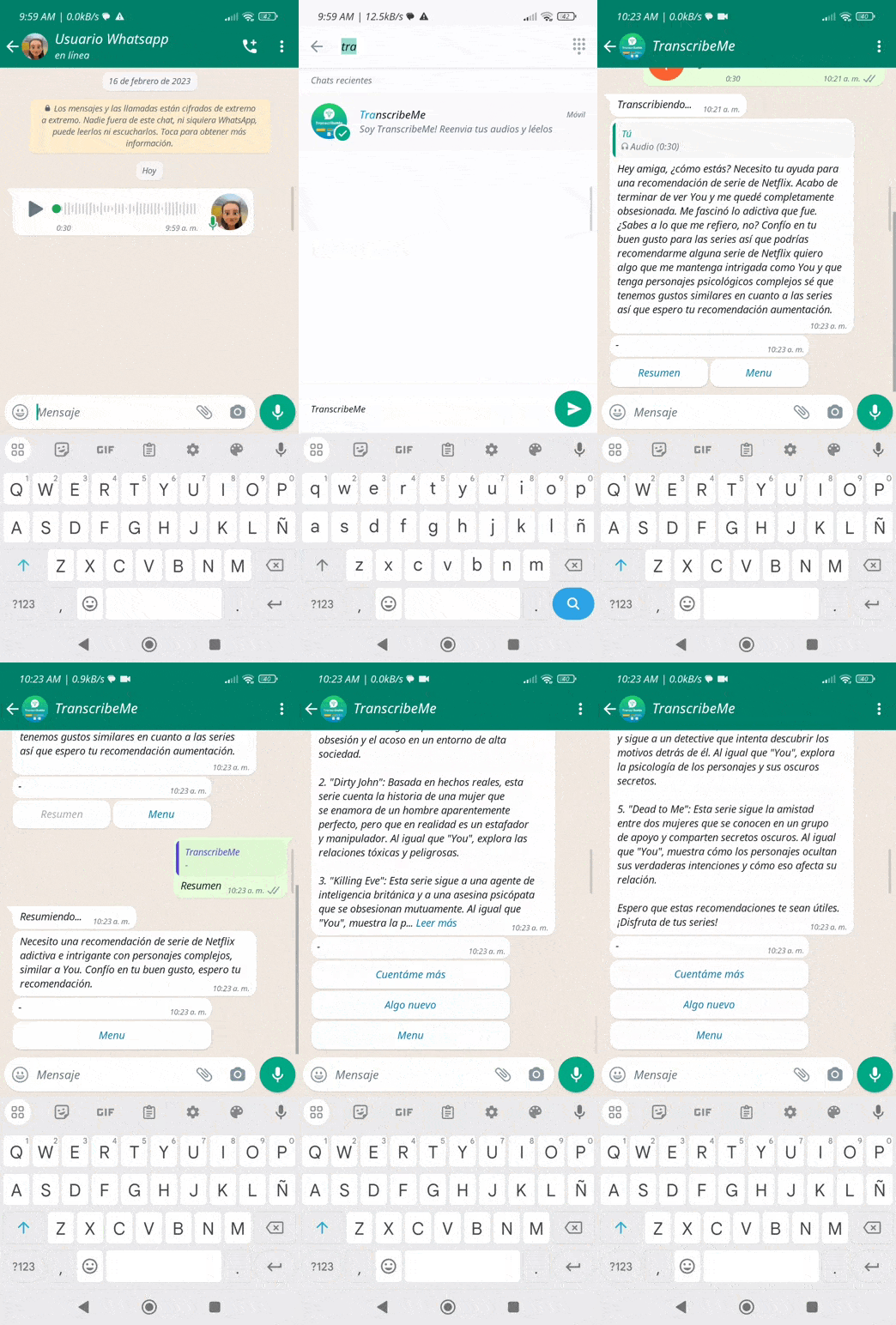
No need to find a quiet spot or plug in your headphones. The transcription arrives right in your WhatsApp chat, ready to read.
Use Case: Record a Class, Process It Later
Imagine you're in a lecture. Open the TranscribeGo chat on WhatsApp, tap the microphone, and start recording right there — no forwarding needed. The bot transcribes whatever you record directly in the conversation.
Later, when you're at your desk, you open TranscribeGo on the web. Your class recording is already there — with a full transcript, an AI-generated summary highlighting the key topics, and the option to translate it or export it as a study document.
No file transfers. No copy-pasting. No switching between apps. Your WhatsApp becomes the capture tool; the web becomes your workspace.
Use Case: Record an Interview, Get It Ready for Publishing
You're conducting an interview — for a podcast, an article, or internal research. Instead of setting up a separate recording app, you open the TranscribeGo chat on WhatsApp and record the entire conversation as a voice note, directly in the chat.
The transcription arrives instantly. Back at your computer, you open the web app and find the full text waiting for you — with speaker-aware formatting, a summary of the key quotes and topics discussed, and the option to translate it, export it as a document, or use AI tools to extract action items and highlights.
From a WhatsApp voice note to a polished, searchable document — without ever leaving the platform.
How to Get Started
- Log in to TranscribeGo
- Go to Settings → Accounts
- Click Link WhatsApp and verify your number
- Start sending voice notes to our WhatsApp bot — they'll sync automatically
Already using TranscribeMe on WhatsApp? Your transcription history on WhatsApp stays right where it is. Linking just connects the accounts going forward.
Same Plans, More Value
Nothing changes with your subscription. Whether you're on the Free plan (10 minutes/month) or a paid plan, you now get access to all platforms — WhatsApp, web, URLs, and file uploads — with the same balance. No extra cost.
This is the biggest update we've shipped so far. We're bringing together the simplicity of WhatsApp transcription with the full power of a web-based workspace. Try it today and let us know what you think — your feedback shapes what we build next.