
Top 10 Free Transcription Tools in 2026 (Honest Comparison)
Short answer: The best free transcription tool depends on what you need. For general audio and video transcription with generous free minutes, TranscribeGo gives you 10 free minutes per month with high accuracy, URL transcription from YouTube and TikTok, SRT export, and translation to 90+ languages — no credit card required. For meeting-only transcription, Otter.ai and Fathom are strong choices. For offline and technical users, OpenAI Whisper is unbeatable on flexibility.
The AI transcription market is valued at $4.5 billion in 2024 and projected to reach $19.2 billion by 2034, according to industry reports. With so many tools competing for your attention, choosing the right one can be overwhelming. We tested 10 popular free transcription tools across real-world scenarios — podcast episodes, lectures, interviews, and YouTube videos — to give you an honest breakdown of what works, what doesn't, and who each tool is really for.
How We Evaluated These Tools
Before diving into the list, here's what we tested for:
- Accuracy — How well does it handle accents, background noise, and fast speech?
- Free tier limits — How many minutes do you actually get for free?
- Export options — Can you download SRT, TXT, or other formats?
- Language support — Does it handle more than English?
- Ease of use — Can a non-technical person start transcribing in under a minute?
- Extra features — Translation, summaries, speaker labels, URL transcription?
The 10 Best Free Transcription Tools in 2026
1. TranscribeGo — Best All-Around Free Transcription
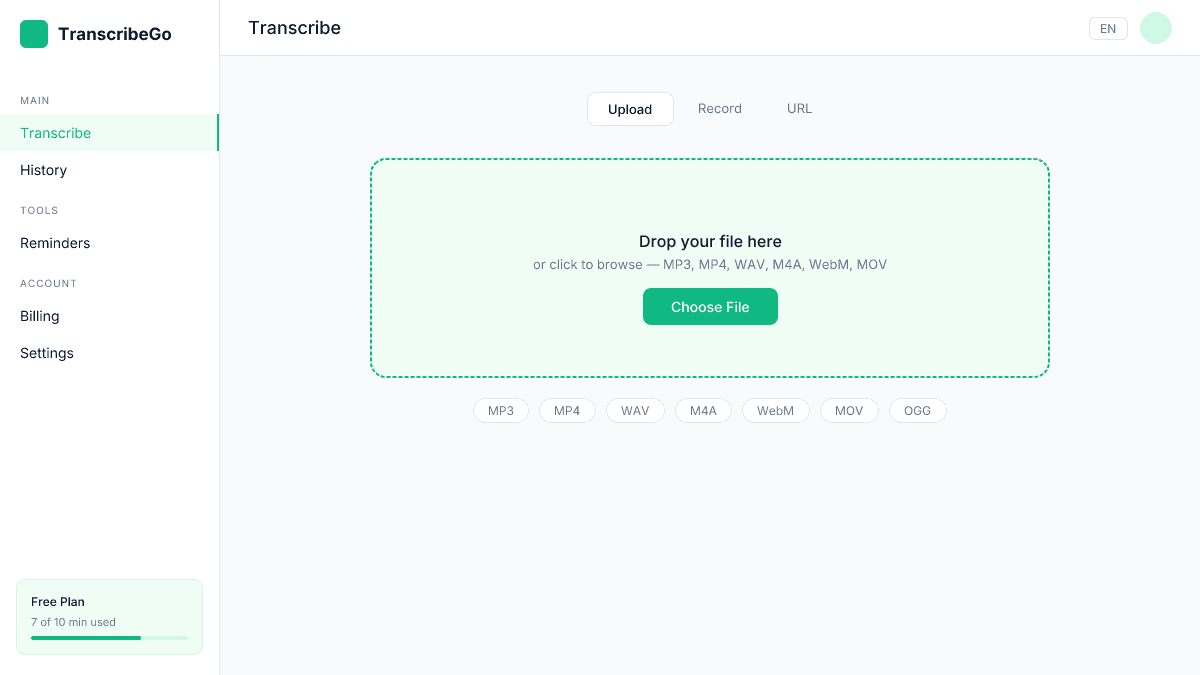
TranscribeGo is an AI-powered transcription platform that supports audio file upload, video upload, URL transcription (YouTube, TikTok, Vimeo, and more), and WhatsApp voice note transcription via a dedicated bot.
Free tier: 10 minutes/month, no credit card required.
What stands out:
- Drag-and-drop file upload plus URL transcription from major platforms
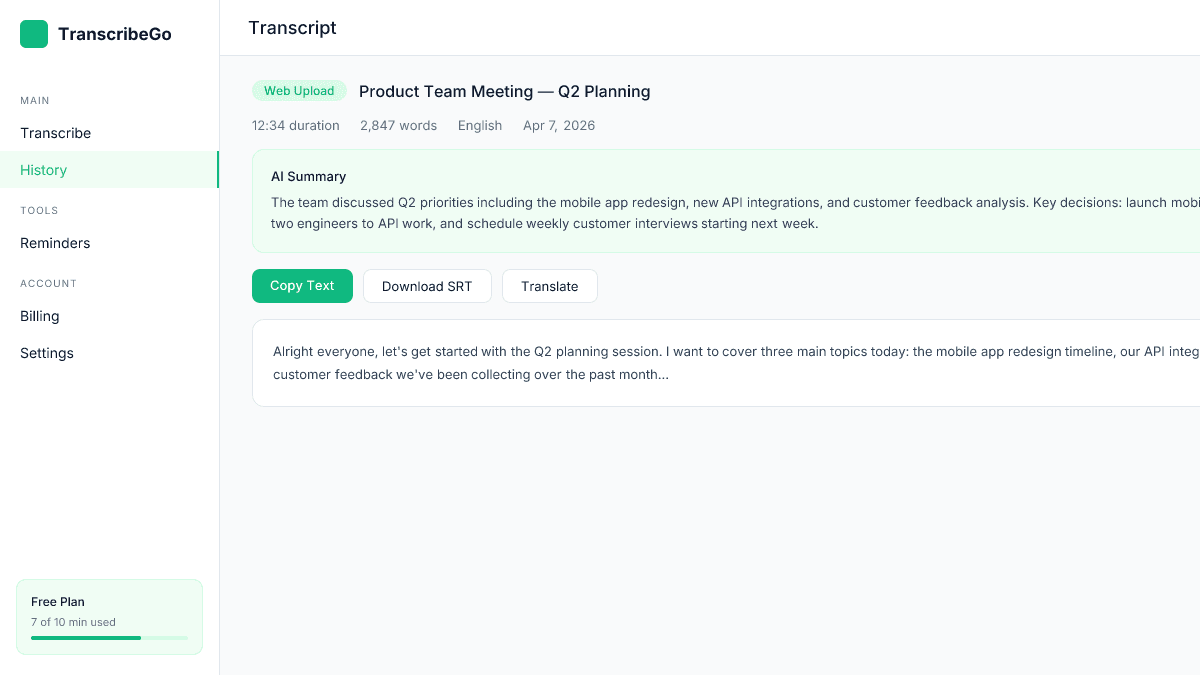
- SRT subtitle download included on the free plan
- Translation to 90+ languages with one click
- AI-generated summaries for every transcript
- WhatsApp bot for hands-free voice note transcription
- 95–98% accuracy across most audio conditions
Limitations: 10 minutes per month on the free plan. Paid plans start at $3.99–$6.99/month for 200 minutes.
Best for: Anyone who needs accurate transcription with subtitles, translation, and URL support — all in one place.
2. Otter.ai — Best for Meeting Transcription
Otter.ai is one of the most widely used AI transcription tools, particularly popular with journalists and professionals who need real-time meeting transcription.
Free tier: 300 minutes/month with a 30-minute per-conversation limit.
What stands out:
- Real-time transcription during Zoom, Google Meet, and Teams calls
- Speaker identification and labeling
- Searchable transcript archive
- Collaborative editing and comments
Limitations: Free tier limits individual conversations to 30 minutes — a problem for longer meetings. No SRT export or video transcription on the free plan. No URL transcription support.
Best for: Professionals who primarily need meeting transcription and collaboration features.
3. Fathom — Best Free Meeting Recorder
Fathom has carved out a niche as a completely free meeting transcription tool that records, transcribes, and summarizes Zoom, Google Meet, and Microsoft Teams calls.
Free tier: Unlimited meeting transcription (one of the most generous free tiers available).
What stands out:
- Truly unlimited free meeting recording and transcription
- AI-generated meeting summaries and action items
- Highlights and clips from meetings
- Integrations with CRM tools
Limitations: Only works with live meetings — you cannot upload audio files, videos, or URLs. No SRT export. No support for pre-recorded content.
Best for: Remote workers and sales teams who need meeting transcription specifically.
4. OpenAI Whisper — Best for Technical Users
Whisper is OpenAI's open-source speech recognition model. It's powerful and free, but requires technical setup through Python and the command line.
Free tier: Open-source model. The OpenAI API charges $0.006/minute ($0.36/hour). New accounts receive $5 in free credits (~833 minutes), after which you pay per minute.
What stands out:
- No usage limits — transcribe as much as you want
- Supports 99 languages with solid accuracy
- Runs entirely offline for maximum privacy
- Multiple model sizes for different accuracy/speed tradeoffs
Limitations: Requires Python installation and command-line knowledge. No web interface, no SRT export GUI, no translation, no summaries. Processing speed depends on your hardware — a 1-hour file can take 30+ minutes on a laptop without a GPU.
Best for: Developers and technical users who want unlimited, private transcription and don't mind setup.
5. Descript — Best for Video Editors
Descript combines transcription with a full video and podcast editing suite, letting you edit media by editing text.
Free tier: 1 hour of transcription per month.
What stands out:
- Edit video and audio by editing the transcript text
- Automatic filler word removal
- Screen recording and basic video editing included
- Speaker labels and search
Limitations: Only 1 hour free per month. The tool is designed for editing workflows, so it's heavier than a pure transcription app. Export options are limited on the free plan.
Best for: Content creators and video editors who want transcription integrated into their editing workflow.
6. Notta — Best for Multilingual Meetings
Notta offers real-time transcription in 58 languages with a clean web and mobile interface.
Free tier: 120 minutes/month with a 3-minute per-transcription limit on uploads.
What stands out:
- Real-time transcription in 58 languages
- Meeting bot for Zoom, Meet, and Teams
- Mobile app with live recording
- Translation between transcription languages
Limitations: The 3-minute limit on uploaded files in the free tier is extremely restrictive. Longer transcriptions require a paid plan starting at $14.99/month.
Best for: Users who need multilingual meeting transcription with a mobile-first experience.
7. Happy Scribe — Best for European Languages
Happy Scribe is a European transcription platform known for strong performance across French, German, Spanish, Portuguese, and other European languages.
Free tier: 10 minutes on signup (one-time, not recurring).
What stands out:
- Strong accuracy across European languages
- Interactive transcript editor with timestamps
- SRT/VTT export available
- Human transcription option (paid)
Limitations: The free allowance is a one-time 10 minutes — not monthly. After that, pay-as-you-go starts at €0.20/minute. Not competitive for ongoing free use.
Best for: European users who need occasional transcription with strong multilingual accuracy.
8. oTranscribe — Best for Manual Transcription
oTranscribe is a free, open-source web app designed specifically for manual transcription of interviews and recordings.
Free tier: Completely free and unlimited.
What stands out:
- No signup required — just open the browser and start
- Keyboard shortcuts for playback control while typing
- Interactive timestamps you can click to jump
- All processing happens locally (nothing uploaded to servers)
- Export to Markdown, plain text, or Google Docs
Limitations: This is a manual transcription assistant — it does NOT do automatic AI transcription. You listen and type. No speaker detection, no AI features, no translation.
Best for: Journalists and researchers who prefer manual transcription with playback controls.
9. Riverside — Best for Podcast Recordings
Riverside is primarily a high-quality remote recording platform for podcasts and interviews, with built-in AI transcription.
Free tier: 2 hours of multi-track recording (one-time, not monthly), plus unlimited single-track recording and editing.
What stands out:
- Studio-quality remote recording (separate audio/video tracks)
- AI transcription in 100+ languages
- Automatic clip generation for social media
- Speaker labels included
Limitations: Designed around recording workflows — not ideal for transcribing existing files from your computer. The free plan limits recording quality and storage.
Best for: Podcasters who want recording and transcription in one platform.
10. MacWhisper — Best for Mac-Only Offline Transcription
MacWhisper brings OpenAI's Whisper model to a native Mac app with a user-friendly interface — no command line required.
Free tier: Free version with basic Whisper models (lower accuracy). Pro version is a one-time $29 purchase.
What stands out:
- Runs completely offline on your Mac
- Simple drag-and-drop interface
- Multiple export formats (SRT, VTT, TXT, CSV)
- No subscription — one-time purchase for Pro
Limitations: Mac only — no Windows, Linux, or web version. Free version uses smaller, less accurate models. No translation, no summaries, no URL transcription.
Best for: Mac users who want offline transcription with a simple interface.
Comparison Table
| Tool | Free Minutes | Accuracy | SRT Export | URL Transcription | Translation | AI Summary |
|---|---|---|---|---|---|---|
| TranscribeGo | 10/month | 95–98% | Yes | Yes | 90+ languages | Yes |
| Otter.ai | 300/month | ~90% | No (free) | No | No | Yes |
| Fathom | Unlimited (meetings only) | ~90% | No | No | No | Basic only |
| Whisper | $5 credits (API) | ~93% | CLI | No | No | No |
| Descript | 60/month | ~94% | Yes (paid) | No | No | No |
| Notta | 120/month | ~91% | No | No | 58 languages | Yes |
| Happy Scribe | 10 (trial) | ~93% | Yes | No | 120+ languages | No |
| oTranscribe | Unlimited (manual) | Manual | No | No | No | No |
| Riverside | 2h (one-time) | ~92% | Yes | No | No | No |
| MacWhisper | Unlimited (basic models) | ~85–90% | Yes | No | No | No |
How to Choose the Right Free Transcription Tool
The right tool depends entirely on your use case:
If you transcribe meetings regularly and need real-time captions and notes, Fathom (unlimited free meetings) or Otter.ai (300 min/month) are your best options. Neither handles pre-recorded files or URLs well, but they excel at live meeting workflows.
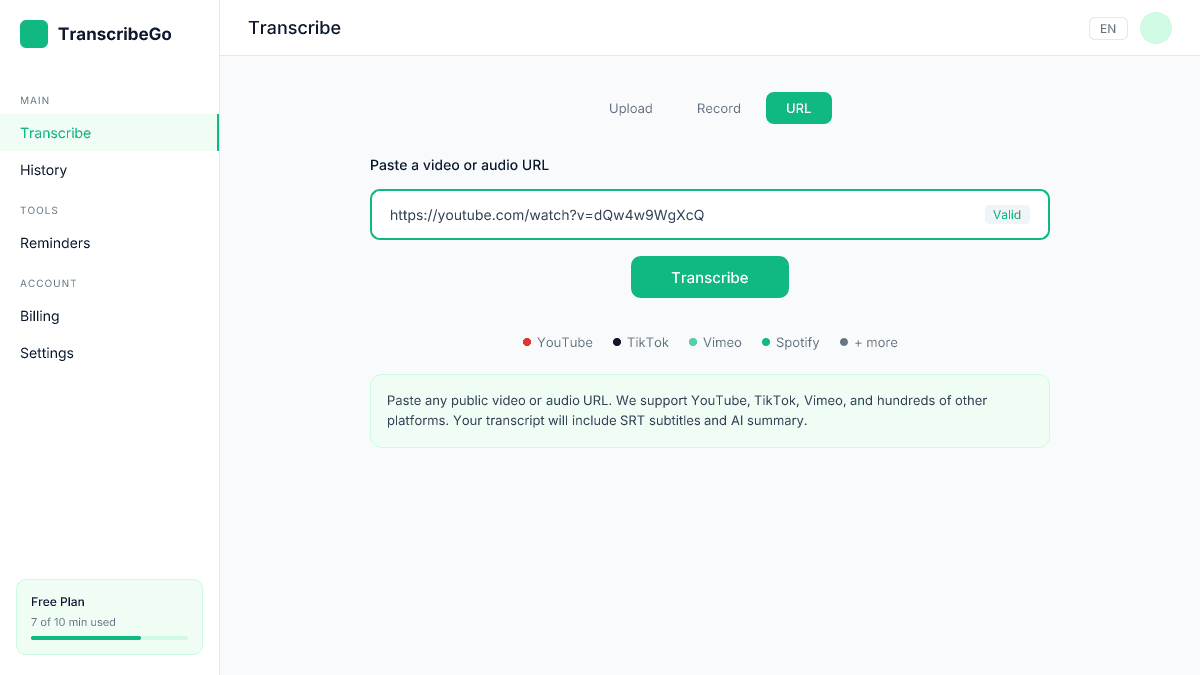
If you transcribe YouTube, TikTok, or other online videos, TranscribeGo is the only tool on this list that handles URL transcription natively on its free plan. Just paste the link and get your transcript with SRT subtitles included.
If you need maximum privacy, Whisper and MacWhisper run entirely offline. Your audio never leaves your device. The tradeoff is setup complexity (Whisper) or platform lock-in (MacWhisper is Mac-only).
If you need translation alongside transcription, TranscribeGo supports 90+ languages for both transcription and translation. Notta covers 58 languages but limits free uploads to 3 minutes.
If you're a content creator editing videos, Descript integrates transcription directly into its editing suite. The 1-hour free tier is enough to test the workflow.
The Real Cost of "Free" Transcription
Here's what most comparison articles won't tell you: free tiers are designed to get you started, not to be your permanent solution. According to Grand View Research, the global transcription market is projected to grow at 5.2% CAGR through 2030 — meaning demand (and pricing) will only increase.
Most free tools hit a wall fast. Otter's 30-minute conversation limit means your weekly team standup gets cut off. Notta's 3-minute upload limit is nearly unusable for real files. Whisper is truly free but requires you to be comfortable with Python and terminal commands.
The smartest approach is to test 2-3 tools with your actual content, then commit to the one that fits your workflow. If you need a tool that handles files, URLs, and WhatsApp voice notes with subtitles and translation built in, TranscribeGo's free tier lets you test all of that before upgrading.
Try TranscribeGo Free
10 free minutes. No credit card required.
What is the most accurate free transcription tool in 2026?▾
For general audio and video files, TranscribeGo and Descript deliver the highest accuracy on free tiers (95–98% and ~94% respectively). For meetings specifically, Otter.ai performs well with real-time speaker detection. Accuracy varies depending on audio quality, background noise, and speaker accents — so testing with your own content is the best way to judge.
Is there a completely free transcription tool with no limits?▾
Yes — OpenAI Whisper is completely free and unlimited, but requires technical setup via Python. oTranscribe is also free and unlimited, but it's a manual transcription assistant (you type while listening). Fathom offers unlimited free meeting transcription, but only for live meetings on Zoom, Google Meet, or Teams. For automatic AI transcription of files and URLs without technical setup, most tools have monthly limits on their free tiers.
Can I get free SRT subtitles from a transcription tool?▾
TranscribeGo includes SRT download on its free plan for all transcriptions. MacWhisper also exports SRT on the free version. Most other tools (Otter, Fathom, Notta) either don't offer SRT export or restrict it to paid plans. If SRT subtitles are a priority, TranscribeGo is your best free option.
Which free transcription tool supports the most languages?▾
TranscribeGo supports transcription and translation in 90+ languages. Riverside claims 100+ languages for transcription. Notta supports 58 languages. Whisper supports 99 languages but requires technical setup. For combined transcription + translation in the most languages with a simple interface, TranscribeGo leads.
Can I transcribe YouTube videos for free?▾
Yes. TranscribeGo lets you paste a YouTube URL and get a full transcript with SRT subtitles on the free plan. Most other tools on this list require you to download the video first and then upload the file manually. For a step-by-step guide, see our article on how to transcribe YouTube videos.