
The fastest way to get more out of voice notes is to transcribe them, then act on the text: search it, turn it into reminders, summarize it, translate it, and repurpose it into content. With TranscribeGo, every voice note you send on WhatsApp, Telegram, or the web comes back as accurate text in 90+ languages — plus an AI summary, one-click translation, SRT export, and voice or text reminders, all in one unified account. That single shift, from listening to acting, is what turns voice notes from a messy inbox into a real productivity system.
Voice notes are everywhere. People send roughly 7 billion voice messages on WhatsApp every single day, and the reason is simple: talking is fast. Research from Stanford found that dictation is about three times faster than typing (161 words per minute by voice versus 53 by keyboard). The catch is that audio is slow to consume and impossible to search. And memory works against you too — without reinforcement, people forget around 70% of new information within 24 hours. A voice note buried in a chat is a thought you'll probably lose.
Transcription flips that. The moment a voice note becomes text, it becomes something you can scan in seconds, search months later, and turn into action. Here are five ways to put voice note transcriptions to work in your daily workflow.
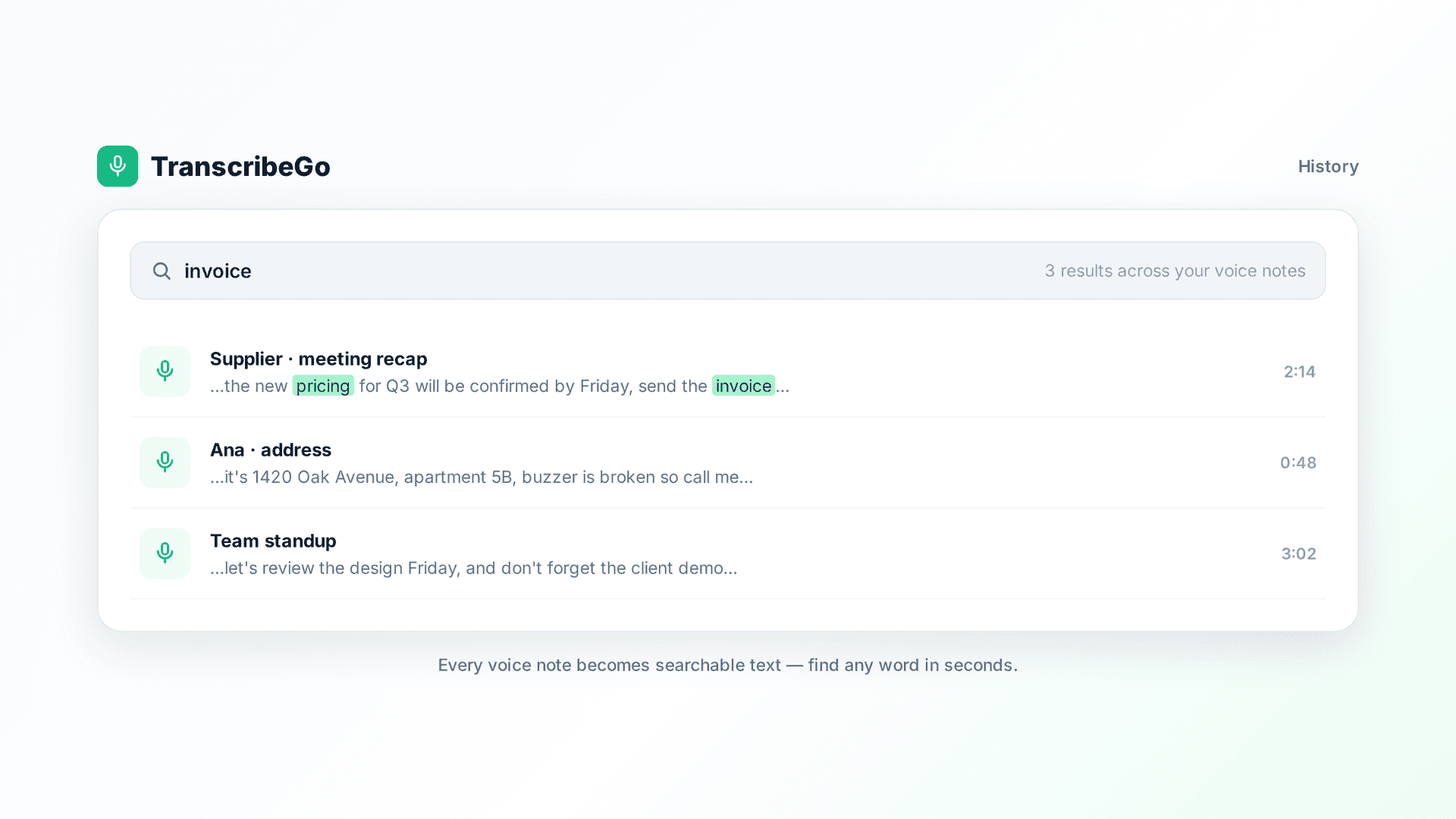
1. Turn Voice Notes into Searchable Text You Can Actually Find
The first and most obvious win is speed of reading. A two-minute voice note takes two minutes to hear but about fifteen seconds to read. When a client, colleague, or friend sends you a rambling audio, TranscribeGo gives you the full text back automatically so you can absorb it at a glance instead of holding the phone to your ear.
The bigger payoff comes later. Every transcription lands in your searchable web dashboard at transcribego.com, where every voice note you've ever sent becomes a searchable archive. Need to find that address a friend dictated three weeks ago, or the exact figure a colleague mentioned in a voice memo? Search for a keyword and jump straight to it — no scrubbing through audio, no scrolling endless chats.
To transcribe a voice note, you don't change your habits at all. Forward it to your TranscribeGo contact on WhatsApp, send it to the Telegram bot, or upload it on the web. It all flows into the same account.
2. Capture Action Items as Reminders the Moment You Hear Them
This is the feature that changes how people work. Voice notes are full of commitments — "can you call me back tomorrow," "don't forget the documents," "let's review this Friday" — and most of them evaporate the second the message scrolls away. Given that we forget the majority of new information within a day, relying on memory is a losing game.
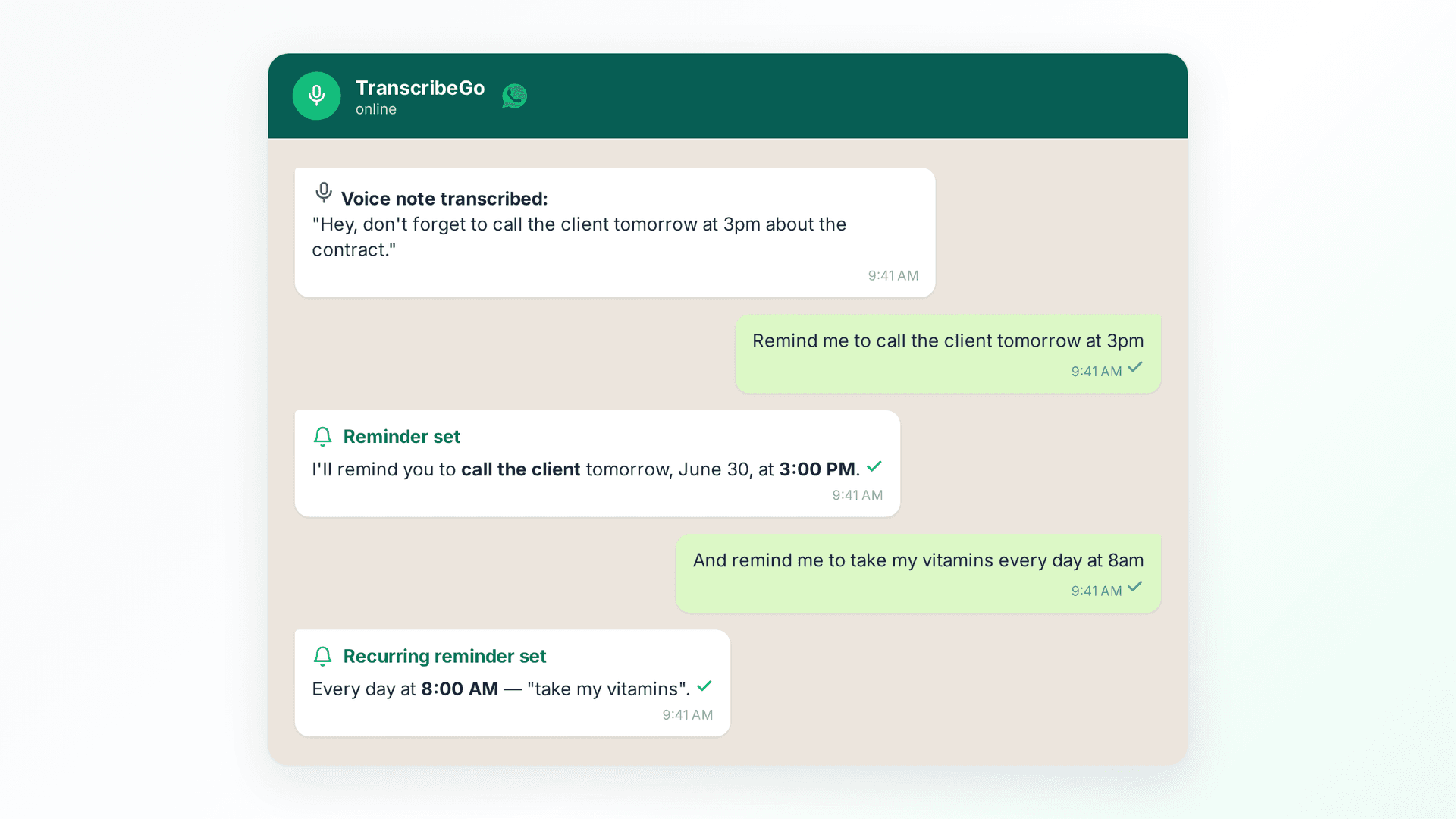
TranscribeGo lets you set reminders by voice or text, right inside WhatsApp or Telegram, with no separate app to open. Just message it in plain language: "Remind me to call the client tomorrow at 3pm" or "Recordame tomar la pastilla a las 8am." It understands natural language, sets the reminder, and pings you on your chat at exactly the right time. Reminders can be one-time or recurring, and they work in any language.
The workflow is effortless: you get a voice note with an action buried in it, you read the transcript, and the moment you spot the task, you fire off a reminder in the same chat. The commitment is captured before it has a chance to disappear. For anyone who runs their life through WhatsApp, this turns voice notes into a self-cleaning to-do list.
3. Get Instant AI Summaries of Long, Rambling Voice Notes
Some voice notes go on forever. A five-minute audio from a teammate thinking out loud might contain three useful sentences and a lot of filler. Reading the whole transcript is faster than listening, but you can go faster still.
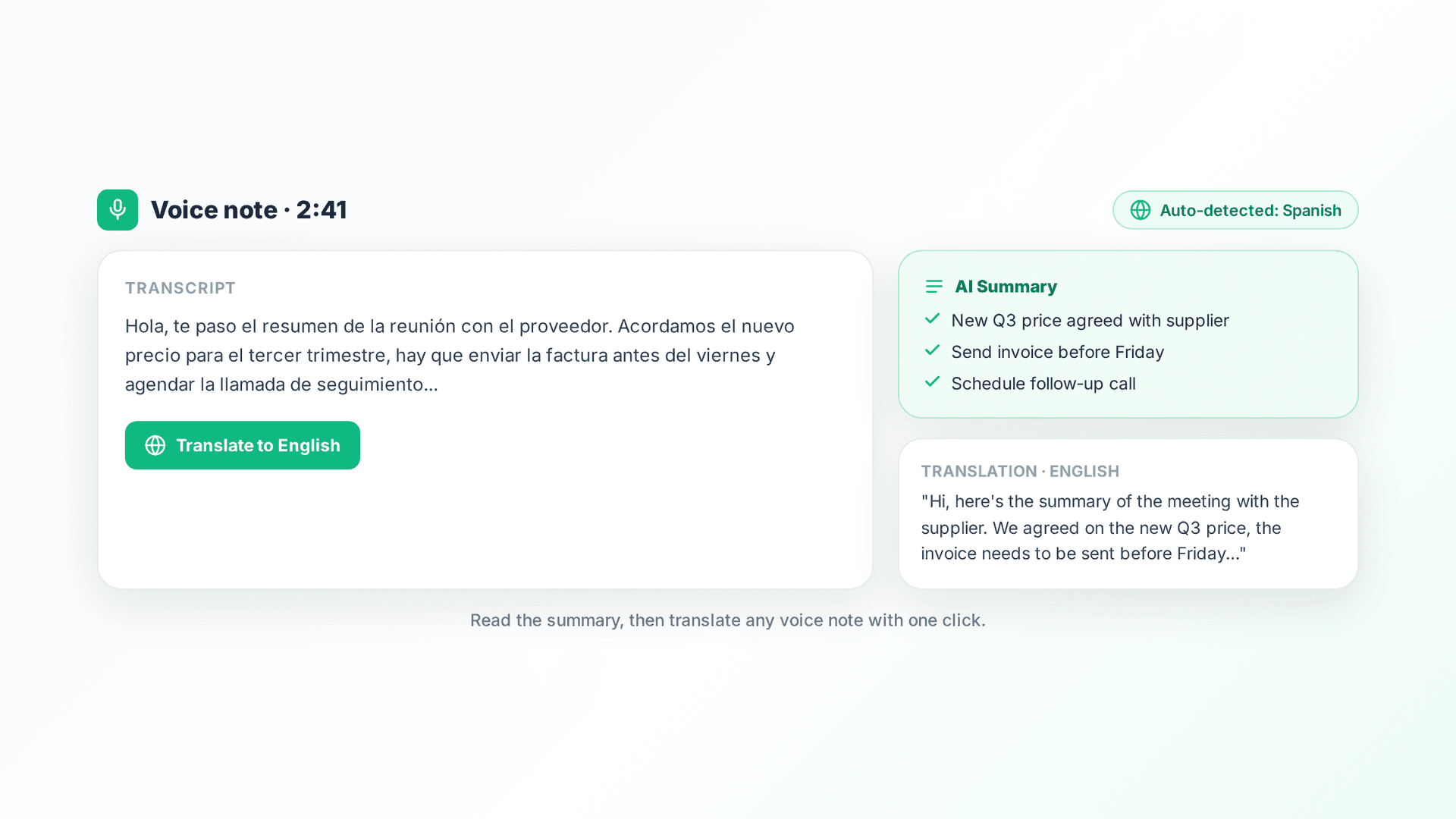
Every TranscribeGo transcription comes with an AI summary that condenses the key points, decisions, and action items into a few lines. Instead of parsing a long voice memo, you read the summary, grasp the essence in seconds, and only dive into the full text where it matters. It's the difference between "I'll listen to this later" (you won't) and "got it, handled."
This is especially powerful for voice notes that pile up while you're busy. Open your dashboard, skim the summaries of everything that came in, and triage in a couple of minutes what would otherwise have been half an hour of audio.
4. Translate Voice Notes Across Any Language
Voice notes don't respect language borders. You might get an audio in Spanish from a supplier, in Portuguese from a colleague in Brazil, or in French from a client — and reply in your own language. TranscribeGo transcribes in over 90 languages automatically, detecting the language without you setting anything.
Then, from any transcript, you can translate it into any language with one click. A voice note recorded in one language becomes readable text in another instantly, so cross-language conversations stop being a barrier. For international teams, remote workers, and anyone with contacts around the world, this quietly removes a huge amount of friction.
Because everything lives in one unified account across WhatsApp, Telegram, and the web, you can receive a voice note on your phone, transcribe and translate it on the spot, and later open the full text and translation on your computer. The original, the transcript, and the translation all stay together.
5. Repurpose Voice Notes into Content and Subtitles
Voice is a great way to capture raw ideas, and transcription is what turns those raw ideas into finished work. Founders, creators, and writers increasingly record a quick voice note with a thought, then build on the transcript: a blog post draft, a social caption, meeting notes, or the outline of a proposal. Talking out an idea and editing the text afterward is far faster than staring at a blank page.
TranscribeGo extends this beyond your own voice notes. You can paste a YouTube, TikTok, or Vimeo URL and transcribe the audio directly — perfect for pulling a quote from a video, repurposing a clip, or studying a talk. And for video content, you can export SRT subtitle files to caption your videos for social media, accessibility, or reach. One voice note or one video link can become text, subtitles, and a finished post.
The common thread across all five uses is the same: capture by voice because it's fast, then let transcription turn that audio into something searchable, actionable, and reusable.
Try TranscribeGo Free
10 free minutes. No credit card required.
Frequently Asked Questions
How do I transcribe a voice note with TranscribeGo?▾
You have three options, all tied to one account. Forward the voice note to your TranscribeGo contact on WhatsApp, send it to the Telegram bot, or upload it on the web dashboard at transcribego.com. The transcription comes back automatically, along with an AI summary, in over 90 languages.
Can I set reminders from a voice note?▾
Yes, and it's one of the most useful features. Inside WhatsApp or Telegram you can set a reminder by voice or text in plain language, like "Remind me to send the invoice tomorrow at 10am." Reminders can be one-time or recurring, work in any language, and TranscribeGo pings you in your chat at the right time.
Does TranscribeGo work on Telegram as well as WhatsApp?▾
Yes. TranscribeGo works on WhatsApp, Telegram, and the web, all under one unified account. You can link your channels from the Settings page so every voice note and transcription appears in the same place no matter where you sent it.
What languages can it transcribe and translate?▾
TranscribeGo transcribes voice notes in over 90 languages and detects the language automatically. From any transcript, you can translate the text into any language with one click, which makes cross-language voice notes easy to read and reply to.
Can I get a summary instead of reading the whole transcript?▾
Yes. Every transcription includes an AI summary that condenses the key points and action items into a few lines, so you can grasp a long voice note in seconds and only read the full text where it matters.
Can I transcribe a YouTube or TikTok video, not just a voice note?▾
Yes. Paste a YouTube, TikTok, or Vimeo URL into TranscribeGo and it transcribes the audio directly, no download needed. You can also export SRT subtitle files to caption your own videos for social media or accessibility.