
WhatsApp has over 3.3 billion monthly active users, and more than 200 million businesses use WhatsApp Business every month. If you spend any meaningful time on WhatsApp — for work, managing a team, handling clients, or just staying on top of dozens of group chats — AI tools can turn it from a time sink into a productivity engine.
The right AI integrations can transcribe voice notes you don't have time to listen to, set reminders so you never forget anything again, automate repetitive customer replies, schedule messages, and summarize long conversations — all without leaving WhatsApp. In this guide, we cover the best AI tools that plug directly into WhatsApp (and Telegram) to save you hours every week.
Why WhatsApp Needs AI Tools
WhatsApp users send over 7 billion voice messages every day. Group chats pile up with hundreds of unread messages. Business accounts juggle customer inquiries across time zones. The volume alone makes manual management unsustainable.
Here's what the numbers say: businesses using WhatsApp automation report 47% reductions in operational costs, and well-configured AI flows handle 60–80% of incoming inquiries without human intervention. For individuals, the gains are simpler but just as real — you stop losing information buried in voice notes, you stop forgetting tasks and appointments, and you stop spending 20 minutes catching up on group chats.
These tools fall into a few key categories: transcription, reminders, and voice-to-text, chatbots and automation, scheduling and CRM integration, and conversation intelligence. Let's break down the best options in each.
1. TranscribeGo — AI Transcription, Reminders, and Productivity Hub
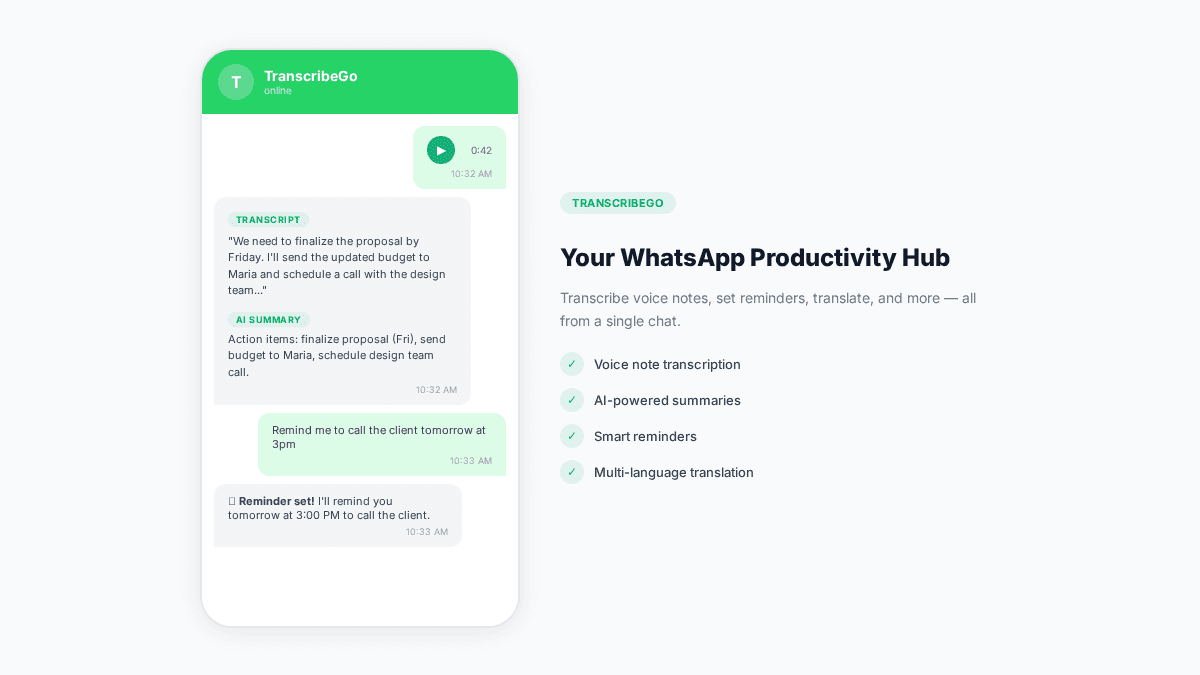
If your biggest WhatsApp pain points are unlistened voice notes and things you keep forgetting, TranscribeGo solves both. It's a WhatsApp and Telegram bot that transcribes every voice note automatically — and doubles as your personal AI reminder system, right inside the same chat.
What it does:
Forward any voice note to the TranscribeGo contact, and you get back a full text transcript, an AI-generated summary, detected language, and word count — in seconds. But transcription is only half the story.
The killer feature most people don't expect: reminders. Just type or voice-record something like "Remind me to call the client tomorrow at 3pm" or "Recordame tomar la pastilla a las 8am todos los días" — and TranscribeGo will message you at that exact time. No separate app, no complex setup. You're already in WhatsApp; why not set your reminders there too?
When you're juggling a hundred things — meetings, medication, follow-ups, deadlines — having a reminder system that lives in the app you already check 50 times a day is a game changer. You can set one-time reminders, recurring reminders (daily, weekly), and manage them all from a simple menu.
Why it stands out:
Unlike WhatsApp's built-in transcription (which supports only 5–20 languages depending on your device and requires manual activation per message), TranscribeGo supports 90+ languages, works automatically on every message, and includes features that WhatsApp's native option doesn't: AI summaries, translation into any language, SRT subtitle export, reminders, and a searchable web dashboard where all your transcriptions are saved.
And it's not just WhatsApp — TranscribeGo works on Telegram too, with the same bot experience. Plus a full web app at transcribego.com where you can upload files, paste YouTube/TikTok/Vimeo URLs, record audio, and access your entire transcription history. One account, three channels, everything synced.
Key features:
- Automatic transcription of voice notes in 90+ languages
- AI reminders via WhatsApp and Telegram — set by voice or text, one-time or recurring
- AI-generated summaries of long messages
- One-click translation to any language
- Searchable transcription history on the web
- SRT subtitle export for video creators
- URL transcription (YouTube, TikTok, Vimeo)
- Works on WhatsApp, Telegram, and web — unified account across all three
Pricing: Free tier with 10 minutes/month. Starter plan from $3.99/mo (200 minutes). Pro from $12.99/mo (1,000 minutes).
Best for: Professionals who receive tons of voice notes, people who forget things (all of us), journalists, students, multilingual teams, content creators, and anyone who wants a productivity assistant built into the messaging apps they already use.
2. Manychat — Marketing Automation and Chatbots
Manychat is one of the most popular no-code chatbot platforms, and its WhatsApp integration makes it a strong choice for small businesses that want to automate marketing, lead capture, and basic customer support.
What it does:
You build automated conversation flows using a visual drag-and-drop builder. When a customer messages your WhatsApp Business number, Manychat handles the reply based on your configured triggers — welcome messages, product recommendations, FAQ answers, appointment booking, and more.
Why it stands out:
Manychat is beginner-friendly. You don't need to write code or understand APIs. It combines marketing automation (drip campaigns, broadcasts) with live chat handoff, so you can automate the repetitive stuff and jump in when a human touch is needed. It also works across Instagram and Facebook Messenger, so you get multi-channel automation from one tool.
Key features:
- Visual flow builder (no code required)
- WhatsApp broadcast messages
- Lead capture and qualification
- E-commerce integrations (Shopify, WooCommerce)
- Live chat handoff
- Multi-channel: WhatsApp + Instagram + Messenger
Pricing: Free plan available (limited). Pro from $15/mo.
Best for: Small businesses, e-commerce stores, marketers, and solopreneurs who want to automate lead generation and customer communication.
3. Zapier — Connect WhatsApp to Everything
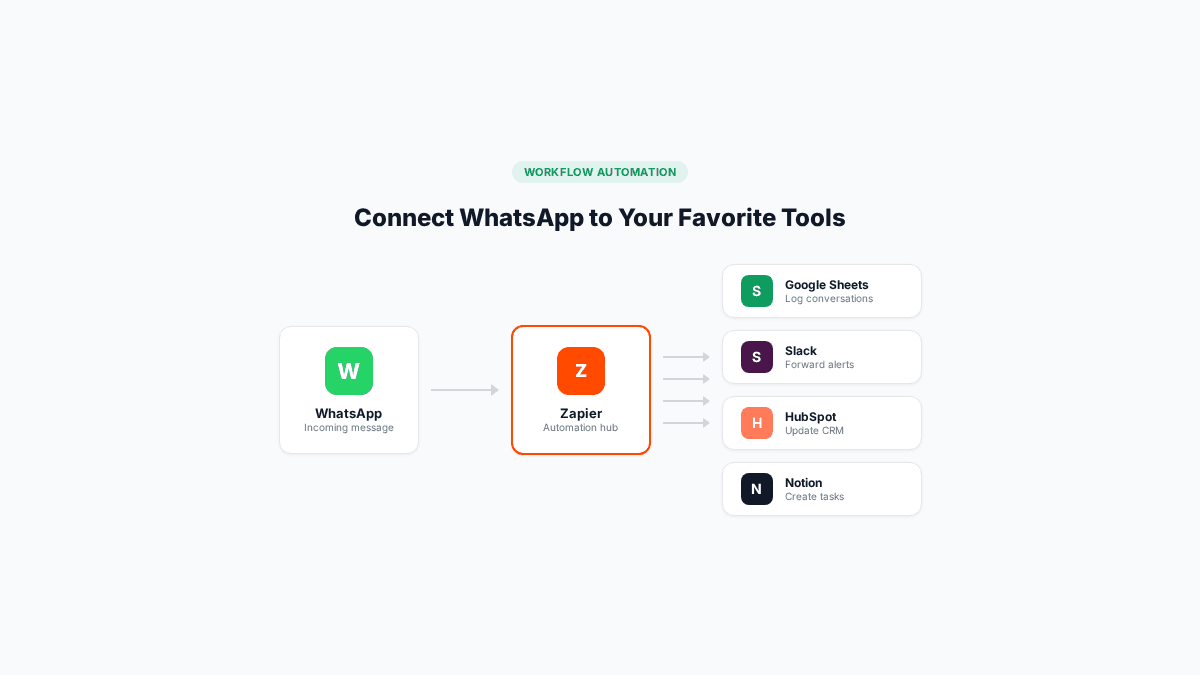
Zapier isn't a WhatsApp-specific tool — it's an automation platform that connects over 7,000 apps. But its WhatsApp integration is what makes it relevant here: you can trigger automated workflows based on WhatsApp messages, or send WhatsApp notifications based on events in other tools.
What it does:
Create "Zaps" (automated workflows) like: "When a new lead fills a form on my website, send them a WhatsApp welcome message." Or: "When I receive a WhatsApp message with a specific keyword, add a row to my Google Sheet." The possibilities are nearly limitless because Zapier connects to virtually every business tool.
Why it stands out:
If you already use tools like Google Sheets, Slack, Notion, HubSpot, or Trello, Zapier is the glue that ties WhatsApp into your existing stack without any custom development. For AI-specific use cases, Zapier also integrates with OpenAI, letting you build flows that analyze incoming messages, generate responses, or summarize conversations automatically.
Key features:
- 7,000+ app integrations
- WhatsApp message triggers and actions
- AI-powered workflows with OpenAI integration
- Multi-step automations
- Filters and conditional logic
- No code required
Pricing: Free tier (100 tasks/month). Starter from $29.99/mo.
Best for: Teams and businesses that want to connect WhatsApp to their existing tool stack without writing code.
4. AiSensy — WhatsApp Business API Platform
AiSensy is built specifically for the WhatsApp Business API, making it ideal for businesses that need to send bulk messages, run marketing campaigns, and manage customer support at scale.
What it does:
AiSensy provides a full WhatsApp Business API interface with broadcast messaging, chatbot automation, a shared team inbox, and analytics. It handles the technical complexity of the WhatsApp API (message templates, approval workflows, opt-in management) so you can focus on sending the right messages to the right people.
Why it stands out:
While tools like Manychat focus on marketing automation, AiSensy goes deeper on the API side. It supports catalog messaging (sending product cards directly in WhatsApp), payment collection via WhatsApp, and retargeting campaigns based on message engagement. For businesses in India and other WhatsApp-heavy markets, it's a strong fit.
Key features:
- WhatsApp Business API management
- Broadcast messaging and campaigns
- AI chatbot with GPT integration
- Shared team inbox
- Product catalog messaging
- Payment collection
- Campaign analytics and retargeting
Pricing: Free trial available. Plans from $20/mo + per-conversation fees.
Best for: Medium to large businesses running marketing campaigns and customer support through WhatsApp at scale.
5. Eazybe — WhatsApp CRM Extension
Eazybe takes a different approach: instead of building a standalone chatbot, it brings WhatsApp into your existing CRM (HubSpot, Zoho, Salesforce) through a Chrome extension.
What it does:
Install the Chrome extension, and Eazybe overlays productivity features on top of WhatsApp Web. You can auto-sync WhatsApp conversations to your CRM, schedule messages, set follow-up reminders, use quick-reply templates, and track team conversations — all without switching between tabs.
Why it stands out:
For sales teams and account managers who live in WhatsApp Web, Eazybe eliminates the copy-paste workflow between WhatsApp and their CRM. Every conversation is logged automatically, contacts are synced, and follow-ups are tracked. It's less about building chatbots and more about making your existing WhatsApp conversations more organized and actionable.
Key features:
- CRM integration (HubSpot, Zoho, Salesforce, Google Sheets)
- Message scheduling
- Quick-reply templates
- Auto-sync conversations to CRM
- Team inbox and analytics
- Follow-up reminders
Pricing: Free plan available. Pro from $30/mo per user.
Best for: Sales teams, account managers, and businesses that need WhatsApp-CRM integration without switching platforms.
6. Respond.io — Omnichannel Inbox with AI
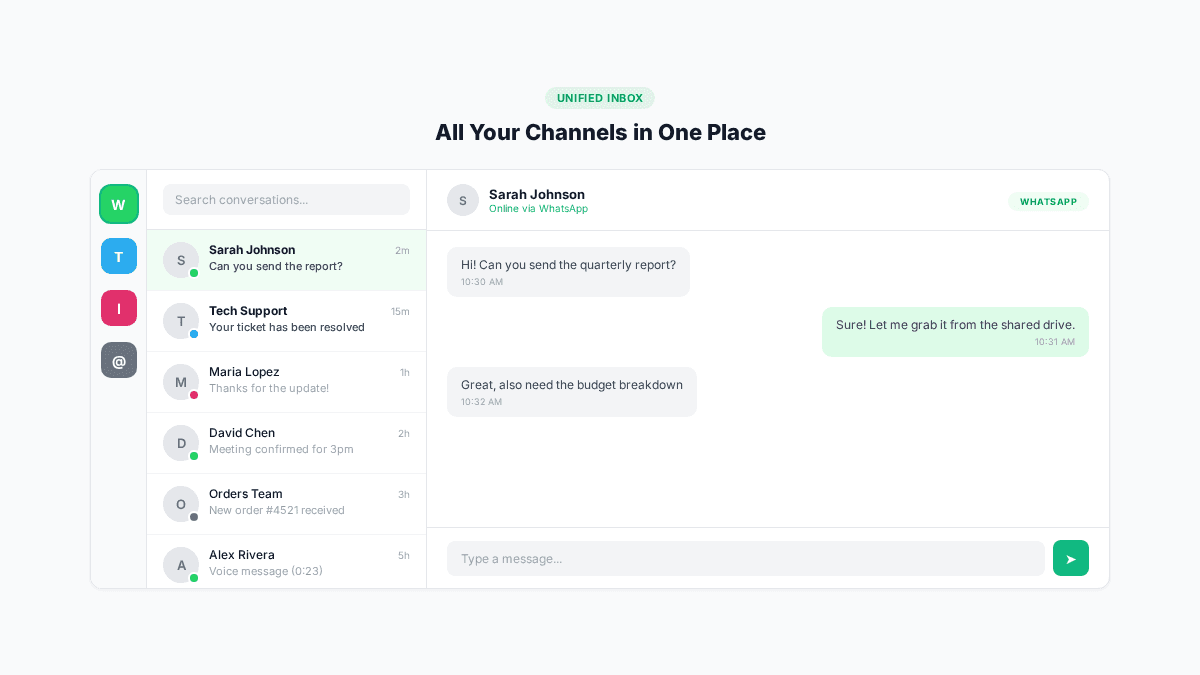
Respond.io is an omnichannel messaging platform that unifies WhatsApp, Telegram, Instagram, Facebook Messenger, email, and more into a single inbox. Its AI features help teams respond faster and more consistently.
What it does:
All your messaging channels feed into one inbox. Respond.io's AI assistant can draft replies, summarize conversation history, and auto-route messages to the right team member. For WhatsApp specifically, it handles the Business API, broadcast messaging, and automated workflows.
Why it stands out:
If your business communicates across multiple channels (not just WhatsApp), Respond.io gives you one place to manage everything. The AI features are genuinely useful for teams: instead of reading through a 50-message thread to understand context before replying, the AI summarizes it in seconds. It also supports custom AI agents trained on your business data.
Key features:
- Omnichannel inbox (WhatsApp, Telegram, Instagram, email, SMS)
- AI-powered reply suggestions
- Conversation summaries
- Automated message routing
- WhatsApp broadcast and campaigns
- Custom AI agents
- Team performance analytics
Pricing: From $99/mo (5 users). Enterprise plans available.
Best for: Teams managing customer conversations across multiple messaging platforms who need AI-assisted response capabilities.
How to Choose the Right Tool
The best tool depends on what problem you're solving:
| Need | Best Tool | Why |
|---|---|---|
| Transcribe voice notes + reminders | TranscribeGo | Automatic, 90+ languages, AI reminders, works on WhatsApp + Telegram + web |
| Marketing automation | Manychat | Visual builder, beginner-friendly, multi-channel |
| Connect WhatsApp to other apps | Zapier | 7,000+ integrations, AI workflows |
| Bulk messaging and campaigns | AiSensy | WhatsApp API native, catalog support |
| CRM integration | Eazybe | Chrome extension, auto-sync to HubSpot/Zoho |
| Omnichannel team inbox | Respond.io | AI summaries, multi-platform, team routing |
For individuals and freelancers: Start with TranscribeGo for voice notes and reminders, plus Zapier for automation. TranscribeGo alone covers two of the biggest productivity pain points (unlistened voice notes and forgotten tasks) — and it works on both WhatsApp and Telegram. These two tools cover 80% of personal productivity needs without a steep learning curve or high cost.
For small businesses: Add Manychat for marketing automation. The combination of TranscribeGo + Manychat + Zapier gives you transcription, reminders, chatbots, and app integration at under $50/month total.
For enterprise teams: Respond.io or AiSensy for omnichannel management, plus Eazybe for CRM sync. These tools scale with your team and handle the complexity of the WhatsApp Business API.
The Bottom Line
WhatsApp is no longer just a messaging app — it's a business communication platform used by 3.3 billion people worldwide. The AI tools in this guide turn it into something more: a transcription engine, a personal reminder system, a marketing channel, a CRM touchpoint, and an automation hub.
The key is to start with the tool that solves your most pressing pain point. If you're drowning in voice notes and keep forgetting things, start with TranscribeGo — it handles both, on WhatsApp and Telegram, from the same chat. If you're losing leads because you can't reply fast enough, try Manychat. If you need everything connected, Zapier is your glue.
Every tool on this list offers a free tier or free trial, so you can test before committing. The productivity gains compound quickly — what starts as saving 10 minutes a day turns into hours per week that you get back for work that actually matters.
Try TranscribeGo Free
10 free minutes. No credit card required.
Frequently Asked Questions
What is the best free AI tool for WhatsApp?▾
For voice note transcription and reminders, TranscribeGo offers 10 free minutes per month — enough to transcribe dozens of short voice messages — and the reminder feature works regardless of your plan. For marketing automation, Manychat has a free plan with basic chatbot features. For app integration, Zapier's free tier includes 100 automated tasks per month. The best choice depends on your primary need.
Can I use AI to transcribe WhatsApp voice notes automatically?▾
Yes. TranscribeGo is an AI-powered bot that transcribes voice notes automatically on both WhatsApp and Telegram. Forward any voice message to the TranscribeGo contact and you get a full text transcript, AI summary, and language detection within seconds — no manual steps required. It supports over 90 languages and also lets you set reminders directly from the chat.
Can I set reminders through WhatsApp?▾
Yes. TranscribeGo includes an AI reminder system built into its WhatsApp and Telegram bot. Just type or voice-record something like "Remind me to call the accountant tomorrow at 10am" and you'll get a WhatsApp message at that exact time. You can set one-time reminders, daily recurring reminders, and manage them all from within the chat. No separate app needed.
Are WhatsApp AI tools safe to use?▾
Reputable tools use encrypted connections and comply with WhatsApp's Business API policies. TranscribeGo processes audio securely and does not store recordings after transcription. For chatbot platforms, look for tools that are official WhatsApp Business Solution Providers — this means Meta has verified their security practices. Always review a tool's privacy policy before granting access to your WhatsApp account.
Do I need the WhatsApp Business API to use these tools?▾
Not for all of them. TranscribeGo works as a regular WhatsApp and Telegram contact — no API setup needed. Zapier can work with both the standard WhatsApp Business app and the API. However, tools like AiSensy and Respond.io require the WhatsApp Business API for their full feature set (broadcasts, team inbox, etc.). Manychat and Eazybe have plans that work without API access.
How much do WhatsApp AI tools cost?▾
Most tools offer free tiers. TranscribeGo starts at $3.99/month (with reminders included at every level), Manychat at $15/month, and Zapier at $29.99/month. Enterprise solutions like Respond.io start at $99/month. For a small business, a combination of TranscribeGo + Manychat costs under $20/month and covers transcription, reminders, and marketing automation.