
Transcription accuracy is measured using Word Error Rate (WER) — a formula that counts substitutions, deletions, and insertions against a reference transcript. In 2026, the best AI transcription engines achieve 2–5% WER on clean audio, meaning 95–98% of words are transcribed correctly. But that headline number only tells part of the story. Real-world accuracy depends on audio quality, background noise, accents, number of speakers, and recording equipment. This guide explains exactly how accuracy is measured, what the benchmarks actually mean, and how to get the best results from any transcription tool.
The speech recognition market is projected to reach $30 billion in 2026, up from $25 billion in 2025 — driven largely by accuracy improvements that have made AI transcription viable for professional use. Understanding how that accuracy is measured helps you set realistic expectations and choose the right tool for your needs.
What Is Word Error Rate (WER)?
Word Error Rate is the industry-standard metric for measuring transcription accuracy. It compares an automatic transcript against a human-verified reference transcript and calculates the percentage of words that were wrong.
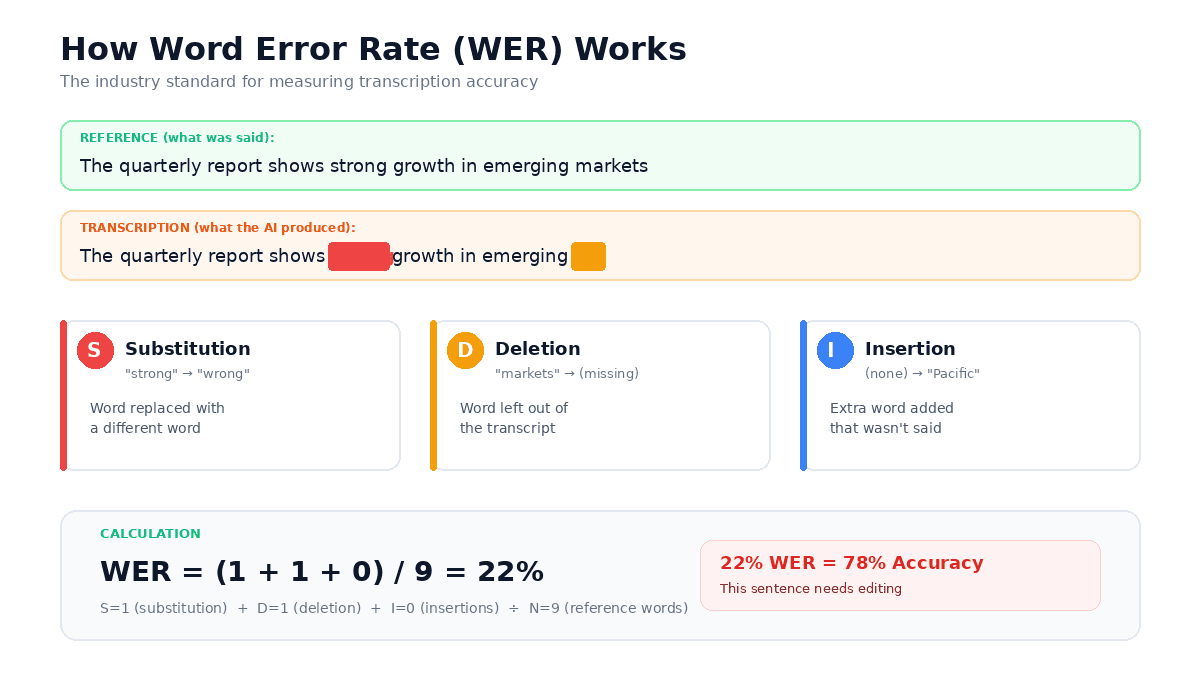
The formula is straightforward: WER = (S + D + I) / N, where S is substitutions (wrong words), D is deletions (missed words), I is insertions (extra words added), and N is the total number of words in the reference.
Here's a concrete example. If someone says "The quarterly report shows strong growth in Asia," and the transcription engine produces "The quarterly report shows wrong growth in Asia Pacific," that's one substitution ("wrong" instead of "strong") and one insertion ("Pacific" was never said). With 8 words in the reference, the WER would be 2/8 = 25% for that sentence.
At scale, these errors are averaged across thousands of words. A 5% WER on a 60-minute recording (roughly 8,000 words) means approximately 400 words contain some error. A 3% WER brings that down to 240 words. The difference between these numbers determines whether you can use a transcript as-is or need to spend time editing.
What the Benchmarks Actually Look Like in 2026
Marketing pages love to claim "99% accuracy" — but those numbers are typically measured on studio-quality recordings with a single native English speaker and no background noise. Real-world conditions are messier.
Here's what independent testing shows across different conditions:
| Audio Condition | Typical WER Range | Accuracy Equivalent |
|---|---|---|
| Studio quality, single speaker | 2–5% | 95–98% |
| Quiet room, clear speech | 4–8% | 92–96% |
| Meeting room, 2–4 speakers | 8–15% | 85–92% |
| Phone call, moderate noise | 12–20% | 80–88% |
| Noisy environment, heavy accents | 20–35% | 65–80% |
For context, human transcribers — considered the gold standard — typically achieve around 4% WER. State-of-the-art AI systems now match or beat that number on clean audio, with top engines reaching 2–3% WER in optimal conditions. The gap between AI and human performance has narrowed dramatically in the past two years.
The important insight is that accuracy drops of 30–40% are common when moving from controlled recordings to real-world audio. A system that scores 3% WER on a benchmark test might score 12% on a meeting recording with crosstalk and room echo. This is normal and expected — it applies to every transcription tool on the market.
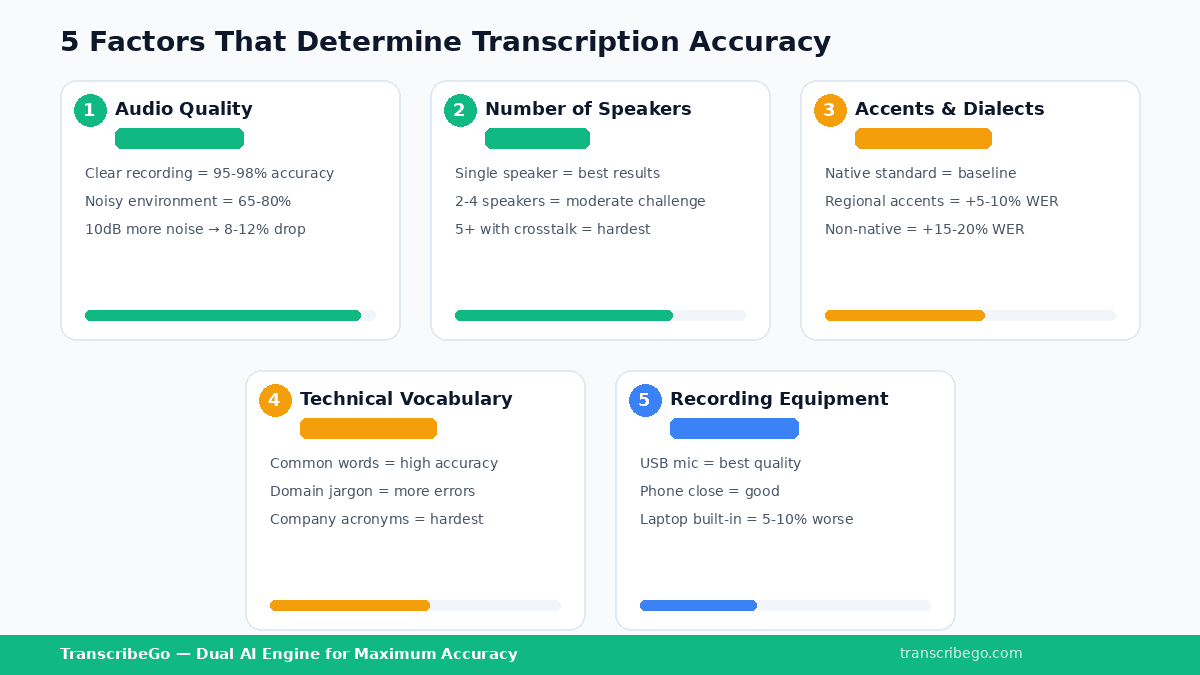
The Five Factors That Determine Your Accuracy
Not all recordings are created equal. Understanding what affects accuracy helps you optimize your recordings and set realistic expectations for your transcripts.
1. Audio Quality
Audio quality is the single most important factor. A clear recording made with a decent microphone in a quiet room will consistently produce WER below 5%. The same content recorded on a phone in a crowded café might produce WER above 20%. Each 10 dB increase in background noise can reduce accuracy by 8–12%, according to industry testing data.
2. Number of Speakers
Single-speaker recordings are significantly easier to transcribe than multi-speaker conversations. When two or more people talk simultaneously — overlapping speech — transcription engines struggle to separate the audio streams. Meetings with 5+ participants and frequent interruptions are the hardest scenario for any transcription system, AI or human.
3. Accents and Dialects
Modern AI transcription handles accents much better than it did even two years ago, but there's still variation. Native English speakers in standard dialects produce the best results. Non-native speakers, strong regional accents, and code-switching (mixing languages mid-sentence) increase error rates by 15–20% on average.
4. Technical Vocabulary
Domain-specific terminology — medical terms, legal jargon, software names, company-specific acronyms — remains a challenge. The word "Kubernetes" might become "Cooper Nettie's" if the engine hasn't been trained on tech vocabulary. This is where context-aware transcription engines have an advantage over generic ones.
5. Recording Equipment
The difference between a built-in laptop microphone and a dedicated USB microphone can be 5–10 percentage points of accuracy. Lavalier mics (clip-on microphones) are particularly effective for interviews and podcasts because they stay close to the speaker's mouth and reject ambient noise.
How to Get the Best Results from Your Transcriptions
Whether you're transcribing voice notes on WhatsApp, recording meetings, or converting YouTube videos to text, these practical steps will improve your results.
Record in the quietest environment available. This sounds obvious, but it's the single highest-impact change you can make. Close windows, move away from air conditioning units, and choose a room with soft furnishings (they absorb echo). Even small improvements in recording environment translate directly to better transcriptions.
Use an external microphone when possible. For important recordings — interviews, podcast episodes, lectures — a $30 USB microphone produces dramatically better results than a phone or laptop mic. For everyday voice notes, hold your phone close to your mouth rather than at arm's length.
Speak clearly and at a moderate pace. Fast speech and mumbling increase errors. If you're recording a voice note that you know will be transcribed, slowing down slightly and enunciating makes a measurable difference.
Minimize crosstalk. In group settings, encourage people to speak one at a time. This is the single biggest factor in multi-speaker accuracy. Even a brief pause between speakers helps the transcription engine separate voices correctly.
Choose a transcription tool with fallback systems. The best transcription services use multiple AI engines. If the primary engine struggles with a particular audio segment, a secondary engine takes over. TranscribeGo uses exactly this approach — our primary AI engine handles the transcription, and if it encounters difficulty, a backup engine processes the audio automatically. This dual-engine architecture keeps accuracy high even with imperfect recordings.
Beyond Accuracy: What Makes a Transcription Actually Useful
Raw accuracy (WER) matters, but it's not the only thing that determines whether a transcript is useful in practice. A transcript with 95% accuracy but no formatting, no speaker labels, and no summary still requires significant work before it's usable. A transcript with 93% accuracy that includes automatic paragraphing, an AI summary, translation options, and the ability to set reminders from the content might save you far more time overall.
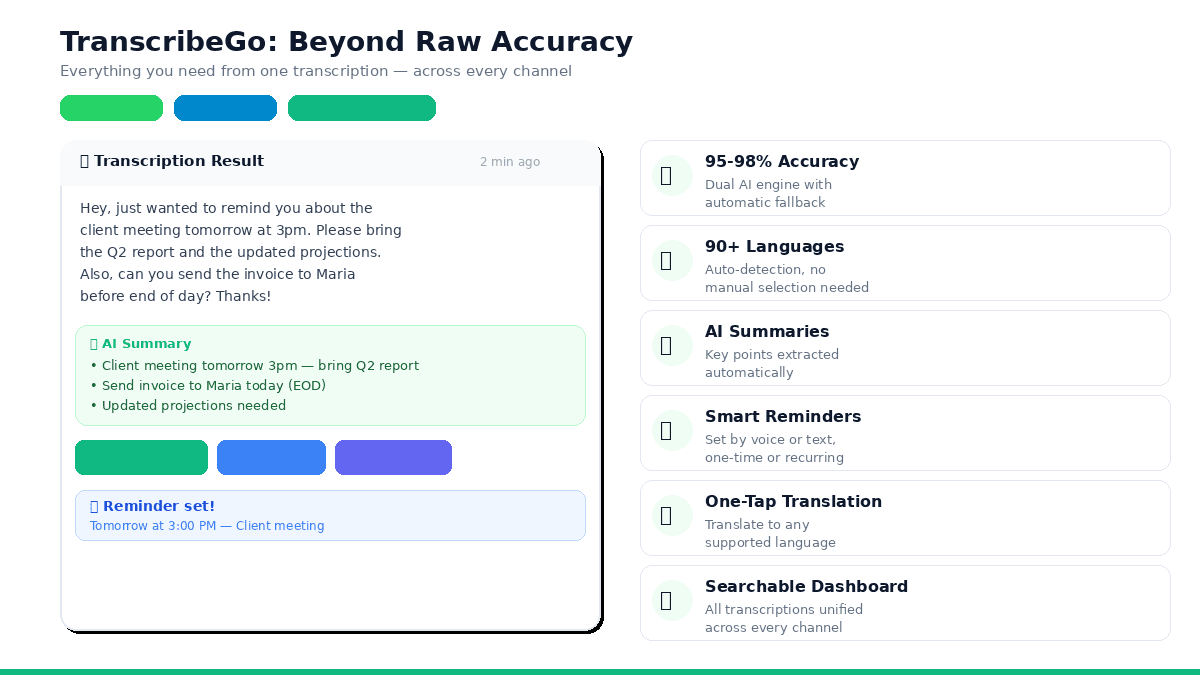
This is where tools like TranscribeGo go beyond basic transcription. When you forward a voice note on WhatsApp or Telegram, you don't just get raw text back. You receive the full transcription, an AI-generated summary that captures key points, the ability to translate the text into any language with one tap, and — one of the most underrated features — the option to set reminders directly from your transcription.
For example, if a colleague sends you a voice note saying "Don't forget to send the proposal to the client by Thursday," TranscribeGo transcribes it and lets you instantly set a reminder: "Remind me to send the proposal on Thursday at 9am." One-time or recurring, in any language. It works on WhatsApp and Telegram, and everything syncs to your searchable web dashboard at transcribego.com.
The point is this: accuracy is the foundation, but what you can do with the transcript determines the real value. A tool that transcribes in 90+ languages, works across WhatsApp, Telegram, and web uploads, generates summaries, exports SRT subtitles, and acts as your personal reminder assistant delivers more practical value than a tool that scores 1% better on WER benchmarks but does nothing else.
How TranscribeGo Handles Accuracy
TranscribeGo uses a dual-engine approach to maximize accuracy across different audio conditions. Your audio is processed by our primary AI transcription engine, which handles the vast majority of recordings with high accuracy. If the primary engine encounters issues — heavy noise, unusual audio formats, or processing errors — a secondary engine takes over automatically. You never need to worry about retries or manual fallbacks.
The platform supports over 90 languages with automatic language detection. You don't need to specify the language before transcribing — the engine identifies it from the audio and selects the appropriate model. This works whether you're receiving a Spanish voice note on WhatsApp, a Hindi audio file on Telegram, or uploading a French podcast episode through the web dashboard.
Every transcription — regardless of channel — appears in your unified web dashboard at transcribego.com, where you can search across all your transcripts, export SRT subtitle files, translate content to any supported language, and manage your reminders. The free plan gives you 10 minutes per month to test everything. If you need more capacity, you can upgrade to a Starter or Pro plan at any time.
Try TranscribeGo Free
10 free minutes. No credit card required.
Frequently Asked Questions
What is a good Word Error Rate (WER) for transcription?▾
A WER below 5% is considered excellent and matches professional human transcription quality. WER between 5–10% is good for most use cases like meeting notes, content repurposing, and subtitle generation. WER above 15% typically indicates challenging audio conditions that may require editing. Modern AI transcription engines achieve 2–5% WER on clean audio with a single speaker.
Why does my transcription accuracy vary between recordings?▾
Transcription accuracy depends heavily on audio quality, background noise, number of speakers, accents, and recording equipment. A voice note recorded in a quiet room will produce much better results than a meeting recording with multiple speakers and room echo. Each of these factors can independently reduce accuracy by 5–15 percentage points.
Is AI transcription as accurate as human transcription?▾
On clean audio with standard speech, yes. Top AI transcription engines now achieve 2–5% WER, matching or exceeding the 4% WER that professional human transcribers typically achieve. Where humans still have an advantage is in extremely noisy environments, heavy accents, and specialized technical content. However, AI is dramatically faster (minutes vs. hours) and costs 5–20x less.
How can I improve my transcription accuracy?▾
The most impactful improvements are: record in a quiet environment, use an external microphone instead of a phone or laptop mic, speak clearly at a moderate pace, minimize overlapping speech in group settings, and choose a transcription tool with multiple AI engines for automatic fallback. These steps can improve accuracy by 10–20 percentage points.
Does TranscribeGo work with accented speech and multiple languages?▾
Yes. TranscribeGo supports over 90 languages with automatic language detection. You don't need to select the language before transcribing. The platform handles accents, mixed-language audio, and non-native speakers across all supported languages. It works on WhatsApp, Telegram, and through the web dashboard, with all transcriptions appearing in your unified searchable history.
What does TranscribeGo do beyond basic transcription?▾
Beyond accurate transcription, TranscribeGo provides AI-generated summaries of every recording, one-tap translation to any supported language, SRT subtitle export for videos, voice and text reminders you can set directly from WhatsApp or Telegram (one-time or recurring), and a searchable web dashboard where all your transcriptions from every channel are unified. It also supports URL transcription for YouTube, TikTok, and Vimeo videos.
