
Short answer: Upload your interview recording to TranscribeGo, get a full transcript in minutes, then use AI Journalist Mode to generate a publish-ready, SEO-optimized article — complete with preserved direct quotes, suggested sources, and a built-in editor. Free tier includes 10 minutes per month; paid plans start at $3.99–$6.99/mo for 200 minutes.
Journalism runs on audio. Interviews, press conferences, field recordings, source calls — the raw material of every story starts as spoken words. But the bottleneck has always been the same: turning those recordings into published text. Manual transcription of a 30-minute interview takes 2–3 hours. Even with basic transcription tools, you still need to copy the text into a separate writing tool, manually structure the article, research SEO keywords, find sources to link, and format everything before publishing.
TranscribeGo eliminates that entire chain. It's a single platform that transcribes your audio, generates a structured article with AI, optimizes it for search engines and AI assistants, suggests authoritative sources, and lets you edit everything in one place. This article walks you through the complete workflow.
Why Transcription Matters More Than Ever for Journalists
The media landscape has shifted fundamentally. Journalists aren't just writing for print or broadcast — they're competing for visibility on Google, in AI-generated answers (ChatGPT, Perplexity, Google AI Overview), and across social media. Every minute of audio you record is potential content that could drive traffic, establish authority, and reach new audiences. But only if it becomes searchable text.
Speed Is the Competitive Edge
In breaking news, the first outlet to publish often captures the majority of search traffic. According to the Reuters Institute Digital News Report, audiences increasingly discover news through search engines and AI assistants rather than going directly to news sites. If your article isn't indexed fast, someone else's will be.
Transcription tools that also generate articles compress the publish timeline from hours to minutes. A journalist who records a 30-minute press conference can have an SEO-optimized article ready in under 10 minutes — while competitors are still typing up their notes.
Direct Quotes Need to Be Exact
Journalistic standards require verbatim attribution. Paraphrasing a source's words isn't the same as quoting them directly. Manual transcription introduces errors and consumes hours of careful re-listening. AI transcription with high accuracy gives you the exact words, ready to pull into your article with confidence.
Every Recording Is Multi-Format Content
A single interview can generate a news article, a social media thread, a podcast transcript, subtitles for video, and a newsletter segment. Without transcription, you'd need to re-listen for each format. With a transcript in hand, repurposing becomes copy-and-edit work.
The Complete Journalist Workflow with TranscribeGo
Here's how journalists are using TranscribeGo to go from raw audio to published article in four steps.
Step 1: Record or Upload Your Audio
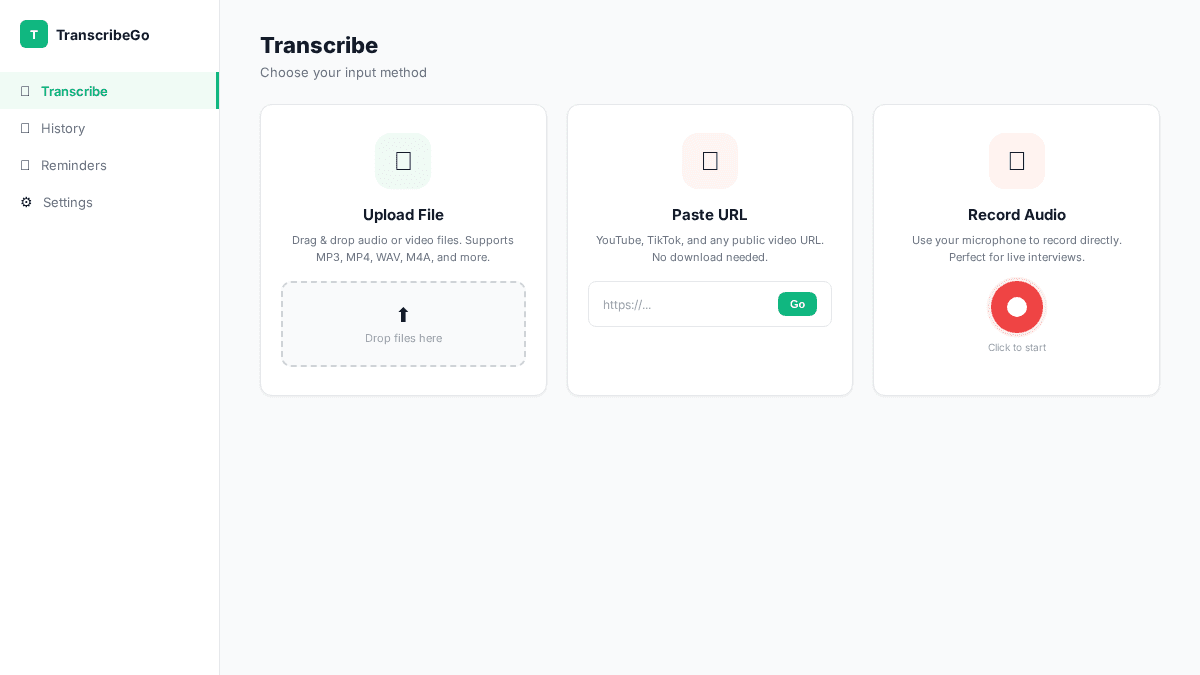
TranscribeGo accepts audio from three sources, covering every journalism scenario:
File upload: Drag and drop any audio or video file — MP3, WAV, M4A, MP4, and 50+ other formats. Works for pre-recorded interviews, edited segments, and conference recordings.
WhatsApp: Send a voice note directly to the TranscribeGo WhatsApp bot and get the transcription back in the chat. Perfect for field interviews — record on your phone, send via WhatsApp, and get text instantly without opening a laptop.
URL paste: Have a source video on YouTube, TikTok, or Vimeo? Paste the URL and TranscribeGo extracts and transcribes the audio automatically. Ideal for covering digital content, press conferences posted online, or podcast sources.
Step 2: Get Your Transcription
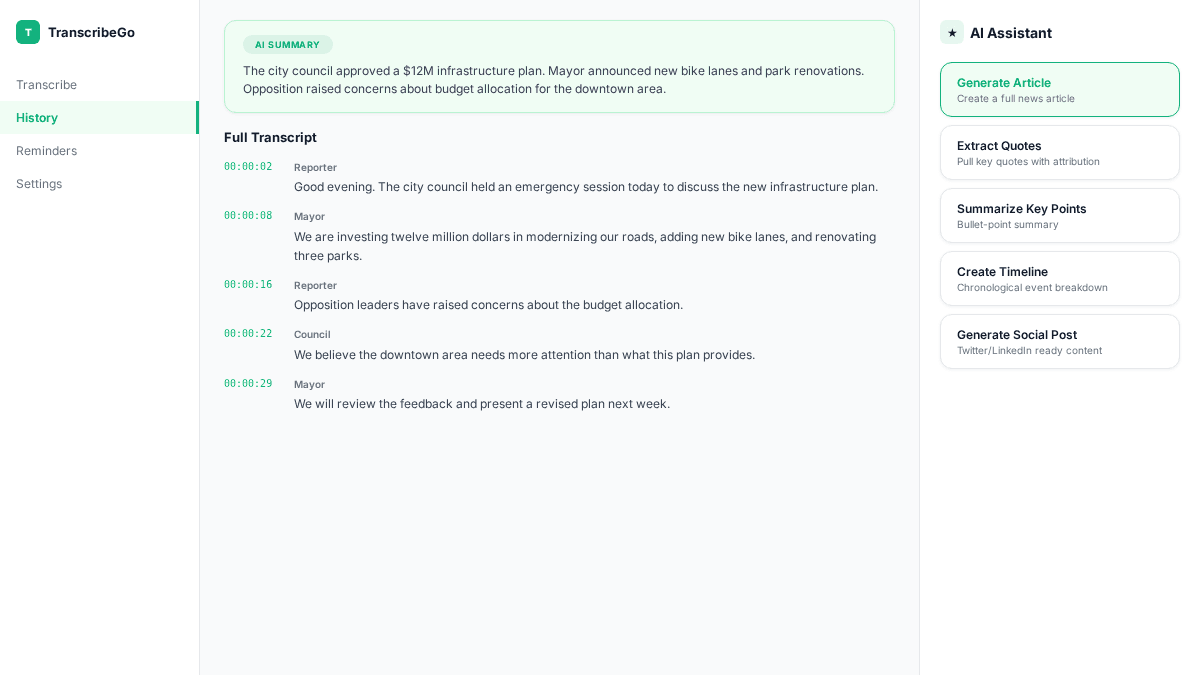
TranscribeGo's AI processes your audio and delivers a complete transcription in minutes. A typical 30-minute interview takes about 1–2 minutes. The platform supports 90+ languages with automatic detection — no need to specify the language beforehand. It handles accents, background noise, and long recordings up to 30+ minutes.
The result includes the full text with punctuation, paragraph breaks, and an AI-generated summary highlighting the key points discussed.
Step 3: Generate Your Article with AI Journalist Mode
This is where TranscribeGo diverges from every other transcription tool. Instead of giving you raw text and leaving you to write the article yourself, TranscribeGo's AI Journalist Mode generates a complete, structured article from your transcription.
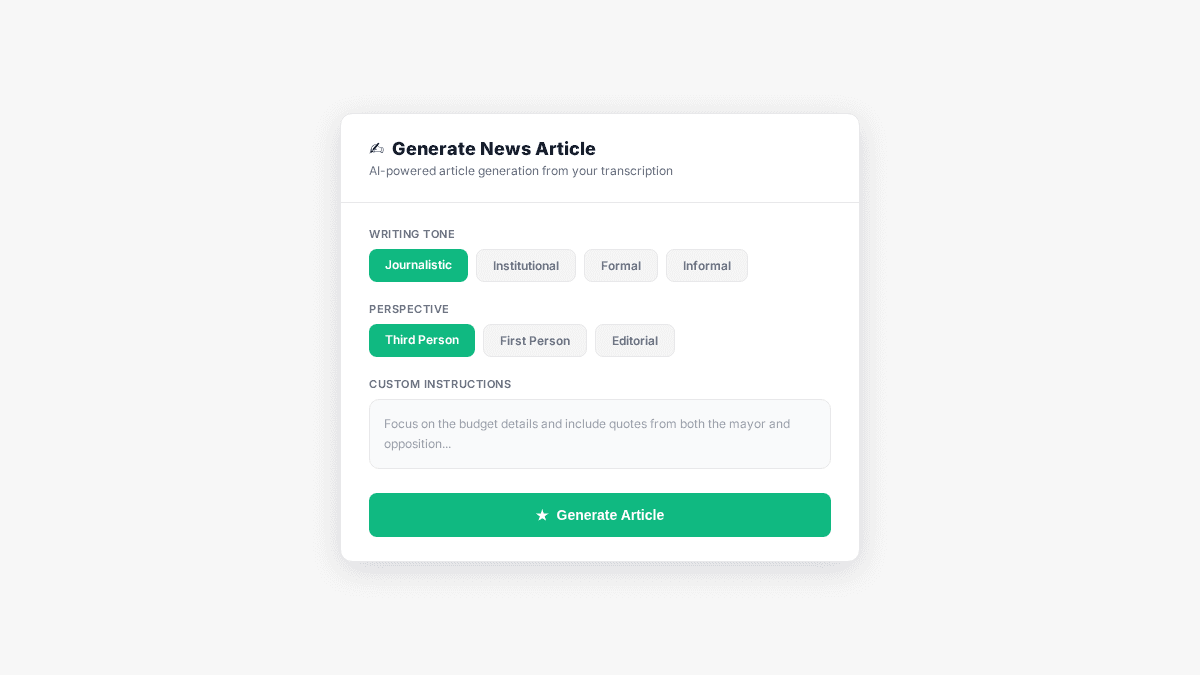
You configure four parameters before generating:
Writing tone: Choose from Journalistic, Institutional, Formal, or Informal — matching your publication's style guide.
Perspective: Third person (standard news reporting) or first person (opinion, editorial, interviews).
Custom instructions: Add specific context that shapes the output. For example: "The speaker is the Minister of Education, it's a press conference about AI in schools, use past tense, no gerunds, include the program name 'EdTech 2030' in the headline."
Synthesis with Declarations: This mode preserves direct quotes from speakers within the generated article — essential for journalistic accuracy and attribution.
The AI then produces a full article with proper heading structure (H1, H2, H3), optimized meta description, and content structured for both human readers and search engines.
Step 4: Edit, Refine, and Publish
The generated article opens in TranscribeGo's built-in editor, where you have full control:
Direct text editing: Click on any paragraph, heading, or sentence to edit it inline — just like a CMS.
AI chat assistant: Ask the AI to make specific changes: "Change the title to reflect the budget announcement", "Make the third paragraph more concise", "Add a transition between section 2 and 3". Changes appear instantly in the editor.
SEO sidebar: See the H1, meta description, AEO recommendations (direct-answer paragraphs for AI assistants), and related search queries — all in a sidebar panel next to your article.
Suggested sources: Every generated article includes curated source suggestions — official data, news articles, and research references — each with a search query so you can verify and link them. This builds SEO authority and meets journalistic attribution standards.
Export options: Download as DOCX for editors, PDF for archives, or copy directly to your CMS clipboard.
SEO, AEO, and GEO: Every Article Is Optimized
TranscribeGo doesn't just generate text — it engineers articles to be discovered. Every article produced in Journalist Mode includes three layers of optimization:
SEO (Search Engine Optimization): Automatic keyword research based on the transcription topic, optimized H1 and meta description, strategic heading structure, and internal linking suggestions. Your article is structured the way Google expects high-quality content to look.
AEO (AI Engine Optimization): Articles include direct-answer paragraphs optimized for AI assistants like ChatGPT, Google AI Overview, and Perplexity. When someone asks an AI about your topic, your content is structured to be the answer it cites.
GEO (Generative Engine Optimization): Content is structured to be cited by generative search engines, with clear claims, sourced quotes, and fact-dense paragraphs that AI models can reference and attribute.
For journalists competing for visibility in an era where nearly 40% of news discovery happens through search and AI, this triple optimization isn't a nice-to-have — it's how you ensure your reporting actually reaches readers.
Real Journalist Use Cases
Press Conferences
Record the full press conference (30–60 minutes), upload to TranscribeGo, and generate an institutional article with one click. Set the tone to "Institutional" or "Journalistic", add custom instructions specifying the speaker and event context, and get a structured article in under 5 minutes — with direct quotes preserved and sources suggested.
Field Interviews
You're in the field with just your phone. Record the interview, send it as a WhatsApp voice note to TranscribeGo. Get the transcription back immediately. Then open the web app to generate the article with Journalist Mode. From recording to publish-ready draft: under 10 minutes, no laptop required for the transcription step.
Video and Podcast Sources
Covering a story that references a YouTube video, a TikTok clip, or a podcast episode? Paste the URL into TranscribeGo. It extracts the audio, transcribes it, and you can generate an article based on the content — perfect for digital journalism and media monitoring.
Institutional and Government Coverage
Set the tone to "Institutional", the perspective to "Third Person", and paste your style guidelines in the custom instructions. Generate press releases or coverage articles that match the official style of government portals, institutional sites, or wire services.
How TranscribeGo Compares for Journalists
| Feature | TranscribeGo | Otter.ai | Trint | Happy Scribe |
|---|---|---|---|---|
| Price (entry) | $3.99–$6.99/mo | $16.99/mo | $80/mo | $17/mo |
| Free tier | 10 min/mo | 300 min (limited) | 7-day trial | 10 min trial |
| AI article generation | Yes (Journalist Mode) | No | No | No |
| SEO/AEO optimization | Built-in | No | No | No |
| Source suggestions | Yes | No | No | No |
| Built-in editor | Yes (+ AI chat) | Basic | Yes | Basic |
| WhatsApp transcription | Yes | No | No | No |
| URL transcription | Yes (YouTube, TikTok, Vimeo) | No | No | Yes (limited) |
| Translation | 90+ languages | No | 40+ languages | 20+ languages |
| Direct quote preservation | Yes (Synthesis mode) | No | No | No |
The difference isn't just price — it's workflow consolidation. With other tools, you transcribe in one app, write in another, optimize for SEO in a third, and find sources manually. TranscribeGo handles all four in a single workflow.
Try TranscribeGo Free
10 free minutes. No credit card required.
A Practical Daily Workflow for Journalists
Here's how to integrate TranscribeGo into your daily routine:
Morning briefing (5 min): Check if any video sources need transcribing — paste URLs for press conferences, interviews, or relevant videos published overnight.
After an interview (5 min): Upload the recording or send it via WhatsApp. While the AI processes, jot down your angle and any custom instructions (speaker name, event context, tone preference).
Article generation (2 min): Open the transcription, select Journalist Mode, configure tone and perspective, add instructions. Hit generate.
Editing pass (10–15 min): Review the generated article. Use the AI chat for quick adjustments ("Shorten the intro", "Add a stronger conclusion"). Check the suggested sources and add the relevant ones. Verify direct quotes against the transcript.
Publish (1 min): Export to your CMS or copy to clipboard. The SEO metadata is already set.
Total time from recording to publish: 25–30 minutes for a fully optimized article. Compare that to the traditional workflow of 2–3 hours for transcription alone, plus additional time for writing, SEO optimization, and source research.
How accurate is the transcription for interviews with background noise?▾
TranscribeGo's AI achieves 95–98% accuracy on clear audio. For field recordings with moderate background noise, accuracy typically stays above 90%. The platform handles accents, multiple speakers, and varying audio quality well. For best results with noisy environments, use a directional microphone or lavalier mic. The built-in editor lets you quickly correct any errors before generating the article.
Can I transcribe interviews in languages other than English?▾
Yes. TranscribeGo supports 90+ languages with automatic detection — you don't need to specify the language beforehand. It also translates finished transcriptions into 90+ languages with one click, which is useful for journalists covering international stories or working in multilingual newsrooms.
Does the AI article generator work for different article formats?▾
Yes. The combination of tone selection (Journalistic, Institutional, Formal, Informal), perspective (first/third person), and custom instructions lets you generate news articles, press releases, institutional reports, opinion pieces, and more. The custom instructions field is especially powerful — you can specify the exact format, structure, and editorial guidelines your publication requires.
How does the 'Synthesis with Declarations' mode work?▾
When you enable Synthesis with Declarations, the AI identifies direct statements from speakers in the transcription and preserves them as verbatim quotes in the generated article, with proper attribution. This means the article includes passages like: According to the Minister, "we will invest $500 million in the program over the next three years." The quotes are pulled directly from the transcription, not paraphrased or invented by the AI.
How much does TranscribeGo cost for a working journalist?▾
The free tier gives you 10 minutes per month — enough to test the full workflow with a short interview. The Starter plan ($3.99–$6.99/mo) includes 200 minutes, covering roughly 6–7 interviews of 30 minutes each. The Pro plan ($12.99–$19.99/mo) includes 1,000 minutes, suitable for daily interview workflows or newsroom teams. Extra minute packs are available if you occasionally need more capacity. Annual billing saves 25%.
Can I use TranscribeGo for a full newsroom team?▾
Yes. Each team member can have their own account with their own minute allocation. For high-volume newsrooms, the Pro plan's 1,000 minutes per month covers substantial daily output. If your team has specific needs, the extra minutes packs ($1.99 for 100 minutes up to $79.99 for 5,000 minutes) provide flexible capacity without changing plans.