
If you're a content creator who records videos but struggles to turn that footage into written content, you're leaving massive reach on the table. 94% of marketers already repurpose their content across channels, and those who do it systematically see up to 2x engagement and 300% more content reach. The problem has never been "should I repurpose?" — it's "how do I do it without spending my entire week rewriting?"
That's exactly where TranscribeGo fits in. Whether you record YouTube tutorials, TikTok explainers, podcast episodes, or Instagram Reels, TranscribeGo turns your spoken words into polished text you can reshape into blog posts, newsletters, social captions, Twitter threads, and SEO articles — in minutes, not hours.
The Content Creator's Repurposing Problem
You already know the math. One 10-minute YouTube video contains roughly 1,500 to 2,000 words of spoken content. That's enough raw material for a full blog post, three social media captions, a newsletter issue, and a handful of quote graphics. But getting from recorded video to written text has traditionally meant one of three things: transcribing it yourself (tedious), hiring someone (expensive), or using clunky software that produces unreadable output (frustrating).
Companies implementing AI-driven content repurposing are reducing production costs by up to 65%, and repurposed content can increase organic traffic by 111.3%. The content is already created — you just need to unlock it from the video format.
How TranscribeGo Solves This
TranscribeGo gives content creators three powerful ways to extract text from their videos, each designed for different moments in your workflow.
Method 1: Paste a URL (YouTube, TikTok, Vimeo)
Already published your video? Just paste the URL into transcribego.com and get a full transcript plus an AI summary within seconds. This works with YouTube, TikTok, Vimeo, and dozens of other platforms. No downloading, no file conversion, no waiting.
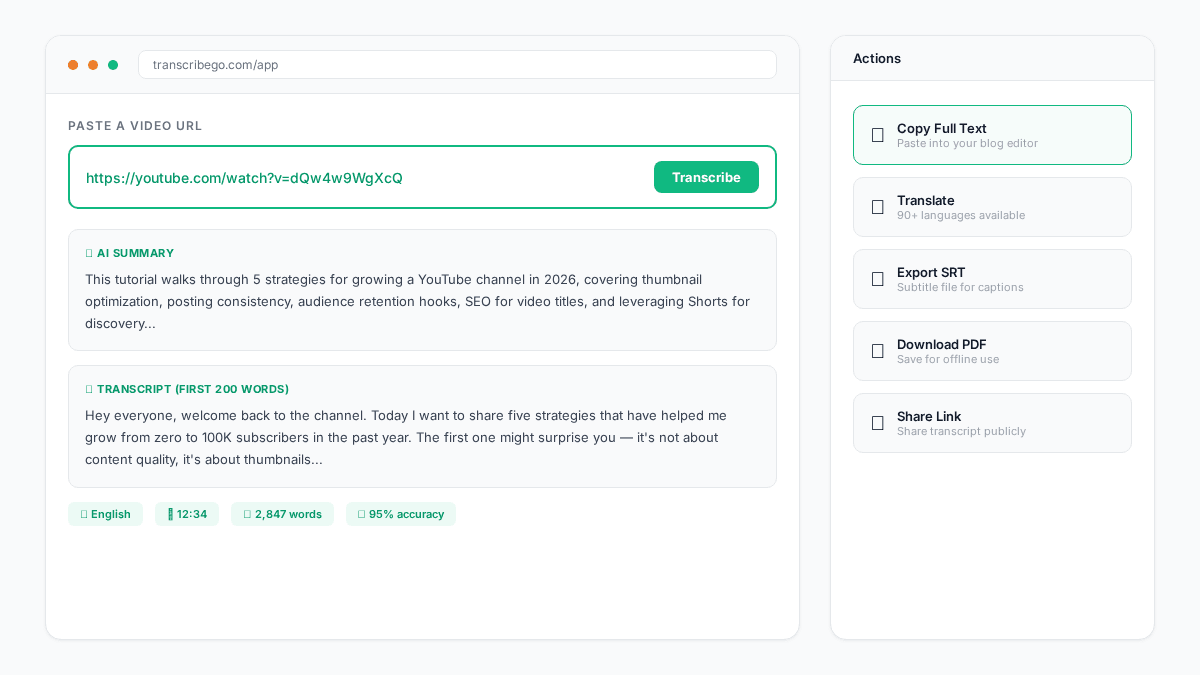
This is the fastest path from published video to written content. You get the full text, an AI-generated summary that captures the key points, and one-click translation if you want to reach audiences in other languages.
Method 2: Upload Your Raw Files
Working with raw footage before publishing? Upload your video or audio file directly to transcribego.com. TranscribeGo handles MP4, MOV, AVI, MKV, WebM, MP3, WAV, M4A, and more. Files up to several hours long are processed reliably — our AI technology handles everything from quick 30-second clips to full two-hour webinar recordings.
Method 3: WhatsApp and Telegram (On-the-Go Repurposing)
This is where TranscribeGo becomes uniquely powerful for creators who work from their phones. Record a voice note in WhatsApp or Telegram with your ideas, talking points, or a rough podcast segment — and send it to the TranscribeGo bot. You get back a transcript and AI summary instantly. No need to be at your desk.
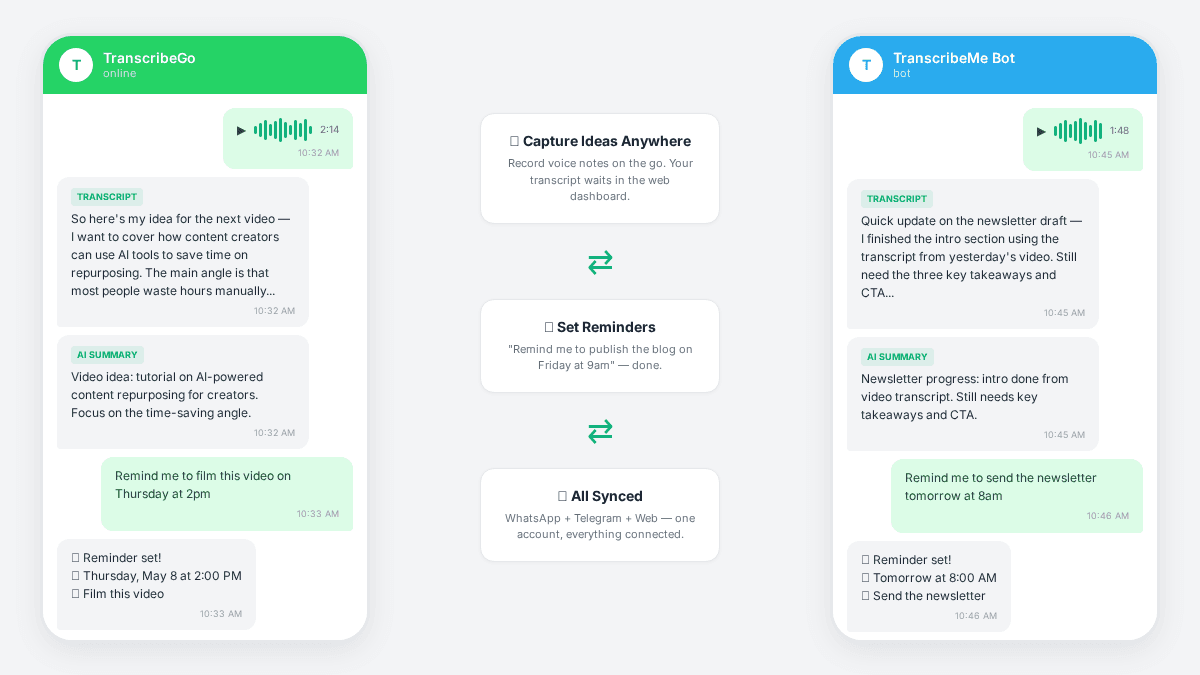
Many creators use this as their "idea capture" system. Walking the dog and an idea hits? Record a 2-minute voice note, send it to TranscribeGo, and by the time you sit down to write, the text is already waiting in your web dashboard — searchable, organized, ready to copy into your blog draft.
The Full Repurposing Workflow
Here's how a content creator can turn a single video into a week's worth of content using TranscribeGo:
Step 1: Transcribe. Paste your YouTube URL or upload the raw file. In under a minute, you have the full text plus an AI summary.
Step 2: Blog post. Copy the transcript into your writing tool. The AI summary gives you a natural outline. Reorganize, add context, remove filler words, and you have a polished blog post in 20 minutes instead of 3 hours.
Step 3: Newsletter. Use the AI summary as your newsletter intro. Pull two or three key quotes from the transcript for the body. Add a CTA. Done.
Step 4: Social posts. Scan the transcript for punchy statements, surprising data points, or quotable moments. Each one becomes a tweet, a LinkedIn post, or an Instagram caption.
Step 5: Subtitles. Export the transcription as an SRT file directly from TranscribeGo — no extra tools needed. Upload the SRT to YouTube, TikTok, or your video editor for instant captions.
Step 6: Translate and expand. Want to reach Spanish-speaking audiences? Click "Translate" and get the full transcript in any of 90+ supported languages. Use that translated text for localized blog posts or social captions.
Never Forget a Content Idea Again
Content creation isn't just about production — it's about capturing ideas before they disappear. TranscribeGo's reminder feature is something most creators don't expect but quickly fall in love with.
Send a message like "Remind me to film the behind-the-scenes video tomorrow at 10am" or "Remind me to publish the blog post on Friday at 9am" directly in your WhatsApp or Telegram chat with TranscribeGo. It will message you at that exact time. Set one-time reminders or recurring ones (daily, weekly) — no separate app required.
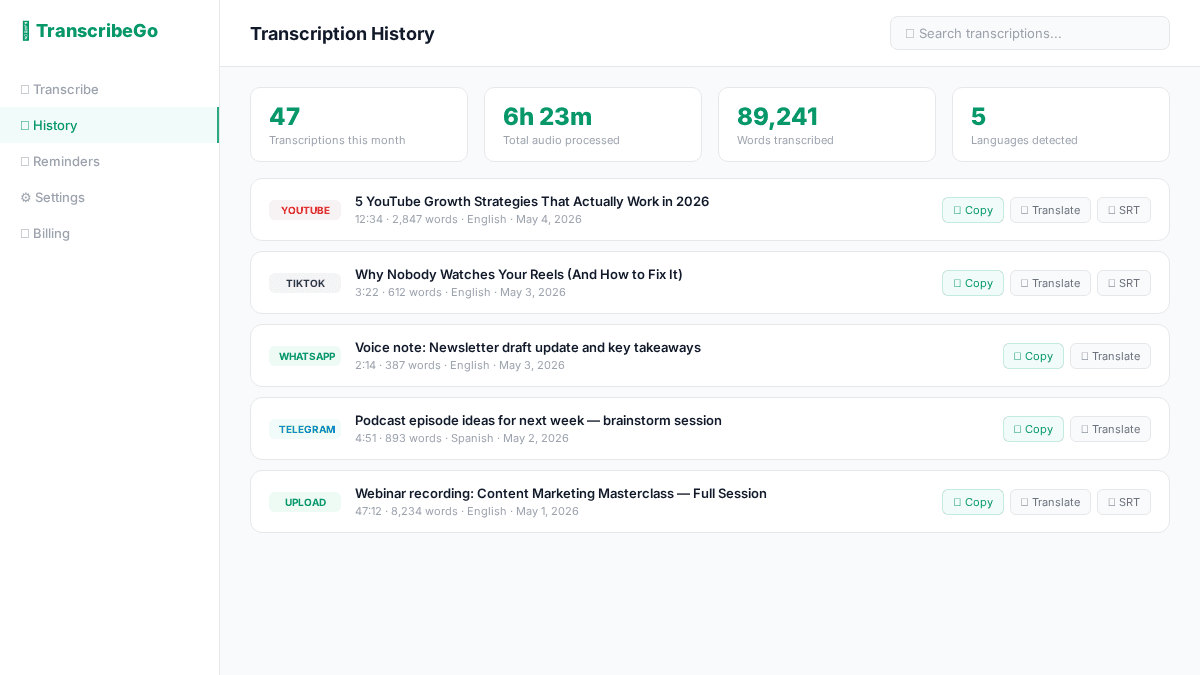
When you're managing a content calendar across YouTube, a blog, a newsletter, and three social platforms, having your reminders in the same place where you capture ideas is a serious workflow advantage.
What Makes TranscribeGo Different from Other Repurposing Tools
There are dedicated "video to blog" tools on the market. Most of them do one thing: take a transcript and rewrite it with AI. The result often sounds generic and loses your voice.
TranscribeGo takes a different approach. It gives you the raw material — a highly accurate transcript plus an intelligent summary — and lets you shape it. You stay in control of your voice, your style, your perspective. The AI does the heavy lifting of transcription and summarization; you do the creative work of turning it into content that sounds like you.
Here's what else sets TranscribeGo apart:
Multi-channel access. Web app, WhatsApp bot, Telegram bot — all connected to the same account. Transcribe a YouTube video at your desk, capture an idea via voice note on your phone, and find everything in one searchable dashboard.
90+ languages. If you create content in multiple languages or for international audiences, TranscribeGo transcribes in 90+ languages and translates between any of them with one click. That's content localization built right into your workflow.
SRT export. Every transcription can be exported as an SRT subtitle file. For video creators, this alone saves hours of manual captioning work.
Reminders. Set production deadlines, publishing schedules, and content ideas directly in WhatsApp or Telegram. "Remind me to edit the podcast episode every Monday at 2pm" — done.
Affordable. Free tier includes 10 minutes/month. Starter plan starts at $3.99/mo with 200 minutes. Pro at $12.99/mo with 1,000 minutes — enough to transcribe dozens of videos per month.
Real Use Cases from Creators
YouTubers paste their video URLs after publishing and turn the transcript into SEO-optimized blog posts. Google indexes the blog, driving search traffic back to the video — a virtuous cycle.
Podcasters upload raw audio files and use the AI summary to write episode descriptions and show notes in minutes. The full transcript becomes a searchable archive of every episode.
TikTok creators transcribe their short-form videos and compile the best scripts into long-form blog content, flipping the usual "long-to-short" repurposing on its head.
Newsletter writers who also have a YouTube channel transcribe every video and extract the best insights for their weekly email. One video becomes one newsletter issue.
Multilingual creators record in one language and use TranscribeGo's translation to produce blog posts and captions in 3 or 4 additional languages — reaching 5x the audience from the same recording.
Getting Started
- Sign up for free at transcribego.com. You get 10 minutes of transcription at no cost.
- Paste a video URL or upload a file. Watch it transcribe in seconds.
- Copy the text, use the AI summary as your outline, and start writing.
- Add WhatsApp or Telegram for on-the-go idea capture and reminders. Just search for TranscribeGo in either app.
- Export SRT files for any video that needs subtitles.
Try TranscribeGo Free
10 free minutes. No credit card required.
Frequently Asked Questions
Can TranscribeGo transcribe any YouTube, TikTok, or Vimeo video?▾
Yes. Paste the URL into transcribego.com and the AI extracts the audio and generates a full transcript plus summary. It works with YouTube, TikTok, Vimeo, and many other video platforms. No downloading required.
How accurate is the transcription for content repurposing?▾
TranscribeGo uses advanced AI transcription technology that delivers 95-98% accuracy across 90+ languages. For content repurposing, this means minimal editing before publishing — most creators spend just a few minutes cleaning up the text.
Can I use TranscribeGo to create subtitles for my videos?▾
Absolutely. Every transcription can be exported as an SRT subtitle file with one click. Upload the SRT to YouTube, TikTok, or any video editor to add captions instantly.
Does TranscribeGo work on WhatsApp and Telegram?▾
Yes. TranscribeGo has bots on both WhatsApp and Telegram. Send a voice note or forward audio, and you get back a transcript and AI summary. You can also set reminders by text or voice — perfect for managing your content calendar from your phone.
How much does TranscribeGo cost for content creators?▾
There's a free tier with 10 minutes per month — enough to try it out. The Starter plan at $3.99/mo includes 200 minutes, and the Pro plan at $12.99/mo includes 1,000 minutes. Most individual creators find the Starter plan covers their needs.
Can I translate my transcriptions to create content in other languages?▾
Yes. TranscribeGo supports one-click translation to any of 90+ languages. Transcribe your video in English, translate to Spanish, French, or Portuguese, and use that text for localized blog posts, social media captions, or subtitles — all from the same dashboard.